



The transition from generative AI to agentic AI marks a shift from content to conduct. For the modern CTO, the main concern is whether the model can be trusted to execute multi-step workflows, invoke internal tools, and operate with a degree of autonomy.
As organisations move from copilots to agents, the risk profile evolves from hallucination to unbounded action.
Agentic AI in practice: risks, controls, and where to start:
- The Shift: We are moving from AI that suggests to AI that acts.
- The Risk: Agentic AI introduces challenges in autonomy, tool misuse, and identity sprawl that traditional SaaS governance cannot handle.
- The Solution: CTOs must treat agents as critical infrastructure and implement bounded autonomy, least-privilege tool access, and runtime policy enforcement.
- The First Step: Avoid broad strategies; start with narrow, internal workflows like service desk triage or cloud cost investigation.
This piece explains where agentic AI starts to challenge enterprise control at a system level, and what CTOs should do to contain risk before agents are given room to act.
Why Agentic AI Changes the CTO’s Control Model
Enterprise AI is becoming harder to evaluate because vendors often describe very different systems with the same language. Some tools are still copilots with limited workflow influence. Others are moving into agentic behaviour, where the system can plan, use tools, take action, and continue toward a goal with less human involvement.
Once AI starts taking action instead of only generating responses, the challenge becomes governance, permissions, and operational control.
Copilots vs Agents

A copilot helps a person work faster. An agent takes steps toward a goal by planning, using tools, and acting across systems. At that point, AI is entering the workflow.
That changes the CTO’s job. The question is now whether the business has the controls, access boundaries, visibility, and fallback paths to let AI act safely in production.
Why Agentic AI Lands on the CTO’s Desk First
Agentic AI starts causing headaches for the CTO early because it introduces autonomy into systems the business has grown to rely on. The problem stops being “oh, is this AI output good enough?” and becomes “can we actually control what this thing is doing?”
The timing matters because enterprise AI adoption is rising fast: across OECD countries with available data, the share of firms using AI more than doubled from 8.7% in 2023 to 20.2% in 2025.
As AI agents start making themselves at home in infrastructure, internal operations and customer workflows, you start to have to think about things like “what if this thing goes rogue”, “what if it somehow gets a hold of data it shouldn’t”, and “what if it crashes and takes our whole system with it.”
Treating agentic AI like just another SaaS feature rollout won’t cut it. It needs to be treated with the same level of discipline as any other production system: you’ve got to be careful about what this thing has access to, be able to see exactly what it’s up to, be able to track it, and you need clear pathways to get the system up and running again if it does go wrong.
5 Control Failures CTOs Need to Solve First
Agentic AI is moving into enterprise workflows before the control layer is fully mature. The UK’s Digital Regulation Cooperation Forum says current deployments are still mostly agents that need close supervision and handle a limited number of steps, while growing autonomy raises issues of accountability, liability, control, and governance.
The 2025 AI Agent Index reviewed 30 prominent deployed agents and found that 25 disclosed no internal safety results and 23 had no third-party testing information. That is a useful signal for CTOs: capability is outpacing assurance.
1. Unbounded Autonomy
The issue: The agent keeps pushing toward the goal after human judgment should have taken over.
A copilot can be reviewed before anything happens. An agent can keep planning, retrying, and taking action across tools. That is where the risk changes. The problem is that the system may keep acting after the safe boundary has already been crossed.
What CTOs should do: Define clear autonomy tiers. Some agents should only read; some should recommend; some can draft; and very few should execute. Anything financially sensitive, customer-facing, infrastructure-changing, or hard to reverse should sit behind an approval gate. Narrow scope matters here. The smaller the blast radius, the safer the rollout.
2. Over-Privileged Agents
The issue: The agent has enough access to turn one mistake into a real incident.
In most enterprise environments, the main danger is the combination of access, permissions, and connected systems. Once an agent can reach internal tools, cloud settings, customer records, or workflow platforms, one bad decision can travel quickly.
What CTOs should do: Treat every agent like a non-human identity with its own access policy. Give it only the permissions it truly needs. Use short-lived credentials, narrow tool access, and clear separation between environments and business functions. An agent handling support workflows should not quietly inherit access to finance or production infrastructure.
3. Black-Box Execution
The issue: The agent takes multiple steps across multiple systems, and nobody can clearly reconstruct what happened.
This is where many teams underestimate the problem. A simple success or failure log is not enough when an agent retrieves context, calls tools, retries steps, and makes decisions along the way. If the business cannot replay the path, it cannot properly debug, audit, or explain the outcome.
If the business cannot reconstruct what the agent did, it cannot debug failures properly or defend those actions later.
What CTOs should do: Log the full chain. Capture prompts, retrieved context, tool calls, retries, overrides, escalations, and handoffs. Every agent should also have a named owner and a clear operating boundary. Shared responsibility sounds fine until something breaks.
4. Quiet Production Failure
The issue: The workflow looks successful on the surface, while the real failure is already spreading underneath.
This is one of the hardest failure modes to spot. A demo can look polished, yet real production conditions introduce partial API responses, stale context, broken integrations, hidden retries, and inconsistent downstream behaviour. The agent may still produce something that looks complete even though the workflow is already off track.
What CTOs should do: Design for graceful failure before scaling success. Build deterministic fallback paths, human takeover triggers, rollback logic, and kill switches. Measure agents on task quality, escalation rate, and recovery time, not just speed. A useful agent is one that fails cleanly and does not damage the workflow in the process.
5. Governance Drift
The issue: Deployment moves faster than classification, documentation, and review.
This is where experimentation becomes exposure. Teams start using agents in real workflows before the business has clearly defined what those agents can access, what evidence they need to generate, who approves exceptions, or how their decisions will be defended later. The result is weak audit readiness and unclear executive accountability.
What CTOs should do: Map every agent use case to a risk tier before rollout. Define what data it can access, what actions it can take, what controls apply, what evidence must be retained, and who owns the workflow. Frameworks such as the NIST AI RMF are useful here because they push teams to govern, measure, and manage AI as an operational system rather than a one-off experiment.
The hardest part of agentic AI is making sure it acts within boundaries the business can observe, explain, and trust.
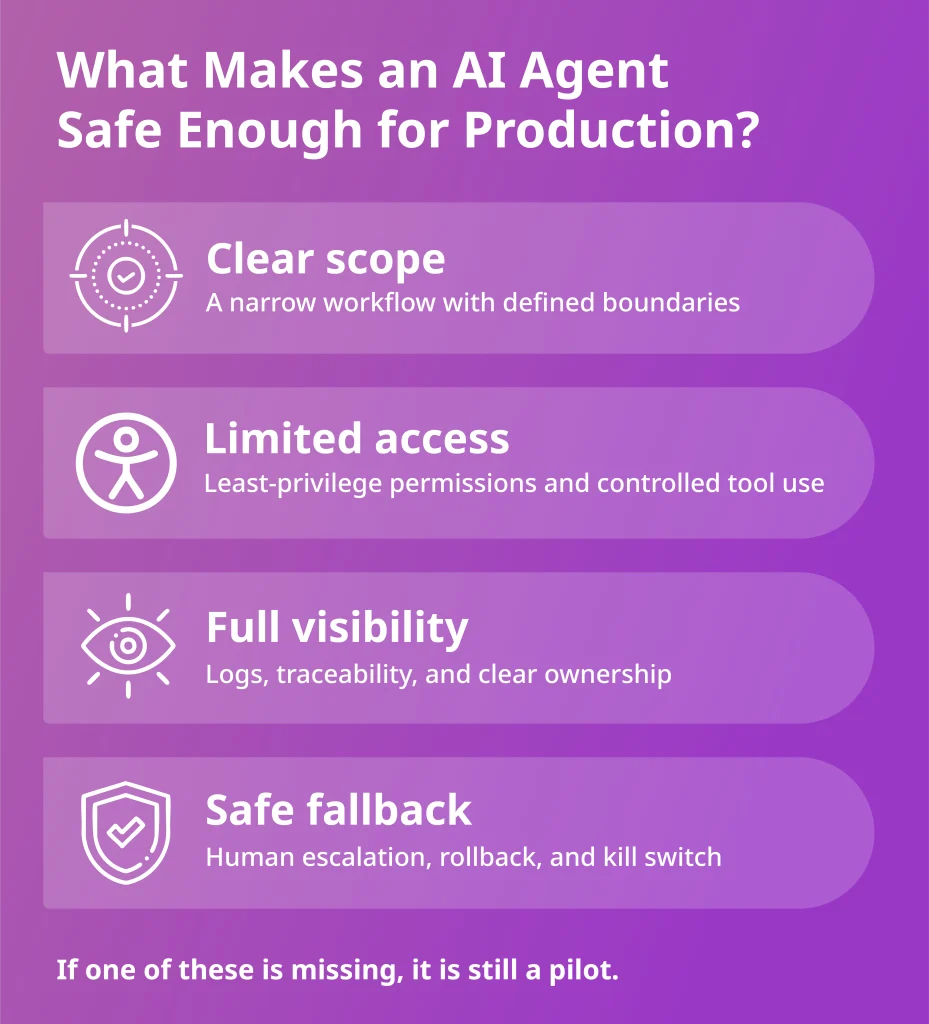
What Agents Need Before They Go Live
A successful pilot is not enough to make agentic AI safe in production. Once an agent can use tools, act across systems, and influence live workflows, the business needs a control model that keeps those actions bounded, visible, and recoverable.
A production-ready setup should cover five areas:

Without these control layers, agentic AI stays fragile no matter how strong the model looks in a demo.
For a look at how these control requirements apply in a high-stakes setting, our guide to AI agent solutions for healthcare providers shows why oversight, traceability, and safe workflow design matter even more when agents operate around sensitive systems and critical services.
Where to Start: Constrained Workflows With Clear Control
The wrong move is to begin with a broad agentic AI strategy and vague transformation goals.
The better starting point is a constrained workflow where manual effort is already slowing delivery, ownership is clear, and rollback is straightforward.
That means starting in engineering and operations, where the process is repetitive enough to automate, valuable enough to justify the effort, and structured enough to contain risk.
Strong starting points include:
- Internal service desk triage for classifying, enriching, and routing requests without taking irreversible action
- Cloud cost investigation for identifying idle resources, surfacing waste, and summarising likely optimisation opportunities
- Security alert enrichment for gathering context and preparing actions for analyst review without triggering remediation on its own
- Pipeline failure investigation for tracing failed builds, highlighting likely causes, and preparing the next step for engineering teams.
- Infrastructure drift detection for spotting changes, flagging policy deviations, and escalating issues before they become incidents
These workflows are a better place to start because they have clear boundaries, lower ambiguity, and safer recovery paths. They let teams prove that the agent can operate reliably before it is trusted with broader authority.
If you want a clearer way to decide which first use case is worth pursuing and how to judge whether it will create real value, our guide to AI agents for business efficiency and ROI breaks down where agents can improve operations without becoming an expensive distraction.
How Deployflow Helps CTOs Move From Pilots to Production
Deployflow’s agentic AI development helps CTOs turn operational drag into controlled execution.
The work starts by identifying where delivery still slows down due to manual handoffs, repeated triage, pipeline friction, infrastructure overhead, or incident response that relies too heavily on engineer time.
Deployflow then designs and deploys AI agents that can operate across pipelines, infrastructure, and operational systems, with the controls required for production use.
The result is a practical execution layer that helps teams move faster, respond earlier, and scale operational output without scaling process overhead at the same pace.
Turning Agentic AI Into Measurable Operational Gains
Agentic AI becomes valuable when it reduces manual effort in the parts of delivery that slow teams down most.
Used well, it can shorten incident response, remove repetitive operational work from engineers, improve consistency across pipelines and infrastructure, and help teams scale delivery without adding the same level of process overhead.
The smartest path is to apply it where the gains are easiest to prove: workflows with clear ownership, repeatable steps, and visible operational drag. That gives the business a faster route to lower toil, quicker execution, and better use of engineering time, while keeping adoption grounded in real outcomes.
For CTOs under pressure to move faster without stretching engineering teams even thinner, book a free consultation with Deployflow to identify where agentic AI can remove manual operational drag first.
Frequently Asked Questions About Agentic AI for Enterprise CTOs
How is agentic AI different from traditional automation?
Agentic AI can make decisions, adapt to changing contexts, and take multi-step action, while traditional automation usually follows fixed rules.
Traditional automation works best when the workflow is predictable, and every step can be defined in advance. Agentic systems are more useful when the workflow includes ambiguity, changing inputs, or decisions that would normally require human judgment. That flexibility is powerful, but it also introduces more risk, which is why control, permissions, and observability matter much more here.
For most enterprises, the best approach is not choosing one over the other, but using agentic AI only where static automation starts to break down.
Do enterprises need clean data before using agentic AI?
No, but they do need enough structure and reliability for the agent to work safely.
Many teams assume they need perfectly cleaned data before they can start, and that often delays progress unnecessarily. What matters more is whether the agent can access trusted sources, work within clear boundaries, and avoid acting on low-confidence or conflicting information.
In practice, weak data quality does not always block adoption, but it does change where the agent should be used and how much human review is needed. A messy environment usually means starting with lower-risk internal workflows instead of high-impact decisions.
Should CTOs build agentic AI in-house or use a partner?
That depends on how much internal engineering capacity, governance maturity, and operational clarity the business already has.
Building in-house can make sense when the team already has strong platform engineering, AI integration, and control-layer experience. The challenge is that many organisations underestimate the work around orchestration, permissions, monitoring, fallback design, and production hardening.
A specialist partner can often accelerate the first deployment by reducing design mistakes and helping teams focus on the workflows that will create value fastest.
For many CTOs, the strongest approach is to start with expert support, prove the model in production, and then decide what to bring further in-house.
Can agentic AI work with legacy systems?
Yes, but legacy systems usually limit how far and how safely agents can go.
The main issue is whether older systems support secure integration, reliable APIs, clear permissions, and enough visibility to control what the agent is doing. In some environments, agentic AI can still add value through read-only analysis, workflow coordination, or human-in-the-loop support, even when deeper execution is not yet realistic.
Legacy systems do not automatically rule agentic AI out, but they do affect scope, rollout speed, and control design.
How do you measure whether agentic AI is working?
You measure it through operational outcomes.
The strongest indicators include reduced manual effort, faster incident response, shorter resolution times, lower operational backlog, better consistency, and fewer repetitive tasks landing on senior engineers. It is also important to track control-related signals, such as escalation rate, failed actions, rollback frequency, and the frequency of human intervention.
If the agent is saving time but creating confusion, hidden risk, or more review overhead, it is not truly working. A good deployment improves both execution and operational confidence.
Explore our BLOG
Recent articles

ISO 42001 Explained: Requirements, Certification and What Your Engineering Team Must Build
ISO 42001 is the international standard that demonstrates your organisation governs AI properly, and enterprise...
read full article

Is Claude Down? Anthropic Outage: Protect Your Cloud Infrastructure
Claude went down across every surface on 29 September 2026. From 14:00 to 14:59 UTC,...
read full article

Top 10 Healthtech Companies in 2026: What Their Growth Means for AI and DevOps
Every software change that reaches a hospital has to clear regulatory, legacy system, and clinical...
read full article