


Hey there, DevOps enthusiasts! Let’s talk about something we all love to hate: documentation.
Whether it’s for onboarding, troubleshooting, or explaining another CI/CD pipeline service, keeping documentation up-to-date and engaging is tough. Enter Google Vids, the AI-powered tool that might be a game changer for creating, sharing, and maintaining DevOps documentation.
Think of Google Vids as your all-in-one video assistant. It’s like having a production team that helps you create tutorials, demos, and guides without breaking a sweat—or the budget. With AI tools enabling teams to create free videos, documenting complex system workflows no longer requires a dedicated production budget.
As someone working in the fast-paced world of Deployflow, where efficiency is everything, I can’t help but get excited about the possibilities. So, let’s dive into why Google Vids could be the secret weapon you didn’t know you needed.
What Are Google Videos, and How Can They Support DevOps Documentation?
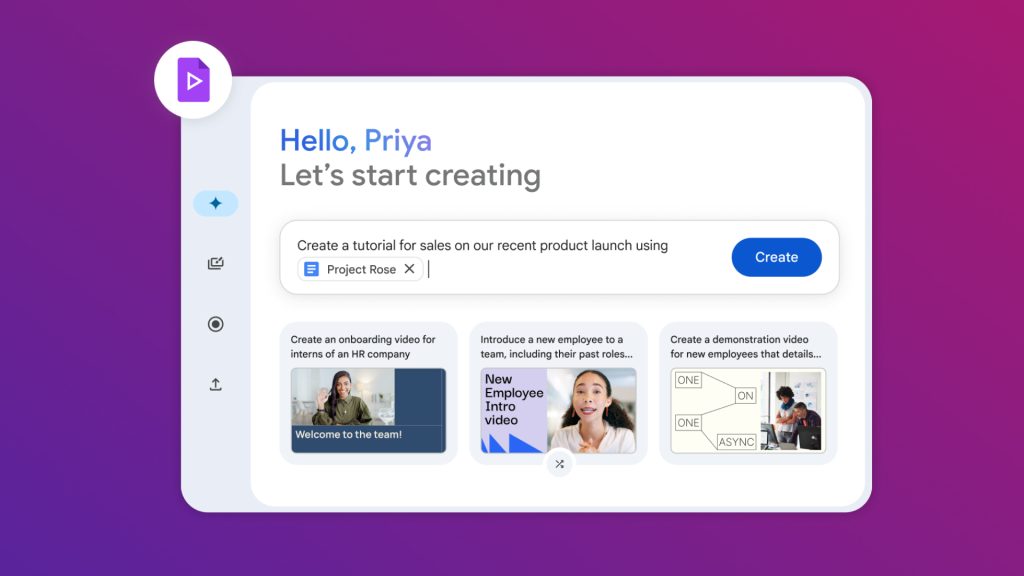
In 2024, Google tested its new AI-powered video creation tool, Google Vids. Google Vids is your new video producer, storyteller, video editor, video producing assistant, and so much more. It allows you to create more engaging videos using several prompts, all powered by the latest Gemini AI version.
The best part?
It can help you produce outstanding results at work by making great visual storytelling much easier without requiring special skills or spending huge amounts of money on professional videos.
This brings us to the enormous value Google Vids can bring to DevOps – it streamlines the processes of creating DevOps documentation.
Why is effective DevOps documentation important?
Documentation can take different forms in DevOps and provide critical information for DevOps teams. However, from experience, we know that DevOps teams usually lack high-quality and effective documentation, which usually leads to disorganisation, inefficiency, and sometimes potential failures in production.
Here are a few challenges in keeping the documentation consistent and up to date:
A lack of time
In the fast-paced DevOps world, it is really challenging to keep everything up to date. DevOps experts usually do not have enough time, the right tools, or the skills to update the existing material, which may cause the documentation to be so outdated that it hinders the process.
No participation from senior team members and team leads
One of the common challenges DevOps teams usually face is not having anyone who will actively participate in maintaining the documentation. The leadership team should also include this on the priority list—if they think it is a waste of time, you won’t get too far.
Scalability of documentation
Rapidly growing tech startups may sometimes face the challenge of managing a growing number of servers, requiring separate teams to manage them.
Any documentation practices they might have had before they became bigger might no longer be the same, leading to inconsistencies in updating information. To avoid this, teams should start working on creating strategies to manage these scalability issues regardless of how complex projects are.
If these sound familiar, you’re not alone. However, using tools like Google Vids can help bridge the gap, making documentation easier, scalable, and engaging.
How Can Google Videos Improve DevOps Documentation?
Here are a few key ways how Google Vids can make the entire process of creating DevOps documentation so much easier:
Visual Explanations Made Simple
DevOps workflows are often a tangle of configurations, deployments, and integrations. Instead of pages of text, imagine walking your team through a process with a crisp, animated video. With flowchart-based animations and illustrations, Google Vids lets you break down the complexities into something everyone can follow.
AI-Generated Scripts and Storyboards
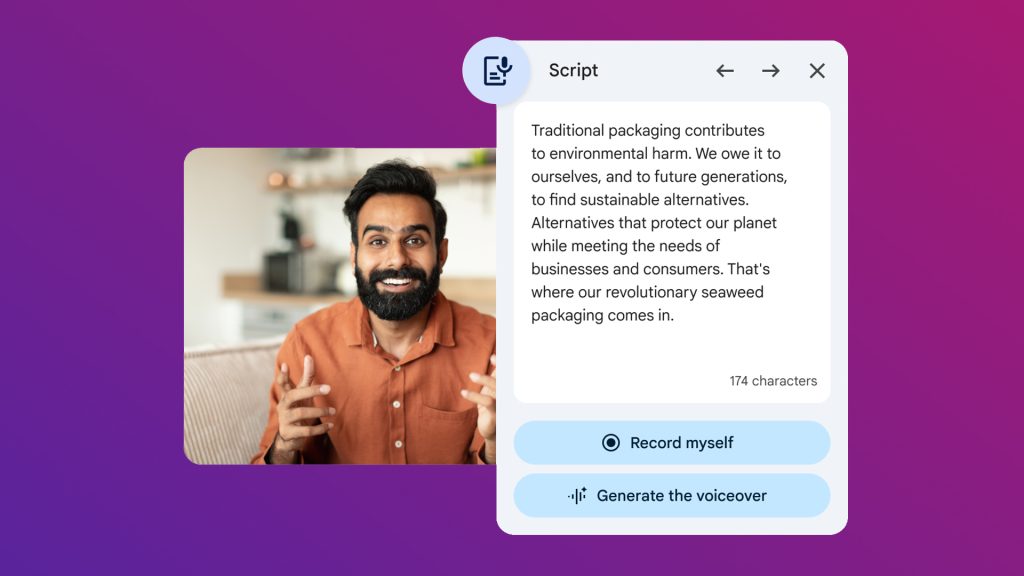
Don’t know where to start? No worries. Google Vids uses AI to generate scripts and storyboards from simple prompts. Need a video on “Troubleshooting Kubernetes Pods”? Just type that in, and you’re off. It’s perfect for creating training materials, incident-response simulations, and even management-level summaries.
If Google Vids isn’t your setup, a free ai video generator offers a similar prompt-to-video workflow for teams that want to spin up tutorials without a dedicated production tool.
Voiceovers for Global Teams
Not everyone on your team speaks the same language—or loves reading walls of text. Google Vids’ AI voiceovers make your tutorials accessible to everyone. Whether your team is in Bangalore or Boston, this feature ensures everyone stays on the same page.
Templates for Workflow Videos
Ever wished for a shortcut to explain your CI/CD pipeline issues? Google Vids’ pre-designed templates allow you to create polished workflow videos quickly. Consistent styles save time, and your videos will look so professional that your team might wonder when you hired a videographer.
Collaboration Made Easy
Google Vids integrates seamlessly with Google Drive, so your team can collaborate in real time. Add logs, metrics, or screenshots directly from shared drives and get feedback on the fly. Say goodbye to endless email threads.
Best Practices for Creating DevOps Videos with Google Tools
1. Plan and Structure Your Content
First things first—plan, plan, and plan some more. You wouldn’t dive into a deployment without a strategy, right? The same goes for your video documentation.
- Set Clear Objectives: Start by asking yourself: What is this video for? Can you explain how to set up a CI/CD pipeline? Onboarding new team members? Debugging an error in Kubernetes? The more specific you get, the easier it will be to stay focused and deliver valuable content.
💡 Pro Tip: Write down a one-sentence mission statement for your video. For example, “This video will teach developers how to deploy microservices using Helm.”
- Script It Out: Don’t wing it—your future self (and your team) will thank you. Open up Google Docs and draft a script. Keep it simple, conversational, and to the point. Avoid overwhelming your audience with too much detail, especially for introductory content.
💡 Pro Tip: Break your script into bite-sized sections. This makes recording easier and allows you to create timestamps for your viewers later.
- Storyboard with Google Slides: Visuals are key. Create a quick slide deck in Google Slides to map out your video’s flow. Include screenshots, diagrams, or flowcharts to represent each section. This will give you (and your team) a clear picture of the final product’s appearance. Why bother with storyboarding? It helps you visualise the content, ensuring your video flows logically and doesn’t leave your audience scratching their heads.
2. Record and Edit Like a Pro
Now that you’ve planned everything, it’s time to hit record! But don’t just settle for a basic recording—polish your video so it shines.
- Live Demos with Google Meet: Google Meet is your best friend for recording live screen-sharing sessions. Let’s say you’re demonstrating how to set up a Jenkins pipeline. Share your screen, walk through the process, and record the session. Boom—you’ve got the foundation for a killer tutorial.
💡 Pro Tip: Use Google Meet’s “Spotlight” feature to keep the focus on specific parts of your screen. This is especially helpful when navigating complex UIs.
- Advanced Editing with Tools Like Loom: Once you’ve recorded your session, edit it up a notch. Tools like Loom integrate beautifully with Google Workspace and let you annotate your video, zoom in on important sections, highlight errors or critical steps in real time. Don’t worry about being Spielberg—just focus on making the video clear and easy to follow.
💡 Pro Tip: Add captions using AI for accessibility. This will not only make your video inclusive but also ensure team members can follow along even in noisy environments.
3. Collaborate Using Google Workspace
Documentation isn’t a solo mission—it’s a team effort. Luckily, Google Workspace has you covered.
- Centralise Your Videos with Google Drive: Store your videos in Google Drive for easy access and version control. To keep everything organised, create folders by project, topic, or team. You’ll never have to dig through email chains to find the latest version of a tutorial again.
💡 Pro Tip: Use descriptive filenames. Instead of “Video1.mp4,” go for something like “Deploying_K8s_Cluster_2024.mp4.” Trust me, future-you will appreciate it.
- Get Real-Time Feedback: Share your drafts directly from Google Drive and invite your team to comment. This collaborative approach ensures that your documentation meets everyone’s needs—whether they’re DevOps engineers, developers, or managers. Why this matters: Feedback helps catch gaps or unclear sections early, saving time and effort later.
Communicate with Google Chat: Create project-specific channels in Google Chat to share video links, gather updates, and keep everyone aligned. For example, if your video is part of an onboarding series, use Chat to discuss progress, deadlines, and additional resources.
💡 Pro Tip: Pin key messages (like feedback deadlines or finalized links) to keep the channel organised and focused.
Overcoming Common Challenges
Even with tools like Google Vids, you may face challenges:
Keeping Content Current
DevOps environments evolve rapidly. Establish a routine for reviewing and updating videos to ensure they reflect the latest workflows.
Balancing Detail and Simplicity
Tailor your content to your audience. Beginners need more context, while experts prefer concise, high-level explanations.
Security Concerns
Store sensitive videos securely on Google Drive with restricted access or use unlisted YouTube links to limit visibility.
Deployflow’s Success Story with Google Vids
At Deployflow, we’ve found that Google Vids isn’t just a tool; it’s a productivity booster. Whether you’re explaining a deployment pipeline, creating a training module, or troubleshooting an issue, videos can make your documentation engaging and effective.

We’ve turned documentation into a strategic advantage by combining video tutorials with analytics, visuals, and traditional documentation.
By pairing video tutorials with strong visual aids like graphs or charts, you can highlight key metrics, explain complex workflows, and showcase your team’s wins.
Ready to give it a shot? Grab Google Vids, start recording, and take your documentation game to the next level. 🚀
Explore our BLOG
Recent articles

Is Claude Down? Anthropic Outage: Protect Your Cloud Infrastructure
Claude.ai has spent 2026 fighting its own success. Twenty-one incidents landed between 12 August and...
read full article

AI Experimentation vs AI Engineering: The Difference That Decides Whether Your AI Budget Survives
Experimentation buys you knowledge. Engineering buys you a system that still works next quarter, when...
read full article

Why Most Agentic AI Projects Fail Before They Scale
Has your agent been three months from production for nine months? Agentic projects break at...
read full article