



Your data sits in a dozen systems, analysts wait for extracts, and the AI roadmap keeps slipping because nobody trusts the numbers.
Snowflake answers that with one cloud platform for storing, managing and analysing data at any scale, with no physical servers to buy, patch or retire.
The sections below cover how the architecture works, what the pricing model really costs, which workloads it suits, and how to migrate without putting reporting or services at risk.
Executive Summary
- Pay for compute only while it runs; governance decides whether that model cuts costs or inflates them.
- Runs consistently across AWS, Azure and Google Cloud, keeping exit options open at contract renewal.
- Built for analytics, live data sharing and AI data foundations. Real-time transactions stay on operational databases.
- A phased migration with a parallel run keeps reporting live; lift-and-shift converts old inefficiencies into monthly invoices.
Data readiness decides which AI projects survive:
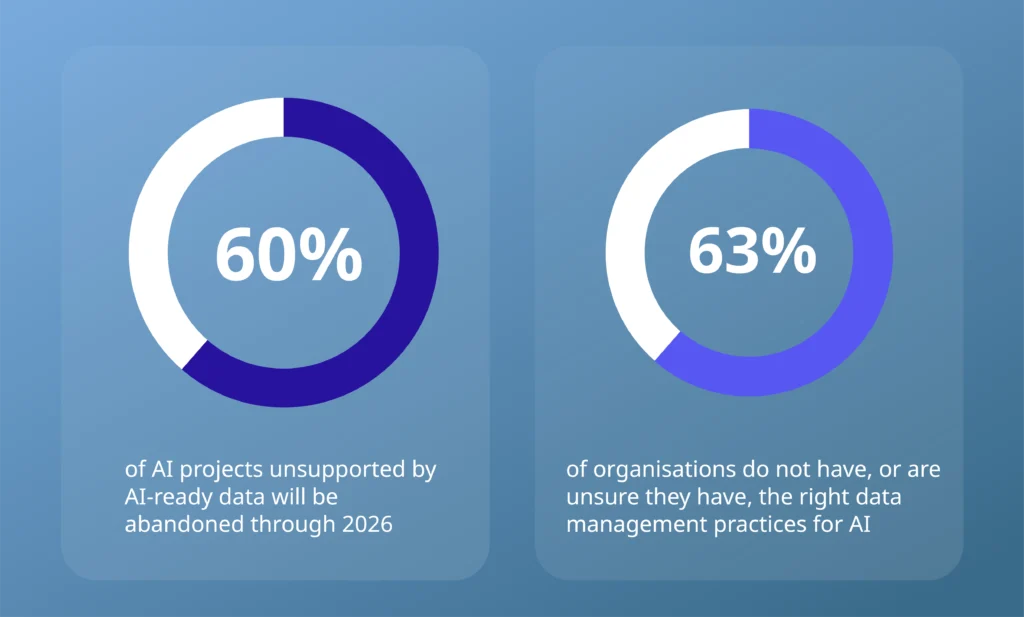
Source: Gartner, February 2025
What Is Snowflake and What Does It Actually Do?
Snowflake is a cloud-based data platform that stores, manages and analyses very large volumes of data in a single governed environment. It runs entirely as a service. There are no servers to provision, no storage arrays to expand and no database software for your team to maintain.
Think of it as one governed estate for everything the business captures. Customer transactions, website behaviour, sensor feeds and the data behind AI models all land in one place, ready to query at whatever scale the day demands.
The problem it targets is sprawl. Data accumulates across operational systems, departmental databases and SaaS tools faster than anyone can connect them, and every disconnected system is another version of the truth for the board to argue over. That fragmentation is why one governed platform has climbed the CTO agenda.
In practice, Snowflake replaces the systems already costing you money: ageing on-premises warehouses such as Teradata or Oracle, departmental databases that multiplied over the years, and Hadoop estates that grew harder to justify with every renewal.
Retiring that legacy estate is a modernisation project in its own right, and it is the point where licence fees, hardware refresh cycles, and specialist maintenance headcount finally leave the budget.
Data Sharing, Apps, and the Snowflake Marketplace
The warehouse label undersells what you are actually buying. Alongside analytics, Snowflake handles secure data sharing between organisations, application development, and a marketplace where companies build, test and sell data products.
One platform decision now shapes your reporting stack, your partner integrations and the foundation under the AI programme. That concentration of consequence is why the evaluation belongs on your desk rather than three layers down.
How Does Snowflake Work, and Why Should a CTO Care?
Snowflake’s architecture separates data storage from processing power, and that single split is where the cost savings and the scaling flexibility both come from.
Traditional databases bolt the two together, so buying more of one forces you to pay for more of the other, needed or not. Your capacity gets sized for peak demand, then sits half-idle the rest of the year on your budget.
How Snowflake Separates Storage and Compute
Data lands in low-cost cloud object storage, which holds terabytes cheaply. Processing runs in separate clusters called virtual warehouses. A heavy job arrives, a right-sized cluster spins up, the work completes, the cluster switches off, and billing stops with it. Overnight idle capacity, the silent drain on most on-premises estates, comes off the bill entirely.
What is a virtual warehouse?
A virtual warehouse is a cluster of compute sized in T-shirt terms, from X-Small up to 6X-Large, with each size step roughly doubling both the compute and the credits consumed per hour.
Warehouses auto-suspend after a set idle period and auto-resume the instant a query hits them, which is the setting that separates a lean bill from a wasteful one. For spiky, high-concurrency workloads, a multi-cluster warehouse scales out horizontally, adding clusters as demand climbs and retiring them as it falls. Multi-cluster scaling sits in the Enterprise edition and above, one of the ways edition choice feeds the credit rate you pay.
That separation buys something your teams will feel by the second week. Each department runs its own warehouse against the same data, so the finance close no longer slows the sales dashboards, and a data science experiment cannot degrade operational reporting. The Monday-morning query queue disappears, and with it a recurring source of internal friction.
The Cloud Services Layer
The third layer in Snowflake’s architecture, cloud services, handles security, metadata, query optimisation and access control automatically. Your engineers tune none of it. A whole category of maintenance leaves the IT plan, which matters most if your specialist database headcount is already stretched thin or hard to hire.
Multi-Cloud Portability and Vendor Lock-In
One design choice belongs on a board slide. Snowflake runs the same product across Amazon Web Services, Microsoft Azure and Google Cloud, so your data is never tied to a single provider. Individual features occasionally reach one cloud before the others, but the platform, the SQL and your data model carry across unchanged.
For a UK organisation under procurement scrutiny, or anyone who has felt the squeeze of a vendor with no credible exit, that portability is worth real leverage at renewal.
Public sector buyers will recognise the same calculation from central guidance on managing technical lock-in, which asks organisations to weigh value against portability and plan how they would leave before dependency runs deep.
How Snowflake Differs From a Traditional Data Warehouse
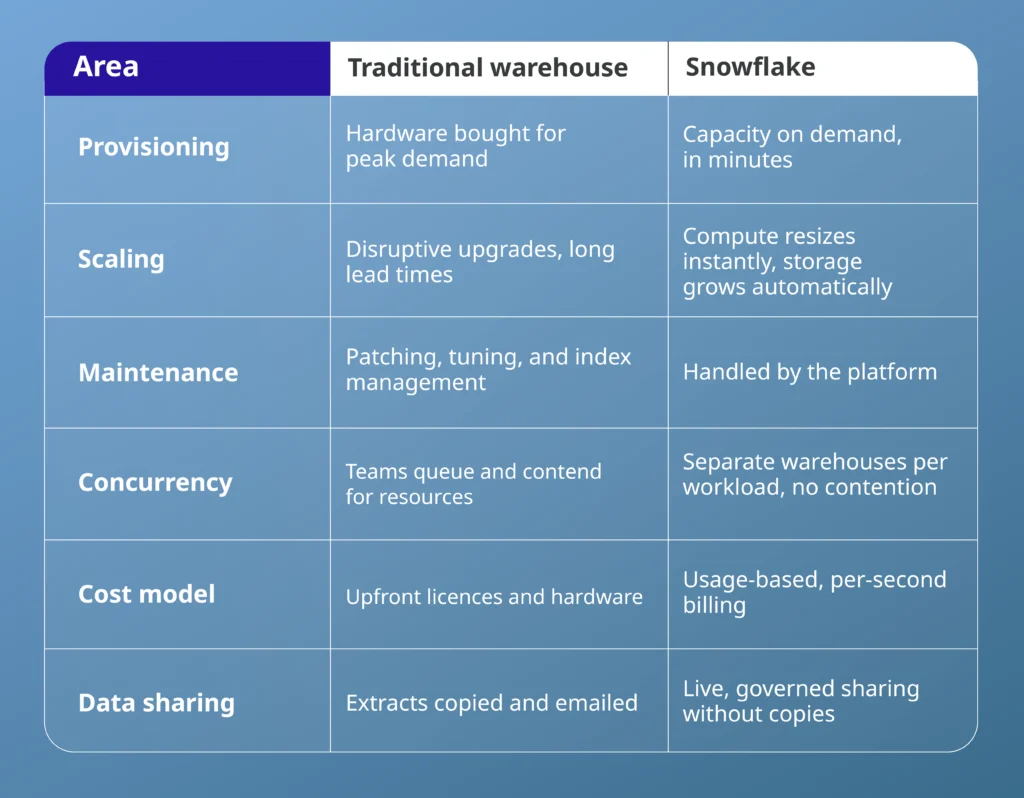
The sharing row deserves particular attention. Instead of manually copying and emailing large files, teams can securely share live data sets directly with partners, vendors or other departments.
The recipient queries the same governed data you do: always current, never duplicated, with access revoked in a click. Supplier collaboration, group reporting and regulatory submissions all become simpler once the extract-and-email cycle disappears.
Concurrency also changes accountability. Each warehouse carries its own cost line and its own resource monitor, so the team that overspends answers for its own consumption rather than hiding inside a shared bill.
How Much Does Snowflake Really Cost? The Credit Model Explained
Snowflake pricing runs on credits. Compute consumes credits while a virtual warehouse runs, with the rate set by warehouse size and product edition. Storage is billed separately at commodity cloud rates. There is no perpetual licence and no hardware line in the budget.
What Drives Your Snowflake Bill Up or Down
The model rewards discipline and punishes neglect. Costs stay low when warehouses auto-suspend the moment queries finish, when clusters are sized to the workload, and when someone owns a usage policy.
Bills escalate quickly when suspension timers are set too long or switched off, when teams default to oversized clusters or when ad hoc queries run without oversight.
Treat governance and cost optimisation as part of the adoption cost, exactly as you would for any other cloud service. Resource monitors, query tagging and regular right-sizing reviews belong in the operating model from day one. Retrofitting cost control after a bill shock is far harder than building it in, and the finance director will remember which approach you chose.
Comparing against your current warehouse spend needs proper modelling, since the credit rate shifts by edition and region.
What Does a Snowflake Credit Cost?
A credit is Snowflake’s unit of compute billing, charged per second with a 60-second minimum each time a warehouse resumes. An X-Small warehouse burns one credit per hour, and each size step up roughly doubles that rate.
Storage is billed separately by the terabyte, so a large but rarely queried archive costs little to keep. Compute works the other way round: a small dataset that teams scan all day can dominate the bill through warehouse time alone.
An example: One X-Small warehouse serving a reporting team for 8 hours a day over 22 working days consumes roughly 176 credits per month. Multiply by your contracted rate, then by every warehouse you plan to run, and the shape of the bill appears before the first invoice does.
When Snowflake Fits Your Stack and When It Doesn’t
Snowflake earns its place when analytics is the priority. Typical strong fits include:
- Consolidating data from many systems into a single source of truth
- Sharing governed data with partners, suppliers or group companies
- Workloads that spike, such as month-end reporting or seasonal trading
- Building a governed data foundation for machine learning and AI
The platform is a poorer match for transactional systems that process orders or payments in real time, where operational databases remain the right tool. Small, static datasets rarely justify the migration effort.
And if your teams are already deep in a single vendor’s analytics ecosystem, such as Microsoft Fabric or Google BigQuery, the business case needs to be tested against what you already own rather than assumed.
An honest evaluation compares total running costs, available skills, and workload shapes across candidates. Vendor demos will not do that work for you.
Can Snowflake Carry Your AI Ambitions?
Partly, and the part it carries is the one that matters most. Snowflake provides the data foundation, which is where most AI programmes break down. As the Gartner figures above show, projects without AI-ready data tend to get abandoned. That failure looks like three teams defining “active customer” in three ways, or a pilot that ran fine on sample data but buckled under production.
Snowflake closes that gap by holding the data in a single governed place, with access controls and lineage already in place. Your data scientists stop rebuilding the same cleaned dataset for every project and stop guessing where a figure came from, because the source and its permissions travel with it.
Governance sharpens the case. Boards ask who accessed which data and when, and regulators expect a precise answer. One platform gives you a single point to enforce policy and produce the audit trail.
What Snowflake Does and Doesn’t Solve for AI
Set the expectation honestly, though. A strong data foundation removes the most common reason AI projects fail. It will not pick the right use case or guarantee model quality. Snowflake solves the readiness problem; the strategy problem stays yours.
Once the foundation holds, pace becomes the differentiator, and sprint-based AI delivery turns that foundation into shipped use cases rather than stalled pilots.
How to Migrate to Snowflake Without Breaking Reporting
Migration risk worries technology leaders more than the technology itself, and rightly so. Reporting outages are visible to the entire business within hours. A phased cloud migration with a clear exit gate at each stage removes most of the danger.
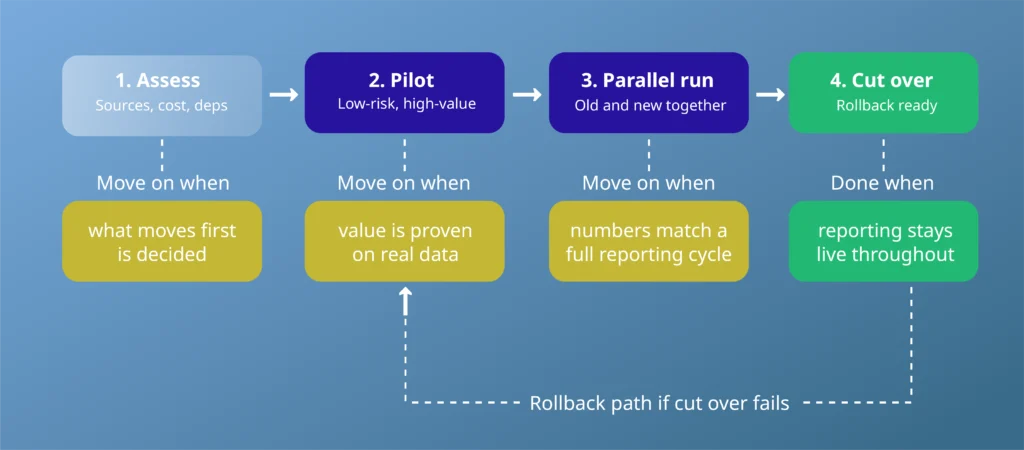
The Four Gates of a Snowflake Migration
A Snowflake migration stays governable because of the gates. Each phase has one condition that must be true before the next begins, so nobody cuts over on optimism.
Move on from the assessment once you have decided what migrates first. Leave the pilot only after it has proven value on real data, not sample data. Hold the parallel run until the numbers match for a full reporting cycle, not just a good day. Then cut over, with a rollback path ready if anything breaks.
Proof the Gates Hold: Vodafone’s €1.5 Billion Migration
The gating discipline is proven at scale. Deployflow ran the same parallel, reconcile-before-cut-over approach on Vodafone’s SEPA migration, where live payment operations left no room for a bad week.
The SEPA-compliant system was delivered in full and now processes €1.5 billion a month across nine eurozone markets, running at 99.5% uptime with platform failures down 85%.
Two Snowflake Migration Traps to Avoid
Two traps catch otherwise sensible programmes.
The first is the lift-and-shift: moving SQL and processes across unchanged imports the inefficiencies of the old estate into a pay-per-use model, which turns historic waste into a monthly invoice.
The second is deferred governance: leaving cost controls until after go-live guarantees the first bill becomes a board conversation for all the wrong reasons.
Skills deserve a line in the plan too. The platform removes infrastructure work, yet it introduces new disciplines around warehouse sizing and credit monitoring that your team will need before the pilot, not during it.
Cut-over is the start of that work, which is why cloud delivery doesn’t stop at migration and why the team running the platform matters as much as the one that moved it.
Deciding Whether Snowflake Belongs in Your Roadmap
Snowflake solves real problems: fragmented data, contended warehouses, painful sharing and shaky AI foundations. Whether it solves your problems depends on workload shape, existing commitments and the governance you are prepared to build around it.
An independent view answers that question faster and more cheaply than a proof of concept built on enthusiasm. Deployflow helps technology leaders evaluate data platforms against their existing estate, model the true running cost, and plan a migration that keeps services online from the first workload to cut over.
If Snowflake is on your shortlist, or your current warehouse contract is approaching renewal, book a free consultation. You will see the numbers, the risks and a realistic timeline before committing a penny of the budget.
Frequently Asked Questions about Snowflake AI Data Cloud
Who owns Snowflake?
Snowflake is an independent, publicly listed company (NYSE: SNOW); no cloud provider owns it. The confusion comes from the platform running on AWS, Azure and Google Cloud infrastructure, so your queries execute on hardware rented from the same providers Snowflake competes with. That is exactly why cross-cloud portability is built so deeply into the product: the company selling it has a structural incentive to keep your exit open rather than trap you on one cloud.
What is the difference between Snowflake and Databricks?
Neither is a superset of the other: Snowflake leads for SQL analytics and governed sharing, Databricks for data engineering and machine learning.
The split reflects their origins, one a cloud data warehouse, the other a managed Spark platform, and although both have built into each other’s territory, the centre of gravity still shows. Many enterprises run both, so the real question is which fits your dominant workload and the skills already on the payroll, since retraining a SQL-first team on Spark carries a real cost, and the skills split between analytics and engineering shapes the platform decision as much as the feature list does.
Where is Snowflake data stored, and can it stay in the UK?
Data lives in the cloud region you choose at account creation, and London regions are available on all three clouds: AWS, Azure (UK South) and Google Cloud.
Nothing leaves that region unless you deliberately enable cross-region replication or sharing, both opt-in and separately billed. Region choice is a one-time setup decision that is awkward to reverse, which makes residency a day-one governance item rather than an afterthought. Note that where data sits and who can access it are two separate controls your DPIA should treat on their own terms.
Should you buy Snowflake on demand or commit to capacity?
Start on demand, commit later. On-demand pricing charges a higher per-credit rate with no obligation; a capacity contract discounts that rate for committed spend across the term.
Committing before you have real usage data fails in one of two expensive directions. Over-commit, and you pay for credits you never burn. Under-commit, and you lose your leverage at renewal. Run the pilot and parallel phases on demand, then negotiate capacity against genuine consumption, the same cloud cost discipline that keeps any usage-based platform honest.
Does Snowflake replace backups and disaster recovery?
Partly, and it matters which part. Time Travel restores data to an earlier point, up to 90 days on Enterprise edition and above (Standard caps at one day), with a further seven-day Fail-safe behind it as a last resort.
Regional disaster recovery is separate: surviving the loss of an entire cloud region requires cross-region replication and failover, which you configure, pay for, and run on a higher edition. Every window is finite, so long-horizon regulatory retention still needs its own archive strategy.
Explore our BLOG
Recent articles

AI Roadmap: How to Get Board Approval for Your AI Strategy in Six Weeks
A board-ready AI roadmap takes six weeks if you rank, cost and sequence use cases...
read full article

Is Claude Down? Anthropic Outage: Protect Your Cloud Infrastructure
Every current Claude model failed at once on 25 October 2026, the worst of five...
read full article

Agentic Process Automation Explained: A Complete Guide for 2027
Agentic process automation hands off entire business processes to AI agents that read, decide and...
read full article