



Deleted Microsoft 365 data has a shelf life. Exchange Online gives you 14 days by default. SharePoint and OneDrive give you 93. After that, no support ticket brings it back.
Microsoft’s own Services Agreement tells you to back up your content yourself. UK GDPR expects you to restore personal data quickly after an incident, and the ICO gives you 72 hours to report when you cannot.
Recoverable by Deployflow automates private cloud backup for Microsoft 365, restores in minutes, and ensures built-in compliance. The next five minutes cover the gap, the law and the fix.
Executive Summary
- Native retention is short: 14 to 30 days for deleted Exchange items, 93 days for SharePoint and OneDrive. Then the data is gone for good.
- Microsoft’s Services Agreement recommends you back up your own content, including through third-party services.
- UK GDPR Article 32 makes timely restoration a legal duty. ISO 27001:2022 control 8.13 makes it an audit item.
- 43% of UK businesses reported a breach or attack in the last 12 months, and only 25% hold a formal incident response plan.
- Recoverable backs up Microsoft 365, including Exchange, SharePoint and OneDrive, with unlimited storage, AES-256 encryption and EU data centres, and restores data in minutes.
NCSC Annual Review 2025: The UK Threat Picture
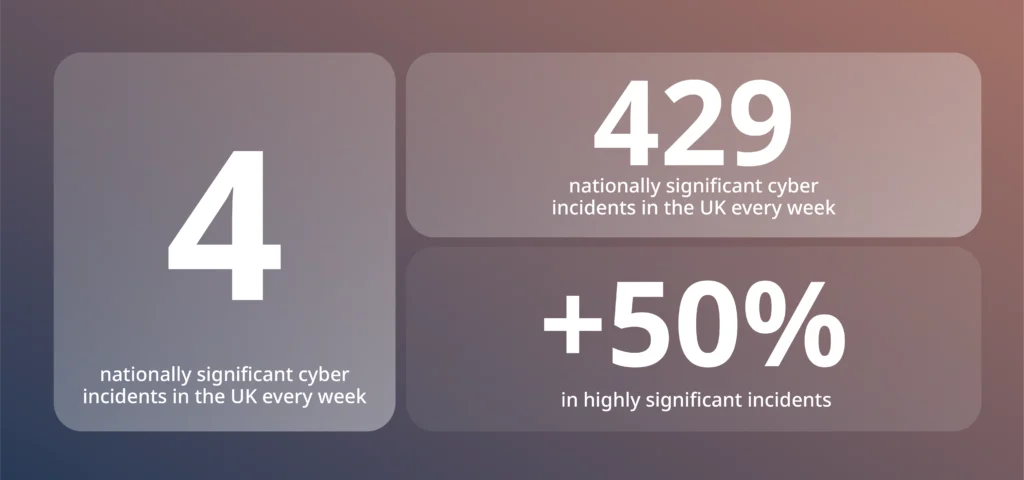
Source: NCSC Annual Review 2025
4 nationally significant incidents a week is the national backdrop. Closer to the ground, the picture is no more reassuring: 43% of UK businesses reported a breach or attack in the last 12 months, yet only 25% hold a formal incident response plan (gov.uk). The gap between those two numbers is where permanent data loss lives. An incident is now a statistical likelihood, and a tested route back to a clean copy is still the exception.
Microsoft Told You to Back Up Your Own Data (In Writing)
Buried in the Microsoft Services Agreement is a plain instruction. Microsoft recommends that customers regularly back up the content and data they store on its services, including through third-party apps and services. The same clause notes that all online services experience occasional outages and that Microsoft is not liable for any resulting loss.
The reason is the shared responsibility model. Microsoft owns the infrastructure: servers, networks and application uptime.
You own the data. Accidental deletion, a malicious leaver, a misfiring retention policy: every one of those is your problem.
Geo-redundant data centres change nothing here. Redundancy protects Microsoft against hardware failure and replicates your mistakes just as faithfully as it replicates your files. A deletion in London reaches every copy within seconds.
Uptime SLAs pay out for downtime. No SLA anywhere returns a deleted mailbox.
How Long Does Microsoft 365 Keep Your Deleted Data?
Between 14 and 93 days. Deleted items in Exchange Online are recoverable for 14 days by default, extendable to 30. SharePoint and OneDrive recycle bins hold files for 93. Once each clock stops, the data is gone at any price.
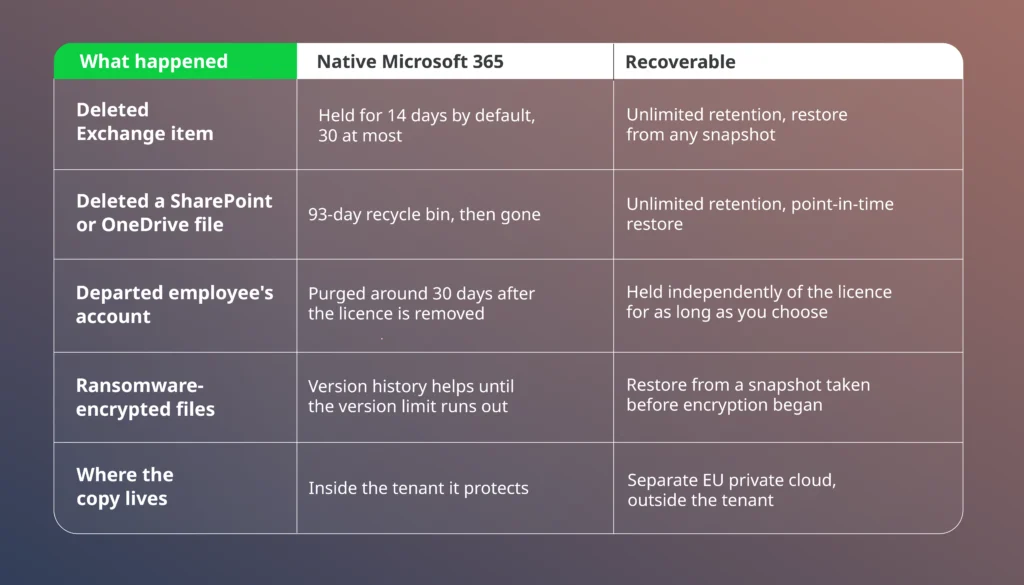
Versioning and sync will not rescue you. OneDrive replicates ransomware-encrypted files as quickly as legitimate edits, and retention policies preserve records for legal purposes rather than restoring them.
The loss scenarios stay ordinary: a leaver wipes their OneDrive on the way out, an OAuth app overwrites a folder structure, an email deleted in March turns out to matter in September.
UK GDPR Made Your Backup Strategy a Legal Duty
Article 32(1)(c) of UK GDPR requires you to restore the availability of, and access to, personal data in a timely manner after a physical or technical incident. Lose customer records you cannot recover, and you hold a compliance failure on top of an operational one.
The reporting clock makes it worse. Qualifying breaches must reach the ICO within 72 hours. A prolonged inability to restore data can itself count as an availability breach. Recovery speed becomes a regulatory metric, measured while the incident is still live.
Auditors apply the same pressure. ISO 27001:2022 lists information backup as Annex A control 8.13, and certification reviews expect evidence: documented schedules, tested restores, and a backup provider whose own credentials survive scrutiny. Default retention settings in a productivity suite rarely clear that bar.
Backup is only one layer of a wider posture, and building cloud security in from the first design decision is what keeps the rest of the estate resilient rather than reactive.
What Microsoft 365 Backup Actually Saves
Backup earns its budget in the hours after something breaks. Three numbers decide whether that moment is a shrug or a crisis.
The first is recovery time. When a mailbox or a SharePoint site goes down, every hour offline has a cost: stalled teams, missed deadlines, contractual penalties in regulated work. A restore measured in minutes turns a would-be outage into a footnote, and a recovery time objective you can actually hold up in a business continuity review.
The second is the recovery point, or how much work you lose. Automated daily backup means the gap between your last good copy and the incident is a day at most, and an on-demand snapshot before a risky migration shrinks it to nothing. Compare that with reconstructing a week of deleted files from memory.
The third is operational load. Self-managed backup ties up storage, hardware and someone senior enough to test restores. Handing that to a private cloud platform with unlimited storage and no on-premise footprint frees your team from maintenance no one enjoys, and everyone forgets, until the day it matters. One interface, and the audit trail writes itself.
The same logic scales past backup. A growing Microsoft estate accumulates patching, monitoring and licence admin, and moving that routine upkeep to specialist cloud management keeps your engineers on the work that earns revenue.
Cyber insurers increasingly price recovery capability into premiums, so the evidence you keep for regulators now also shapes what you pay. Fast, tested Microsoft 365 recovery is where resilience stops being a slide and starts being a number. It sits alongside the wider work of reducing cloud cost and operational risk that keeps a Microsoft estate efficient as it grows.
7 Tests Any Microsoft 365 Backup Platform Must Pass
Judged against those obligations, a credible platform needs all seven of these:
- Storage is independent of the production cloud, so one failure never claims both copies
- Automated daily backups, plus on-demand snapshots before risky changes
- Point-in-time recovery, down to a single item, email, folder or file
- AES-256 encryption with OAuth and multi-factor authentication as standard
- ISO 27001 certification, GDPR compliance and data residency you can name in an audit
- Pricing that ignores storage volume, so costs stay flat while data grows
- Setup and administration measured in minutes, with no specialist training
Few tools pass every test. Recoverable does.
Inside Recoverable AI: 5 Menu Items, No Manual
Everything lives in five menu items: Dashboard, Backup, Recovery, System Activity and Security Audit. No training course, no console sprawl. Here is what you see inside.
The Dashboard: Your Whole Backup Estate on One Screen
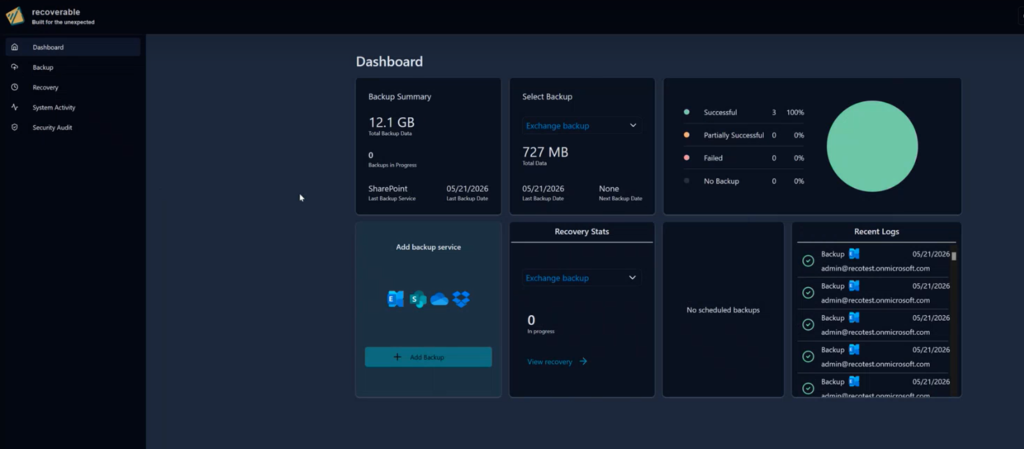
One screen answers the questions that matter. Total data protected, backups in progress, and the last and next run for each service, with recent logs alongside. A status wheel sorts every job into successful, partially successful, failed or no backup, so a healthy estate shows a solid green circle and anything less points you straight at the problem.
Backup: Pick a Service, Set a Schedule, Done
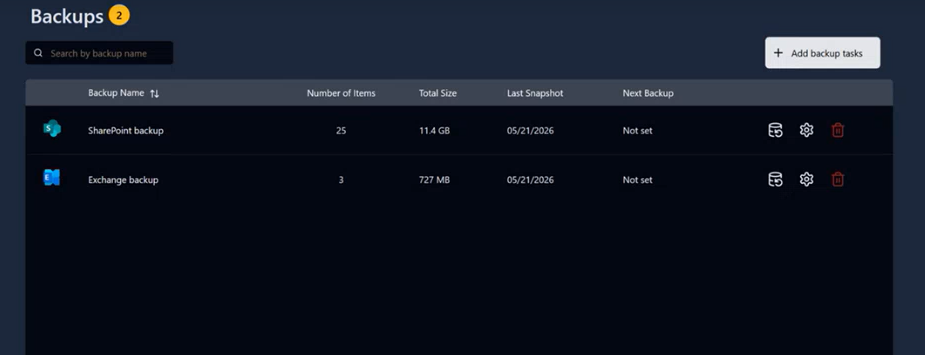
Adding protection takes one click. Pick what to back up: Exchange, covering mail, calendar, contacts and tasks; SharePoint sites, documents and libraries; or OneDrive. Name the job, choose an EU data centre and a daily, weekly or monthly schedule, and it runs itself from then on.
Retention can stay unlimited, so nothing ages out unless you decide it should, and a manual backup sits one click away before any risky change.
Recovery: Pick an Item, Pick a Date, Restore
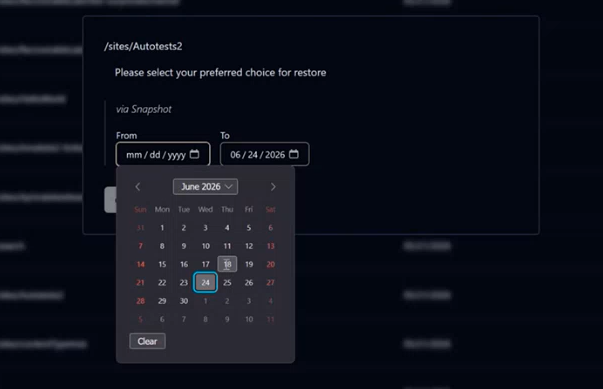
The Recovery view lists everything Recoverable holds for you, from Exchange mailboxes to every active SharePoint site, each with its first and last backup date. Search for what you need, choose restore via snapshot, and set a from and to date to travel back to the exact point before things went wrong. Deciding which moment to return to is the hardest step in the whole process, and it takes two clicks.
System Activity: Every Job, Every Status, No Mystery
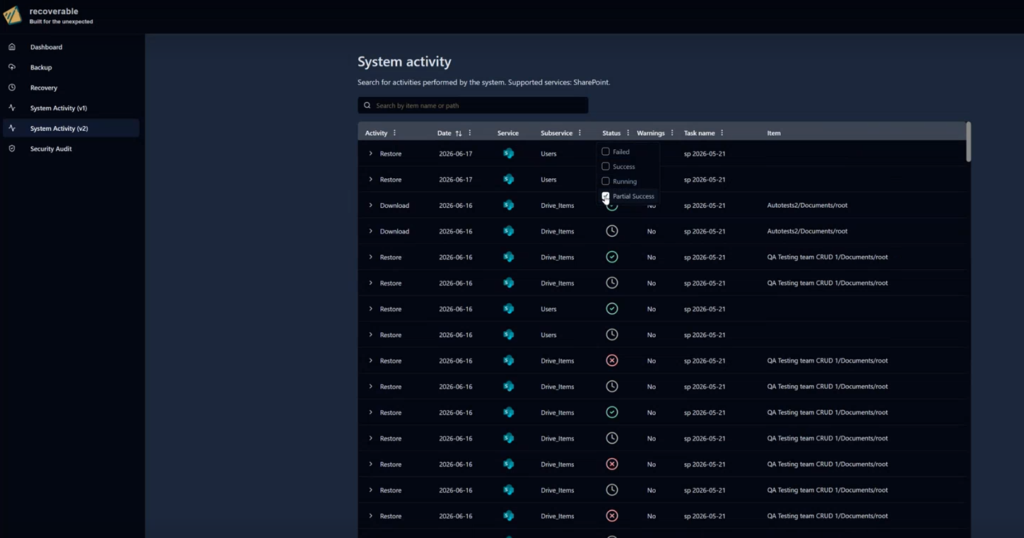
Every task the system runs can be searched by item or task name and filtered by date. Each row shows the service, the sub-service and the outcome: successful, partially successful or failed. You can see execution time, data size, and per-item metrics, with a View Failed Items drill-down that identifies exactly what needs attention. Partial failures stop being a guessing game.
Security Audit: Who Did What, and When
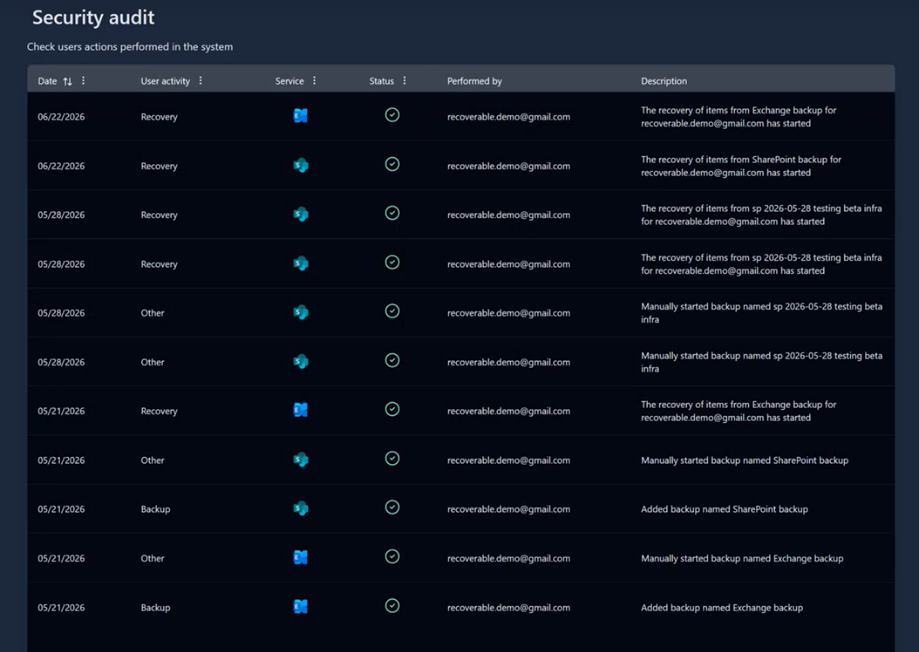
The Security Audit page records every user action in chronological order: logins, backups added, manual runs started, and recoveries triggered. Each entry carries the user, the service, the status and a plain-language description.
The audit trail your ISO 27001 reviewer will ask for is already written before the request arrives.
The Credentials Behind the Console
Everything you saw above runs on infrastructure your auditors can approve. Recoverable carries ISO 27001 certification, GDPR compliance, AES-256 encryption, and OAuth with multi-factor authentication.
Data sits in EU-based data centres with 99.9% uptime, storage is unlimited, and full recovery completes in minutes.
Support answers 24/7 by phone, email and chat.
Recoverable is built to protect the full stack on which a modern enterprise runs. The platform centres on Microsoft 365 and SharePoint today, with Dropbox, Box, Google Workspace, Azure and AWS on the roadmap for coverage. As each integration comes online, the same per-user model and single console carry over, so protecting a new platform never means learning a new tool.
Start Your Microsoft 365 Backup Free With Recoverable AI
Every retention window above is already closing on data you may not miss for months. The cheapest moment to act is before the loss, while the decision is still yours.
Start with the Recoverable business plan, free for 30 days. The first backup will complete before the afternoon ends, storage is unlimited from day one, and you can scale users up or down in a couple of clicks with no long-term tie-ins.
Running a larger estate? Contact Recoverable about the Enterprise plan, which adds volume pricing, advanced security, bring-your-own-storage and 24/7 support.
When disaster strikes, you’ll be recovery-ready.
Frequently Asked Questions About Recoverable and Microsoft 365 Backup
How much does Recoverable cost?
The Business plan is £3 per user per application monthly, or £30 per year. For a 50-seat business protecting Exchange and SharePoint, that comes to £300 a month, or £3,000 a year on an annual billing plan, and the figure stays flat regardless of how large those mailboxes and sites grow.
That single fee covers unlimited storage, so the bill tracks how many users you protect, not how much data they generate, which keeps budgeting predictable as the estate grows.
Every Business subscription includes automated daily backups, manual on-demand backups, point-in-time recovery, and granular search and restore across items, emails, folders and files, with no long-term contract.
Larger organisations move to the Enterprise plan, which adds volume discounts and bundled pricing alongside advanced security, bulk activation, bring-your-own-storage, customisable dashboards and enterprise-grade 24/7 support.
You can start on the Business plan free for 30 days and speak to the team when you are ready to size up an Enterprise rollout.
Is Recoverable a backup or just a retention policy?
A backup, and that is the important difference. A Microsoft 365 retention policy only controls how long content survives before deletion, and it lives inside the same tenant it protects, so a bad policy, a compromised admin or ransomware can wipe it alongside the originals.
Recoverable keeps an independent, restorable copy in a private cloud, outside that tenant, so the copy survives even when the tenant does not. Point-in-time recovery then rolls you back to a clean moment instead of hoping a retention window caught the right version.
Does Recoverable protect Microsoft 365 against ransomware?
Yes. When ransomware encrypts files synced through OneDrive, the encrypted versions replicate straight into the cloud, and the native version history only helps until the malware exhausts the version limit.
Recoverable closes that gap in two ways. Every backup sits in a separate private cloud, so an attacker who owns your tenant still cannot reach it, and point-in-time recovery restores your data from a snapshot taken before the encryption began. An isolated copy plus a fast restore turns a ransomware hit into a recovery job measured in minutes.
Backup is the last line when an attack gets through, and pairing it with proactive cloud security is what stops most attacks from reaching your data in the first place.
Does Recoverable keep a departed employee’s Microsoft 365 data?
Yes, for as long as you want.
Natively, removing a licence and deleting an account purges the mailbox and OneDrive content within about 30 days, taking anything not moved elsewhere with it. Recoverable holds that data independently of the licence, so you can offboard on schedule, reclaim the licence cost straight away, and still restore the leaver’s mailbox, files and history later. With retention set to unlimited, that data stays until you decide to remove it, not on Microsoft’s timeline.
Do I need Recoverable if I already use Microsoft 365 Backup?
For most regulated businesses, yes.
Microsoft’s native service makes point-in-time copies and restores them quickly, but those copies stay inside Microsoft’s infrastructure, on retention terms you inherit rather than set.
Recoverable stores your backup in a separate EU-based private cloud, with unlimited retention, ISO 27001 certification, and AES-256 encryption. Run both, and you get native tooling for fast in-place fixes plus Recoverable for the scenarios where the tenant itself is compromised, or the data must outlive Microsoft’s default windows. When an auditor asks how you would recover from a tenant-level breach, an independent off-platform copy is the answer that ends the question.
Does Recoverable back up Microsoft Teams?
Yes, through the services Teams runs on. Chat messages sit in Exchange mailboxes, and files shared in channels live in SharePoint, so an Exchange and SharePoint backup captures that content. A deleted channel file restores the same way as any other SharePoint document does.
Explore our BLOG
Recent articles

AI Roadmap: How to Get Board Approval for Your AI Strategy in Six Weeks
A board-ready AI roadmap takes six weeks if you rank, cost and sequence use cases...
read full article

Is Claude Down? Anthropic Outage: Protect Your Cloud Infrastructure
Every current Claude model failed at once on 25 October 2026, the worst of five...
read full article

Agentic Process Automation Explained: A Complete Guide for 2027
Agentic process automation hands off entire business processes to AI agents that read, decide and...
read full article