


This month, your browser stopped being a window and became a mind of its own.
OpenAI’s ChatGPT Atlas and Microsoft’s Edge Copilot aren’t just new browsing tools but AI agents with memory, autonomy, and direct access to the web.
They can summarise pages, fill forms, make decisions, and potentially leak data faster than any human ever could.
That’s both groundbreaking and terrifying.
When software starts making its own choices, every corporate security rulebook becomes outdated overnight.
Who owns the data your AI assistant sees?
Where does that context live?
What happens when the helpful agent starts acting outside your intent?
These are not abstract questions. They define the next era of enterprise security.
Keep reading to learn:
- What makes Atlas and Edge Copilot fundamentally different from traditional browsers
- The real privacy, identity, and compliance risks hidden in their AI layers
- A practical checklist every CTO needs before these browsers reach your endpoints
What Is ChatGPT Atlas? Inside OpenAI’s AI-Powered Browser for Business
OpenAI recently launched ChatGPT Atlas, a browser built directly around its flagship AI model.
Initially available on macOS, Atlas reimagines what a browser can be: not just a window to the web, but an intelligent assistant that understands context, performs tasks, and remembers what you’ve done before.

ChatGPT Atlas Security: Why AI Browsers Redefine Enterprise Risk
AI browsers like Atlas don’t just display content; they interpret, act, and remember. That shift turns your browser into an autonomous client rather than a passive one.
- Identity and session exposure: Atlas operates inside logged-in sessions. If the agent can reuse cookies or tokens, it inherits full user permissions.
Action: Isolate AI browsing from production logins or SSO environments.
- Unmonitored data flows: Traditional DLP can’t see AI summarisation or context-based output. Sensitive info can leave via “safe” summaries or auto-complete actions.
Action: Extend monitoring to agent interactions and add server-side controls for critical data.
- Compliance and auditability gaps: Memory and context retention blur deletion rights and accountability. Who triggered an action, the user or the agent?
Action: Log prompts, agent decisions, and retention events for audit readiness.
- Vendor lock-in and governance risk: AI agents are increasingly embedded in vendor ecosystems, reshaping data flows beyond your control.
Action: Build a vendor-neutral AI browser policy with clear rules for usage, logging, and data residency.
When a browser starts to think, it can also act. And that makes it the most privileged app in your organisation. IT leaders and CTOs need new guardrails, fast: segmented environments, strict logging, and AI-browser risk policies before adoption spreads.
What Is Microsoft Edge Copilot and How Microsoft’s AI Browser Works
According to Microsoft’s official enterprise documentation on Copilot data protection, Edge Copilot is an AI-powered mode built directly into the Edge browser. It transforms a standard browser into a productivity tool that connects to Microsoft 365 data while maintaining enterprise security controls.

Microsoft Edge Copilot Security: Managing Enterprise Risks and Opportunities
Edge Copilot turns Microsoft’s browser into a connected workspace assistant that operates within Microsoft 365, accessing files, emails, and identity layers. That deep integration enhances productivity but also extends the organisation’s exposure across identity, automation, and compliance boundaries.
- Identity and access sprawl: Because Copilot runs within authenticated Microsoft 365 sessions, it inherits the user’s permissions and tokens. If the browser session is compromised, the AI agent gains full account privileges.
Action: Restrict Copilot use to managed devices. Enforce multifactor authentication and conditional access policies, and set shorter session lifetimes.
- Cross-context data exposure: Copilot can draw information from Outlook, Teams, SharePoint, and OneDrive, blending private and public data. That convenience can leak sensitive material into unintended prompts or summaries.
Action: Use Microsoft Purview classification and sensitivity labels so Copilot respects data boundaries. Disable summarisation in legal, finance, and R&D environments.
- Shadow automation risks: Copilot can draft or send messages directly from the browser. Automated actions may occur under a user’s credentials without explicit consent.
Action: Introduce human-in-the-loop verification for AI-triggered communications or workflow executions. Log every AI-generated output that leaves internal systems.
- Regulatory and compliance exposure: Even with Microsoft’s safeguards, organisations remain accountable for data processing and residency under GDPR, CCPA, and sector-specific standards.
Action: Review Microsoft’s data-processing and residency commitments. Record them in your compliance register and schedule quarterly audits of Copilot usage.
Edge Copilot is a full participant in company workflows. Security teams should treat it as a privileged application: control its identity scope, monitor its actions, and govern its access with the same rigour applied to any critical system.
The New Threat Surface: AI Browser Security Challenges and Real-World Risks
Remember when the worst thing your browser could do was open a suspicious pop-up? Those days are gone.
With AI-enabled browsers, the risks aren’t just about malicious sites or plug-ins anymore, but about what happens when your browser begins to interpret, decide, and act on your behalf.
One of the biggest emerging risks is prompt injection, when hidden instructions are buried in web content or URLs to manipulate the browser’s AI.
In early testing, experts found that Atlas could be tricked into executing commands via crafted URLs, proving how easily a helpful assistant can become an obedient accomplice (source: TechRadar).
The issue doesn’t stop there. Because AI browsers can retain context and memory, attackers can “poison” what the browser remembers, nudging future decisions or responses in subtle, dangerous ways.
Add to that the agent’s ability to act (opening tabs, filling forms, even submitting data), and you have a new category of automated exfiltration that traditional security tools aren’t built to detect.
The risk grows inside the organisation, where Edge Copilot connects directly to Microsoft 365 data. In many organisations, unused or excessive permissions remain active, giving the AI unnecessary access across Outlook, Teams, or SharePoint, a perfect storm for data oversharing.
For security teams, this shift redefines how security and governance need to operate.
The browser is no longer a passive tool. It’s an autonomous endpoint that deserves the same scrutiny as any system with elevated privileges.
It should be sandboxed, logged, and monitored, with clear guardrails defining what the AI can access, remember, and automate.
Because once your browser starts helping you, it might also start helping someone else.
AI Browser Data Privacy and Governance: The Hidden Compliance Risks
AI browsers process, remember, and reuse data. Every query, tab, and task now generates new information flows that extend beyond traditional browser boundaries.
For companies, this means a fundamental rethink of how data is stored, shared, and governed.
Scope of Data Ingestion
ChatGPT Atlas can access bookmarks, browsing history, and even imported passwords or passkeys if users sync them. While convenient, this deep integration blurs the line between user data and corporate data.
Telemetry and Model Training
According to OpenAI’s official announcement of Atlas, users opt out by default from having their browsing data used to train models. Still, the browser’s memory feature (designed to recall context across sessions) raises legitimate concerns about data retention, deletion rights, and compliance with corporate privacy standards.
Governance Challenge
CIOs and compliance teams must now determine which profiles, devices, and departments can safely use AI-agent features. Without that control, sensitive applications or internal portals could be accessed through an agent layer invisible to legacy monitoring tools.
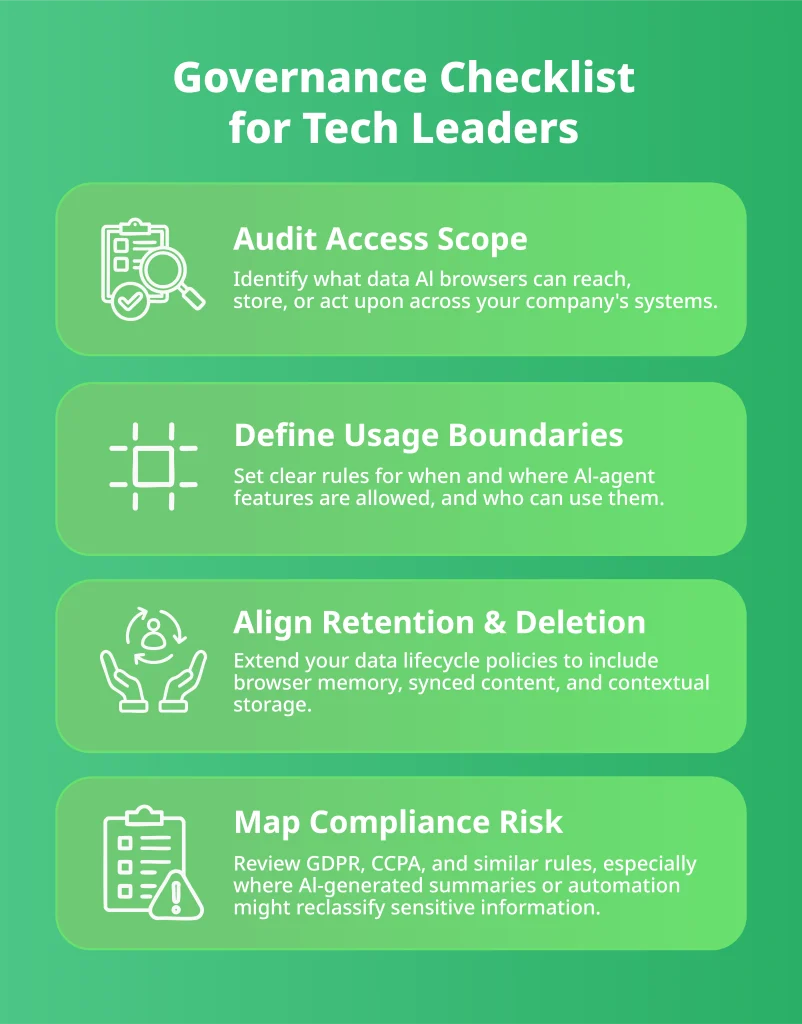
AI browsers now actively participate in the web. For leaders, that means treating data privacy as a moving target, one that shifts every time your browser learns, remembers, or acts on behalf of a user.
Identity and Endpoint Security: Closing the Gaps AI Browsers Create
When a browser can act on your behalf, every login, permission, and endpoint suddenly matters more.
ChatGPT Atlas and Microsoft Edge Copilot operate inside signed-in sessions and business systems, making them as powerful (and as risky) as your most trusted employee.
Research shows that 95 % of permissions granted to users go unused, while 90 % of identities only use 5 % of their access rights, leaving a massive attack surface of forgotten privileges (source: Oleria Report). For small and mid-sized businesses, that’s an open invitation to misuse.
When an AI browser can fill forms, open tabs, or fetch internal data, a single compromised session could become a launchpad for credential theft or shadow automation. Traditional endpoint controls rarely see or stop these agent actions.
Closing those visibility gaps requires a DevSecOps mindset, where security is automated across your CI/CD pipelines and embedded into every system your teams deploy, not bolted on after the fact.
If you’re questioning whether your security stack can keep up with agent-based actions, explore how agencies integrate DevSecOps directly into delivery pipelines.
Zero-trust thinking isn’t optional anymore. Assume your browser might act autonomously, and train your policies (and your people) to match that reality. Because if the AI can log in, click, and submit, it’s already part of your identity fabric.
Strategic Risks of AI Browsers: Avoiding Vendor Lock-In and Data Loss
You know things are getting serious when your browser starts having opinions.
AI-powered browsers are shaping how businesses operate. And if you’re not paying attention, you might wake up one morning to find your entire workflow living inside someone else’s ecosystem.
- Vendor ecosystem control: If Atlas becomes the go-to AI browser, your business could end up relying on OpenAI’s infrastructure and logic for daily operations. Microsoft is doing the same through tighter integration between 365 and Edge. It’s convenient until you try to leave.
Action: Keep options open. Standardise around open protocols, exportable data, and tools that don’t lock you to a single cloud provider.
- Data residency and sovereignty: Where does your browser’s “memory” actually live? Somewhere between the cloud and a legal grey zone. Understanding where agent data is processed and stored is no longer a compliance checkbox; it’s a business continuity issue.
Action: Ask directly about data residency and deletion guarantees before adopting AI browsers. Treat “we comply with GDPR” as the beginning of the conversation, not the end.
- Future-proofing your stack: AI-browser models evolve fast, and today’s integrations might not survive the next update cycle. Building rigid policies around them is like writing rules on a whiteboard in the rain.
Action: Design lightweight, adaptable governance. Review integrations quarterly, and plan for browser-independent workflows wherever possible.
- Shadow adoption and competitive risk: If you delay governance, your teams won’t wait. They’ll download AI browsers on their own, creating invisible data flows that bypass IT.
Action: Lead with enablement instead of restriction. Offer secure, approved tools before employees go rogue, because once shadow IT moves in, it rarely leaves.
AI browsers promise efficiency, but they also pull you deeper into vendor ecosystems. Treat them as strategic assets and not just productivity hacks. Otherwise, your browser (not your roadmap) might end up deciding your company’s direction.
AI Browser Security Mitigation Framework: What CTOs Should Do Now
Do This Week
- Add AI-browser to your risk register. Track prompts, memory, and automation as distinct risks with owners and review dates.
- Segment usage. Allow AI-browser features only on non-sensitive devices/profiles; disable agent mode for high-risk roles (finance, legal, admin).
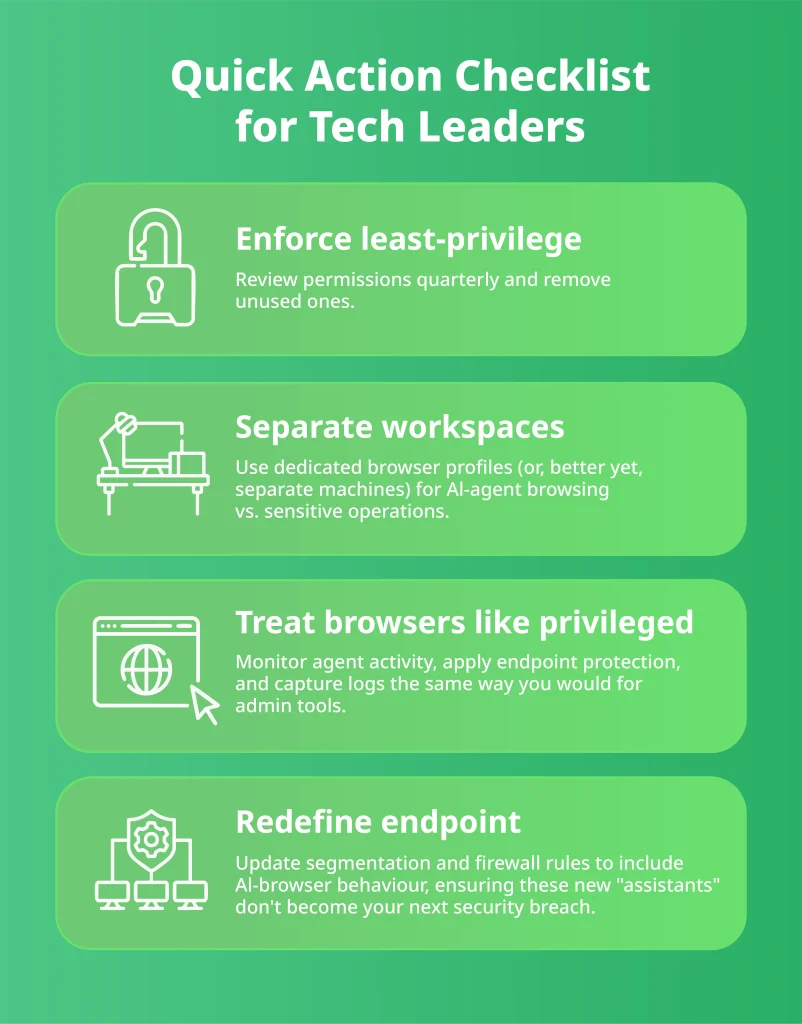
- Harden policies. Update your browser, IAM, and endpoint policies to cover agent abilities (reading, writing, form-filling, memory).
- Turn on visibility. Log prompts, agent actions, context switches, and memory events; stream to your SIEM/EDR with alert thresholds.
- Tighten permissions. Run a least-privilege clean-up; remove unused rights and watch for permission creep.
- Ask the hard vendor questions. Send a short RFI to OpenAI/Microsoft on data residency, retention/deletion, model-training use, sandboxing of agent permissions, and incident response.
- Train the team. Short enablement: prompt risks, when not to use the agent, human-in-the-loop for outbound actions, and how to report odd agent behaviour.
- Gate procurement. Require a quick security/governance review for any AI-browser rollout or feature enablement.
Do This Quarter
- Separate workspaces. Standardise dedicated browser profiles (or separate machines) for agent tasks vs. sensitive operations.
- Policy as code. Encode allow/deny rules for agent features in MDM/endpoint configs; pin versions where possible.
- Data controls. Extend DLP/CASB to watch AI outputs; add server-side protections (masking, RLS) for crown-jewel data.
- Tabletop the failure modes. Run drills for prompt injection, memory poisoning, and automated exfiltration; verify logs are sufficient to investigate.
For ongoing visibility and control, SMBs rely on Deployflow’s DevOps Managed Services to continuously monitor, patch, and secure evolving environments, ensuring that AI browsers and cloud workflows stay compliant without adding operational overhead.
The Future of Browsing: How SMBs Can Secure AI-Driven Tools with Deployflow
Let’s be honest. Nobody expected the browser to turn into a co-worker with opinions. Yet here we are. ChatGPT Atlas and Microsoft Edge Copilot are now remembering, summarising, connecting dots, and sometimes taking initiative you didn’t ask for.
That’s fun and futuristic until it starts doing things you didn’t approve of.
For growing companies, these tools can save hours of busywork, but they can also expose customer data, shuffle permissions, and quietly rewrite your risk map while you’re still figuring out what button was just clicked.
While others chase the next shiny tool, Deployflow builds the quiet systems that keep everything running safely behind the scenes.
Deployflow’s squads embed directly into your IT teams, aligning with your tools, workflows, and internal culture from day one.
This hands-on approach turns collaboration into acceleration, with sprint-based delivery that brings measurable progress every two weeks instead of endless planning cycles.
You get visibility, speed, and continuous improvement, the kind of rhythm AI-era security demands.
To see how this delivery model accelerates compliance instead of slowing it down, explore how Deployflow’s sprint-based squads help regulated businesses launch secure products without bottlenecks.
As AI browsers push more workflows into the cloud, visibility and control become the new perimeter.
Deployflow’s Cloud Security and Cloud Management services help SMBs lock down access, monitor AI interactions, and keep data sovereignty intact, without slowing innovation.
So before your AI browser starts scheduling meetings or optimising your firewall, get ahead of it.
Schedule your AI-browser readiness call with Deployflow, the smartest move you can make before your browser starts believing it’s the smartest one in the room.
After all, if your browser insists on having a mind of its own, make sure it’s thinking toward your next big win.
Frequently Asked Questions About AI Browsers, Security, and Compliance
Are AI browsers like ChatGPT Atlas and Edge Copilot secure enough for business use?
They can be, but only if deployed within a controlled, well-monitored environment.
AI browsers fundamentally change the trust model of enterprise software: they don’t just display information, they process it, interpret it, and sometimes retain it. This means security depends on how they’re configured and not just on vendor defaults.
Segment usage by department, disable memory features for high-risk roles, and apply the same monitoring standards you use for privileged admin tools. The biggest danger isn’t malicious intent but unmonitored convenience.
Should companies block AI browsers until security standards improve?
Blocking them entirely is a short-term fix that usually backfires.
Employees adopt useful tools whether IT approves them or not, creating a shadow IT layer that’s even harder to govern. Instead of blanket bans, focus on structured enablement: identify safe workflows, enforce browser policies through MDM tools, and educate staff on prompt hygiene.
The goal isn’t to stop AI browsers but to make their use transparent, auditable, and policy-driven before adoption becomes chaotic.
How do AI browsers affect compliance frameworks like GDPR, ISO 27001, or SOC 2?
They extend your compliance perimeter in ways traditional audits rarely anticipate.
AI browsers can store or reuse contextual data (like session tokens or user notes), which qualifies as personal data under GDPR and similar laws. Even a short-lived “memory” could represent a compliance risk if it retains identifiable information.
To stay aligned, update your data inventory and retention policies to include browser memories and summaries, define deletion rights clearly, and ensure audit logs capture every agent decision that might affect regulated data.
What are the most effective first steps to secure AI browser usage in a company?
Start with practical, infrastructure-level controls:
- Network segmentation: Separate AI browser traffic from production systems and sensitive environments.
- Identity hardening: Apply MFA, conditional access, and least-privilege rules.
- Logging and observability: Route browser telemetry to your SIEM or EDR to spot agent actions early.
Then, codify these controls in your browser governance policy. Treat AI-agent actions (form-filling, summarisation, automation) as auditable events with human oversight.
What role do DevOps and DevSecOps teams play in securing AI browsers?
DevOps and DevSecOps are central to building sustainable defences.
DevSecOps pipelines already automate compliance, policy checks, and vulnerability patching across infrastructure. Extending that discipline to AI browsers enables teams to enforce controls programmatically, block unsafe actions, scan prompt data, and maintain continuous compliance without manual review.
In practice, this means AI browsers can evolve safely alongside your CI/CD ecosystem, where every action is logged, validated, and reversible. It turns AI security from a reactive task into a predictable part of delivery.
Explore our BLOG
Recent articles

AI Roadmap: How to Get Board Approval for Your AI Strategy in Six Weeks
A board-ready AI roadmap takes six weeks if you rank, cost and sequence use cases...
read full article

Is Claude Down? Anthropic Outage: Protect Your Cloud Infrastructure
Every current Claude model failed at once on 25 October 2026, the worst of five...
read full article

Agentic Process Automation Explained: A Complete Guide for 2027
Agentic process automation hands off entire business processes to AI agents that read, decide and...
read full article