


Remember the old joke about the castle with a drawbridge? The king spent a fortune on guards, but left the drawbridge wide open every night. That’s how many software teams still treat security: plenty of effort, but at the wrong stage.
In the rush to deliver features faster, security often shows up late. By then, fixing vulnerabilities is expensive, messy, and slows everything down. That’s why DevSecOps has become a survival strategy.
In this article, you’ll learn:
- Why securing your CI/CD pipeline is no longer optional
- How delivery squads integrate DevSecOps from sprint one
- The practices, tools, and real-world results that set agencies apart
- Why businesses in 2025 are switching from traditional models to secure delivery squads
By the end, you’ll see how partnering with a DevOps agency that works through delivery squads turns security from a last-minute patch into a built-in advantage.
Why Security Can’t Be an Afterthought in CI/CD
The Rising Cost of Software Breaches and Downtime
The global average cost of a data breach reached $4.44 million between March 2024 and February 2025, underscoring why security can’t be treated as an afterthought. (source: IBM)
The average cost of downtime across industries has historically been about $5,600 per minute, but recent studies show it has climbed to nearly $9,000 per minute, making every unpatched vulnerability a direct financial threat. (source: Forbes)
Security that arrives late is expensive in ways teams don’t always calculate. It delays releases, forces rework, and drains confidence across the organisation. Bugs fixed at the end of the cycle take far longer to patch than those caught early.
Every missed check adds friction, and friction kills speed. In modern delivery, ignoring security is the fastest way to stall progress.
From DevOps to DevSecOps: What’s Changing in 2025
DevOps has doubled release speed for many teams, but that pace comes at a cost. Almost half of organisations knowingly push vulnerable code under deadline pressure, proving why security must evolve alongside delivery. (source: StrongDM)
The culture of “move fast and fix later” no longer works. Customers expect safety as much as features, and regulators demand proof that businesses treat security seriously.
DevSecOps is the natural response: it builds protection into the same rhythm as development and operations. Instead of waiting for an audit panic, teams deliver software that is reliable and compliant by design.
For CTOs rethinking delivery models, this guide on sprint-based DevOps and why it’s replacing traditional IT projects explains how embedding security from the start accelerates releases while reducing long-term risks.
Why Delivery Squads Outperform Traditional Teams for Secure Delivery
Organisations with well-designed teams are already 4.5 times more likely to be top performers, delivering features 60% faster. (source: FullScale)
Engineering squads take that advantage further by removing silos, embedding security from day one, and proving that speed and safety aren’t a tradeoff but a shared outcome.
Traditional models hand work from developers to operations to security, like passing a baton in a relay race. Each exchange introduces delays and miscommunication. DevOps teams remove the handoffs. Security specialists sit inside the team, working alongside developers and ops from sprint one.
Vulnerabilities are resolved where they start, compliance is tracked alongside new features, and the entire team shares ownership for safe delivery.
That’s why delivery teams feel faster and safer at the same time. Security isn’t a wall at the end of the pipeline, but the ground the modern team runs on from the very beginning.
What Is DevSecOps and How It Transforms Delivery
Shifting Security Left With Embedded Squads
DevSecOps isn’t just DevOps with an extra step. It is a mindset shift. Instead of treating security as a separate gate, it moves checks and controls into the earliest stages of development.
With security engineers embedded directly in the team, vulnerabilities get flagged and fixed during the same sprint. It’s not “security later,” it’s “security always.” That’s how squads avoid the last-minute scrambles that cripple traditional teams.
CI/CD Security Best Practices Every DevSecOps Pipeline Needs
A secure pipeline is more than automated builds and deployments. The essentials include:

Shipping software without these practices is like driving without brakes: you might go fast, but you won’t like how it ends.
Missed code analysis, and small flaws snowball into production incidents. Skip dependency scanning, and you’re one outdated library away from a headline you don’t want. Treat compliance as paperwork instead of code, and you’ll burn weeks preparing for audits instead of delivering features.
The point is simple: every check you automate is one less late-night fire drill. Continuous testing and instant feedback loops make delivery sustainable. Teams that wire security into the pipeline release without fear of what’s waiting around the corner
The Business Value: Faster Releases, Stronger Compliance, Greater Trust
When DevSecOps runs through delivery squads, companies don’t have to choose between speed and safety. Releases move faster because security checks no longer pile up at the end.
Compliance feels lighter because policies are coded into the pipeline instead of handled in spreadsheets. And customers, partners, and regulators see proof that software is built with protection at its core.
The impact goes far beyond code quality. Companies report releases landing weeks faster, audit prep times cut in half, and measurable gains in customer confidence scores.
With Little Journey (explored later in this article), audit preparation time was reduced by about 50% once compliance checks were automated in the pipeline. Teams also reported faster releases and stronger customer confidence.
These advantages are what separate the teams that scale from those that stall. DevOps squads turn DevSecOps from an overhead cost into a competitive edge.
How Engineering Squads Integrate Security Into Pipelines
Security Embedded in Every Sprint, Not Bolted on Later
In a delivery unit, every sprint includes security tasks alongside feature development. That means:
- Static code analysis (SAST) runs automatically on every commit.
- Dependency and secrets scanning happen before code is merged.
- Threat modelling is part of backlog grooming, so features launch with risks already mapped.
By the time a sprint closes, the code is not only functional but has already passed key security checks. This prevents the backlog of vulnerabilities that usually pile up when testing is delayed until the release stage.
Cross-Functional Squads vs. Siloed Security Teams
Traditional security teams operate outside the delivery flow. They review code after handoff, creating bottlenecks and rework.
Execution teams break this pattern by embedding security engineers directly in the team.
Here’s the difference in practice:

This integration also shifts accountability. Instead of security being “someone else’s problem,” the entire squad owns both features and their protection.
Why Cross-Functional Teams Accelerate Compliance and Cut Vulnerabilities
Compliance is often seen as a drag on delivery, but squads turn it into a continuous process.
They use:
- Policy-as-Code to automatically enforce GDPR, HIPAA, or PCI rules inside the pipeline.
- Automated audit trails are generated by CI/CD tools, so reporting doesn’t rely on manual documentation.
- Continuous monitoring that alerts the squad instantly when a misconfiguration or policy violation occurs.
This means compliance checks run every time code moves through the pipeline, not once a year before an audit.
As a result, vulnerabilities are identified before production, and compliance gaps are closed without slowing down releases.
For the business, the outcome is tangible: releases that are both faster and safer, with compliance built in rather than bolted on.
Teams in regulated industries often struggle with audits and reporting. Our blog on aligning DevOps with compliance through a practical framework gives concrete steps for keeping pipelines compliant without slowing delivery.
Key DevSecOps Practices Agencies Implement
- Automated Scanning From the Start: Every sprint begins with security checks running in the background. Pipelines automatically scan source code for vulnerabilities and hidden secrets the moment a commit is pushed.
Instead of relying on manual reviews at the end, issues surface while developers are still working on the feature. This saves time, reduces rework, and ensures insecure code never slips further down the line.
- Continuous Testing Built Into Daily Workflows: Security testing isn’t a quarterly exercise but part of every merge and deployment. Tools for static analysis (SAST), dynamic testing (DAST), and software composition analysis (SCA) are integrated directly into the workflow.
Problems don’t pile up in a backlog; they’re resolved inside the sprint. That tight feedback loop keeps quality and security aligned.
- Compliance as Code, Not Spreadsheets: Regulations like GDPR, HIPAA, and FCA demand constant attention. By treating compliance rules as code, organisations avoid bottlenecks and reduce human error.
Pipelines enforce policies automatically, reject non-compliant builds, and generate audit-ready logs in real time. Compliance becomes continuous, not an afterthought.
- Securing Containers and Infrastructure from Day One: With modern applications running on containers and cloud infrastructure, checks need to happen before anything goes live. Infrastructure-as-Code templates are scanned for misconfigurations, container images are verified for vulnerabilities, and deployment environments are hardened during setup.
By securing infrastructure at the backlog level, teams prevent incidents in production instead of cleaning them up later.
Tools and Technologies That Power Secure Delivery
Open-Source Foundations (Trivy, SonarQube, OWASP ZAP)
Engineering squads often start with open-source tools because they’re flexible, widely supported, and easy to integrate.
- Trivy scans containers, infrastructure-as-code, and dependencies. Teams use it early in the pipeline so vulnerable libraries or misconfigured templates never reach production.
- SonarQube provides continuous code quality checks. Its “quality gates” are built into the workflow, blocking insecure or low-quality code from being merged until issues are resolved.
- OWASP ZAP runs automated penetration tests against staging environments. Teams rely on their baseline scans for every build and schedule deeper scans at regular intervals, making security testing routine rather than reactive.
For teams that need broader coverage, enterprise integrations extend protection. Platforms like Snyk, Prisma Cloud, and Checkmarx provide deeper scanning, policy enforcement, and reporting suited to larger organisations or heavily regulated sectors.
To show how easily these tools slot into delivery pipelines, here’s a minimal GitLab CI example for Trivy:
Example: Adding Trivy to a GitLab CI Pipeline
trivy_scan:
image: aquasec/trivy:latest
stage: test
script:
– trivy fs –exit-code 1 –severity HIGH,CRITICAL .
allow_failure: false
This single job ensures every commit is scanned for critical vulnerabilities before merging, giving squads immediate feedback without slowing down the pipeline.
Enterprise Integrations (Snyk, Prisma Cloud, Checkmarx)
When organisations need broader coverage or enterprise-level reporting, DevSecOps squads extend their toolkit with commercial platforms.
- Snyk is used for dependency scanning, container checks, and infrastructure-as-code analysis. It integrates directly into pull requests, so issues are visible while code is being reviewed.
- Prisma Cloud strengthens cloud and container security, allowing for the enforcement of consistent policies across multiple environments and keeping infrastructure compliant.
- Checkmarx focuses on static application security testing (SAST) and integrates findings back into the workflow, helping engineers fix issues during the same sprint rather than weeks later.
These integrations scale well for larger teams or regulated industries where security and compliance reporting are critical.
Seamless Security in Jenkins, GitLab, and Azure DevOps
Teams work best when security is embedded into the tools teams already use:
- Jenkins pipelines can include scanning and quality checks as standard stages, so nothing ships without passing security gates.
- GitLab provides built-in templates for SAST, dependency scanning, and container checks. Experts customise these pipelines so every merge request automatically runs security tests.
- Azure DevOps offers marketplace extensions for tools like SonarQube and Snyk, allowing users to integrate compliance and vulnerability checks into their existing workflows.
By embedding security into familiar CI/CD platforms, users remove the need for separate security reviews and keep the delivery process smooth and continuous.
Real-Life Success Story: From Paper to Power BI With HHP
HHP, a leading fresh produce packhouse serving UK retailers like Tesco, Lidl, and Waitrose, needed to transform its quality control process to meet strict audit requirements. Until recently, every QC check was logged on paper, with thousands of forms stored in physical archives. Preparing for audits meant hours of searching through stacks of documents, slowing operations and adding risk.
Before partnering with Deployflow, HHP’s quality control system was slow, highly manual, and vulnerable to data loss. Audit preparation took days, workflows were bogged down by printing and filing, and critical QC information wasn’t easily accessible when inspectors asked for proof.
Deployflow’s team redesigned the foundation with a sprint-based P-Suite squad, delivering a custom digital QC app and integrated Power BI dashboards.
Records became instantly searchable by date, packing line, or label, giving the team real-time traceability during audits. Manual paperwork was eliminated, workflows streamlined, and data security reinforced from the ground up.
Impact
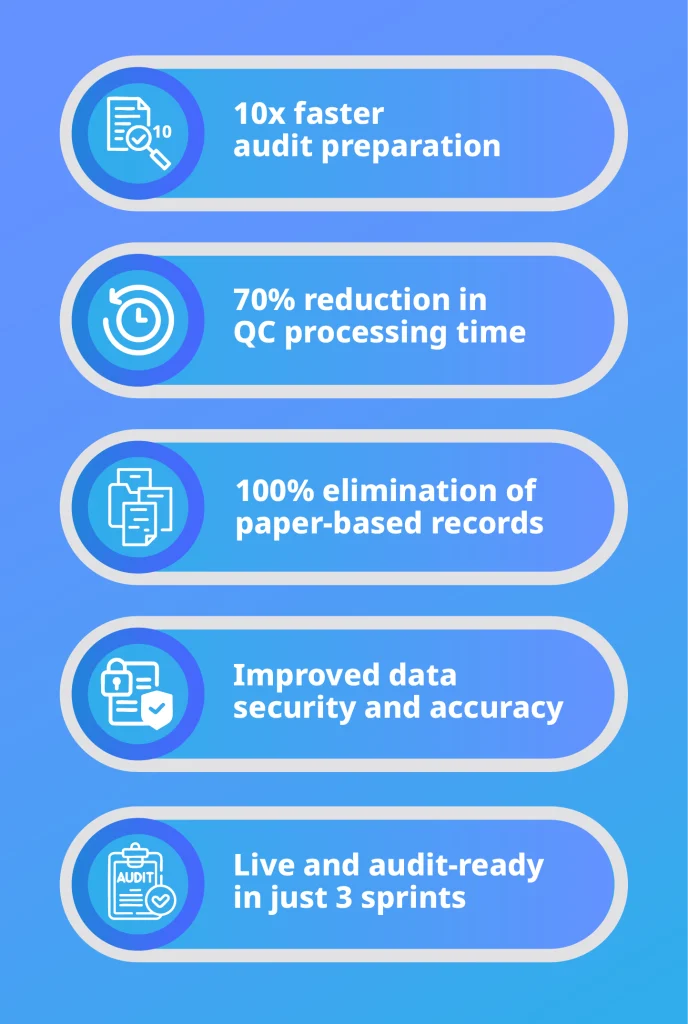
This collaboration proved how sprint-based delivery enables teams to digitise complex processes quickly and confidently. By moving from paper records to a fully digital, audit-ready system, HHP achieved operational efficiency, stronger compliance, and measurable gains in trust with retailers and regulators.
Many growing companies, especially in healthcare, learn the hard way that scaling DevOps without structure creates risks. Our blog on what a scalable DevOps setup looks like in a 50-person health tech team shows how teams can expand without losing security or speed.
Common Challenges and How Modern Teams Solve Them
Speed vs. Security: Delivering Both
One of the biggest tensions in software delivery is the belief that security slows everything down. Traditional models often force a tradeoff between releasing quickly and fixing vulnerabilities.
Cross-functional teams remove this dilemma by weaving security into the delivery rhythm. Automated scans run in the same pipeline as builds, policies are enforced without extra approvals, and issues are resolved while code is still fresh. The outcome is faster releases that are secure by default.
Overcoming Cultural Resistance With Embedded Security Champions
Even with strong tools, culture can be the hardest obstacle. Developers sometimes see security as a blocker, while security teams view developers as careless.
Integrated teams address this by embedding security champions directly into the workflow. These experts translate compliance requirements into developer-friendly practices, explain risks in practical terms, and highlight how small changes prevent major issues.
Instead of enforcing rules from above, they foster a culture where security is a shared responsibility, and resistance fades.
Avoiding Tool Overload With Streamlined Pipelines
Many organisations drown in overlapping tools: multiple scanners, dashboards, and policies that generate more noise than insight. This overload slows progress and creates blind spots.
Well-structured delivery teams counter this by curating pipelines around the tools that add the most value. They align on a core toolkit, set clear severity thresholds, and ensure findings flow into a single workflow.
The result is leaner pipelines, actionable results, and engineers focused on solving problems instead of managing integrations.
Building Secure Growth With DevSecOps
As businesses scale, the challenge is no longer just delivering software quickly — it’s doing so securely, consistently, and with confidence. DevSecOps answers this challenge by weaving protection into every stage of delivery, making compliance routine and security a natural part of the process.
Key Takeaways
- Security must be integrated into every stage of CI/CD, not added at the end.
- DevSecOps combines automation, collaboration, and continuous feedback to keep delivery fast and safe.
- Compliance becomes lighter when policies are coded into pipelines.
- Delivery squads show how cross-functional teams can balance speed, protection, and user trust.
Security done right gives teams the confidence to move faster. DevSecOps shows how delivery can be secure, compliant, and still agile enough to keep pace with changing markets.
For leaders, it’s a strategic choice: a way to scale responsibly and strengthen trust with every release.
Companies that want expert support instead of building everything in-house should explore DevOps managed services, which can provide the right mix of automation, security, and compliance from day one.
If you’d like a deeper look at how these principles play out in real projects, download our DevOps Whitepaper. Inside, you’ll find clear frameworks, case studies, and practical guidance to help you build delivery pipelines that are fast, secure, and sustainable.
The future belongs to teams that deliver with confidence, and DevSecOps is how they get there.
Frequently Asked Questions About DevSecOps
How Is DevSecOps Different From Traditional Security?
Traditional security often shows up as a gate at the very end of delivery. The code is written, features are merged, and then a separate team conducts reviews and audits. By that point, even small fixes reopen old work, cause delays, and frustrate developers.
DevSecOps changes this. Security checks run automatically at every stage, from commit to build, test, and deploy. Instead of being an obstacle at the finish line, protection becomes part of the pipeline itself. Vulnerabilities are flagged while the code is still fresh, compliance rules are enforced programmatically, and the team ships faster because rework never piles up.
What Are the Core Principles of DevSecOps?
DevSecOps is built on three principles:
- Automation: security testing and compliance checks run automatically inside CI/CD pipelines.
- Collaboration: developers, operations, and security specialists share responsibility for protecting systems.
- Continuous feedback: issues are flagged instantly, so fixes happen while the context is still fresh.
Together, these principles ensure security keeps pace with modern delivery.
Does DevSecOps Only Apply to Regulated Industries?
Not at all. While healthcare, finance, and retail often adopt DevSecOps first because of compliance pressures, any business that delivers software benefits from it. Cyber threats target every industry, and embedding protection into pipelines helps avoid costly downtime, reputational harm, and rushed fixes, regardless of regulation.
Even in non-regulated sectors, adopting DevSecOps managed services ensures teams gain expert support to keep delivery secure and compliant without slowing innovation.
How Do You Know if DevSecOps Is Working?
Success is measured by outcomes, not just activity. Signs of effective DevSecOps include:
- Fewer critical vulnerabilities are reaching production.
- Faster recovery when issues are found.
- Builds that consistently pass security gates without rework.
- Teams report higher confidence in deploying frequently.
When delivery speed and security improve together, DevSecOps is working as intended.
Explore our BLOG
Recent articles

AI Roadmap: How to Get Board Approval for Your AI Strategy in Six Weeks
A board-ready AI roadmap takes six weeks if you rank, cost and sequence use cases...
read full article

Is Claude Down? Anthropic Outage: Protect Your Cloud Infrastructure
Every current Claude model failed at once on 25 October 2026, the worst of five...
read full article
Agentic Process Automation Explained: A Complete Guide for 2027
Agentic process automation hands off entire business processes to AI agents that read, decide and...
read full article