


When the Terraform AWS provider crosses 4 billion downloads, you’re witnessing enterprise-scale adoption of Infrastructure as Code (source: HashiCorp)
Instead of manually wrestling cloud resources and hoping everything aligns, Terraform lets you declare your ideal infrastructure once and deploy, version, and manage it consistently across AWS, Azure, Google Cloud and beyond.
This kind of unified cloud management approach eliminates human error and brings full visibility to every environment.
Here’s what this article will walk you through:
- What Terraform really is, and why it dominates the IaC space
- How the “refresh → plan → apply” workflow brings safety and predictability to cloud deployment
- Why Terraform outpaces legacy tools like CloudFormation or Ansible
- How multi-cloud automation translates into tangible business value
- How the team at Deployflow uses Terraform to drive faster, more resilient cloud solutions
By the end, you’ll understand not just how Terraform works, but why thousands of organisations trust it to build their infrastructure with confidence.
What Is Terraform and Why It’s a Game-Changer for DevOps
Terraform is an open-source tool that automates how infrastructure is created and managed.
Instead of setting up servers, databases, or networks manually, you describe what you want in a simple configuration file, and Terraform builds it for you, exactly the same way every time.
Developed by HashiCorp, it’s built on the idea of Infrastructure as Code (IaC), a method that lets you manage infrastructure the same way developers manage software: through version control, reusable code, and automated testing.
This means no more mystery settings or inconsistent environments; everything is transparent, trackable, and reproducible.
Because Terraform works across providers like AWS, Azure, Google Cloud, and VMware, it gives DevOps teams true freedom to deploy anywhere without vendor lock-in.
It’s a foundation for effective multi-cloud management, allowing teams to handle complex setups through a single, predictable workflow.
That neutrality, combined with automation and auditability, is what makes Terraform a real game-changer for how modern teams build and scale systems.
How Terraform Works: The IaC Workflow in Three Steps
Terraform works a bit like a GPS for your cloud: you tell it where you want to go, and it figures out the safest route there.
It doesn’t just deploy blindly; it checks, plans, and executes in a way that keeps your infrastructure consistent, even when everything else changes around it.
This automated process turns cloud management into a repeatable science rather than a manual chore.
Here’s the flow that makes it all work:
Refresh: Reality Check
Terraform first takes a look around. It connects to your cloud providers to understand what’s currently running. This step ensures Terraform knows the exact “map” of your infrastructure before making any moves.
Plan: The Strategy Session
Next, Terraform compares your desired setup (the code) with the real-world setup (the cloud). It shows you a detailed “what will happen” preview without surprises or broken environments, just clarity before action.
Apply: The Grand Execution
Once you approve the plan, Terraform executes it safely, creating, updating, or deleting resources in the right order. It knows dependencies, so your database never launches before your network exists.
Behind this simple three-step dance lies something powerful: predictable, automated delivery that replaces chaos with confidence. It’s how modern DevOps teams turn infrastructure from a guessing game into a repeatable science.
Why Terraform Beats CloudFormation, Ansible, and Puppet
Terraform changes the rules of the game. Where CloudFormation, Ansible, and Puppet focus on specific parts of the infrastructure puzzle, Terraform connects the whole picture. It defines, provisions, and manages resources across every major cloud provider through one consistent language.
Terraform takes a declarative approach: you describe what your infrastructure should look like, and Terraform figures out how to make it happen.
Its provider ecosystem spans AWS, Azure, Google Cloud, VMware, and hundreds of SaaS tools, meaning you can use a single workflow for everything from virtual machines to DNS zones. For teams managing multi-cloud environments, this is a huge advantage because there’s no more juggling separate scripts and syntaxes.
CloudFormation, on the other hand, is AWS-exclusive. It’s deeply integrated into Amazon’s ecosystem but doesn’t easily translate beyond it. Migrating to or integrating with another provider means starting from scratch.
Ansible and Puppet operate in slightly different spaces: configuration management.
They’re excellent for managing software and ensuring systems stay consistent after deployment, but they don’t inherently provision or orchestrate entire environments the way Terraform does. In other words, Terraform builds the house; Ansible and Puppet make sure the lights and plumbing work afterwards.
The real strength of Terraform lies in its neutrality and predictability. It bridges tools, platforms, and providers under one declarative model, giving DevOps teams full visibility, consistent automation, and the freedom to build anywhere without compromise.
Multi-Cloud Flexibility: One Codebase for Every Provider
Terraform connects directly to almost any cloud or service through its provider system, an ecosystem of plugins that speak each platform’s native API.
Whether you’re deploying infrastructure, networking, or SaaS integrations, the syntax stays the same. You write it once, and Terraform knows how to make it work everywhere.
This consistency removes the friction of managing separate tools for each platform.
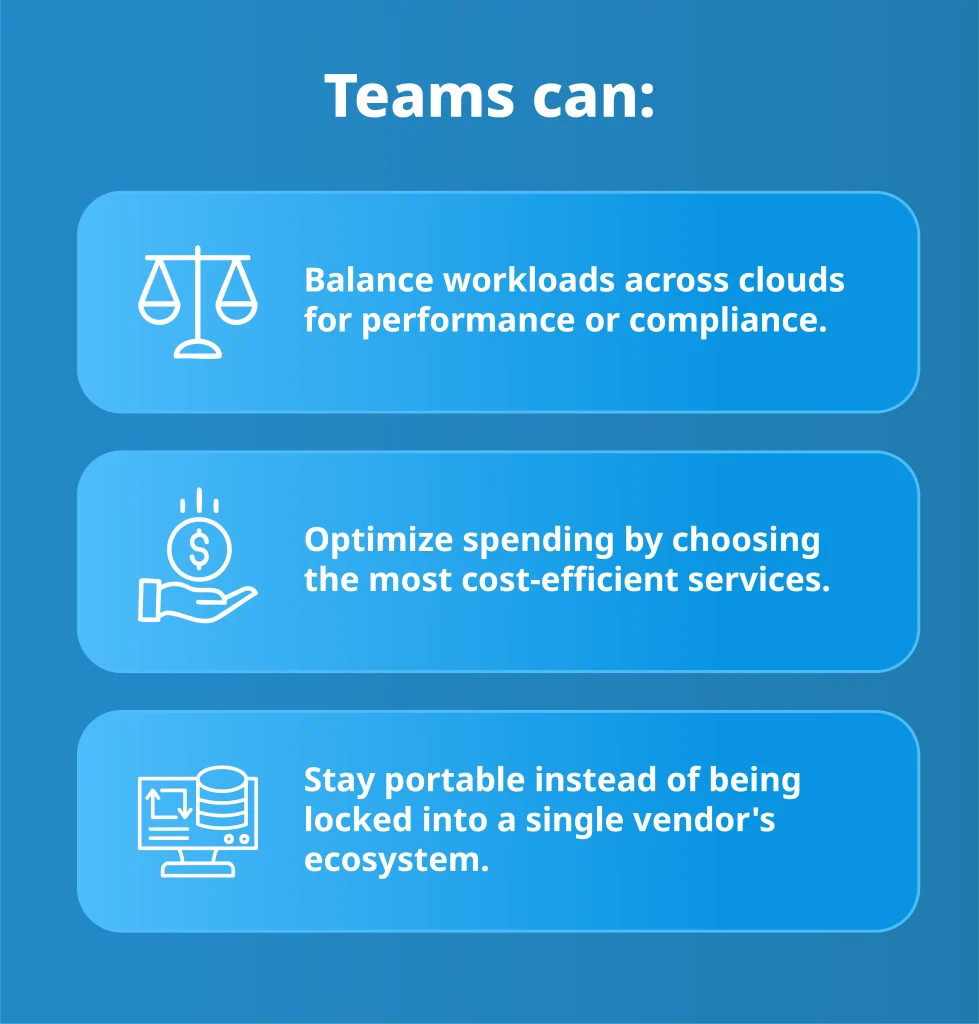
One language, one workflow, complete freedom. That’s what multi-cloud automation looks like with Terraform.
Top Business Benefits of Using Terraform
Terraform makes infrastructure management faster, cleaner, and far less painful. It replaces repetitive tasks with automation and turns messy cloud setups into something reliable, visible, and easy to scale.
- Faster delivery: New environments can be deployed in minutes. Teams move from idea to testing to production without bottlenecks or manual setup delays.
- Fewer errors: Every resource is defined in code, which means changes are consistent and traceable. If something breaks, you already know where to look.
- Predictable, auditable systems: Terraform records every action it takes, creating a clear history of your infrastructure. Audits become simple reviews instead of investigations.
- Better teamwork: Developers and operations teams work in the same language, reviewing infrastructure changes like code commits. It’s collaboration without friction.
- Built-in efficiency: Automation keeps infrastructure lean, scaling up when needed and shutting down when it’s not. The result: better performance and lower costs.
Terraform gives teams something rare in the cloud world: stability without slowing down.
Getting Started with Terraform: Step-by-Step Setup
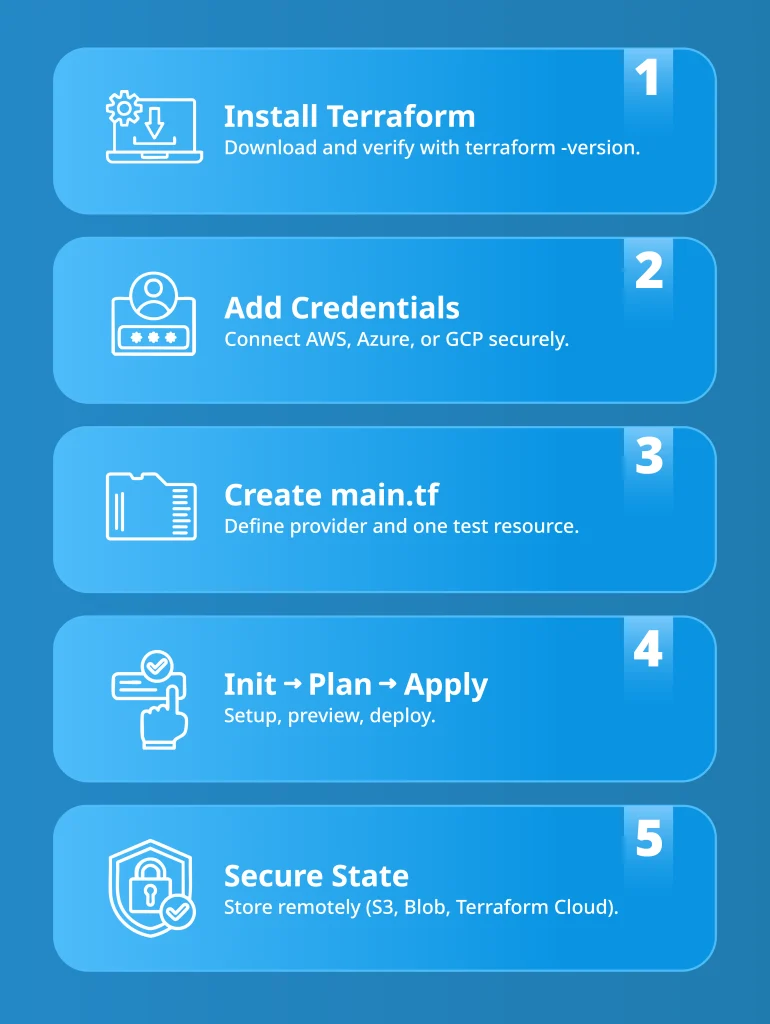
Getting Terraform up and running doesn’t take long, but doing it right from the start makes all the difference.
The setup process defines how clean, repeatable, and secure your infrastructure will be later on. Here’s a clear, no-nonsense roadmap to start strong:
- Install Terraform: Download Terraform directly from terraform.io. Installation takes just a few minutes. It’s a single binary that runs on macOS, Linux, and Windows. Once it’s installed, verify it with “terraform -version” to ensure everything’s working.
- Configure your cloud provider credentials: Terraform needs permission to talk to your cloud. Create or use existing credentials from your provider (AWS, Azure, or Google Cloud) and export them as environment variables or use a secure credentials file. This step ensures Terraform can authenticate safely when deploying resources.
- Write your first “.tf” file: Open your favourite text editor and create a new file, for example, main.tf. In it, define a provider and a simple resource, like a virtual machine or storage bucket. This is where you describe what you want your infrastructure to look like, in plain, readable syntax.
- Run “terraform init, plan”, and “apply”:
- “terraform init“: sets up your working directory and downloads provider plugins.
- “terraform plan“: shows a preview of what Terraform will create or change.
- “terraform apply“: executes the plan and brings your infrastructure to life.
- Store your state securely: Terraform tracks everything it builds in a state file. Storing that file locally is fine for testing, but for production, use a remote backend like AWS S3, Azure Blob Storage, or Terraform Cloud. This keeps the state consistent, secure, and accessible for your team.
Once you’ve completed these steps, you’ll have a functional, version-controlled environment ready for automation. That’s the setup. From here, Terraform keeps your cloud predictable and under control.
4 Terraform Best Practices: How to Avoid Costly Mistakes and Keep Infrastructure Stable
Every Terraform setup looks simple at first, until state files go missing, credentials leak, or an innocent “apply” wipes half your environment.
Four small habits can prevent those disasters and keep your Infrastructure as Code (IaC) clean, predictable, and safe.
- Use remote state storage: The state file is Terraform’s brain. If it’s stored locally, that brain can easily get lost or overwritten. Use a remote backend (like S3, Azure Blob, or Terraform Cloud) with locking enabled so only one person can make changes at a time.
- Version-control everything: Your “.tf” files should live in Git, just like application code. Versioning makes it easy to track changes, roll back mistakes, and maintain a single source of truth for your infrastructure.
- Run “terraform plan” before “apply”: The plan command is your preview of what Terraform will do; treat it like a safety net. Skipping this step is how unexpected deletions and resource changes slip through.
- Secure your credentials: Never hardcode access keys or secrets in Terraform files. Store them in environment variables, secret managers, or vaults. Credentials in code are the fastest way to turn a clean setup into a security risk.
These practices don’t take extra time. A few lines of prevention in Terraform can protect hours of troubleshooting later.
The Future of Infrastructure as Code: Terraform’s Next Chapter
Terraform’s story is moving from automation to intelligence.
The next wave of Infrastructure as Code isn’t about writing more scripts but teaching systems to manage themselves.
Git will stay at the heart of this shift. Every infrastructure change will live in a pull request, reviewed, versioned, and rolled out automatically.
Analysts expect that by 2026, most enterprise infrastructure will be tied directly to Git repositories and CI/CD pipelines (source: DataCenters). In that world, Terraform is the engine driving modern delivery.
Security and compliance are becoming part of the codebase, too.
Policy-as-Code frameworks are turning Terraform plans into living contracts that check for cost limits, access rules, and configuration drift before anything reaches production. Instead of slowing teams down, they let infrastructure evolve safely, with rules that adapt as fast as the code does.
Then comes the real curve: AI.
Research already shows that models can generate Terraform configurations, predict capacity issues, and even rewrite infrastructure code for better performance (source: Arxiv).
The goal isn’t to remove the engineer but to remove repetition. The result is infrastructure that self-adjusts, self-verifies, and eventually, self-heals.
Terraform is becoming the operating system for cloud automation, still written by humans, but guided by data, policy, and intelligence.
The next frontier of IaC is about clarity: knowing exactly what runs, where it runs, and why it’s running.
How Deployflow Implements Terraform for Faster Delivery
Terraform sits at the centre of Deployflow’s engineering process. It underpins the company’s cloud management strategy, ensuring environments remain stable and auditable across projects in FinTech, HealthTech, PropTech, and other regulated industries.
In FinTech, Zilch (the now double-unicorn BNPL provider) used Terraform to automate its entire AWS infrastructure, enabling rapid environment setup through versioned, reusable templates.
With Terraform at the core of their CI/CD pipelines, Deployflow helped them deliver complex API integrations within a month, double environment setup speed, and ensure full alignment across remote teams
In HealthTech, the team behind Little Journey used Terraform to securely manage medical environments. Each deployment became a repeatable process with defined access controls and automated policies, cutting setup time from days to just two hours and achieving full data segregation and compliance.
In PropTech, Strike (now Purplebricks) integrated Terraform to stabilise its AWS-based cloud environment. Automated provisioning and controlled updates eliminated outages, improving stability by 70% and reducing downtime by 60%
These results prove why Terraform isn’t just another DevOps tool but a delivery accelerator. It gives Deployflow’s engineers a single, auditable workflow to deliver scalable, compliant infrastructure faster than traditional methods.
Discover more about DevOps Managed Services and CI/CD Automation Services. Learn how Terraform continues to power automation and reliability behind the world’s fastest-growing digital platforms.
Teams miss delivery goals because of how work is structured. This idea is explored in Deployflow’s blog on improving delivery models, which shows how shifting from linear projects to sprint-based execution boosts both speed and predictability.
Partner with Deployflow to Automate Your Infrastructure
Terraform can do a lot, but getting it right takes experience, structure, and a clear strategy.
For teams operating at full capacity, Deployflow’s insights on filling delivery gaps with sprint-based engineer squads show how focused engineering pods can maintain Terraform momentum without downtime or disruption.
Sprint-based delivery makes Terraform practical, measurable, and fast.
Instead of long implementation cycles, each sprint builds a functional piece of automation that’s tested, documented, and ready for production. It’s a delivery rhythm that keeps infrastructure evolving smoothly, without downtime or disruption.
Terraform frameworks built through Deployflow’s model scale cleanly, stay compliant, and adapt as business needs change. Every sprint delivers visible value: cleaner pipelines, consistent deployments, and less manual maintenance.
To simplify infrastructure management, boost reliability, or unify multi-cloud environments, connect with the Deployflow Terraform experts.
As a Terraform DevOps partner, Deployflow helps companies turn complex infrastructure into a sprint-based system of continuous improvement: predictable, secure, and built for growth.
Frequently Asked Questions About Terraform and Infrastructure as Code
What’s the difference between Terraform and other Infrastructure as Code tools like Pulumi or CloudFormation?
Terraform uses a declarative language (HCL) that focuses on what the infrastructure should look like rather than how to create it. It’s also cloud-agnostic, meaning the same configuration can deploy to AWS, Azure, Google Cloud, or on-prem environments.
Pulumi is more developer-centric and uses traditional languages like Python or TypeScript, while CloudFormation is limited to AWS. Terraform remains the top choice for teams managing multi-cloud environments or aiming for consistent, vendor-neutral automation.
How can I use Terraform with GitOps workflows?
Terraform fits naturally into a GitOps pipeline because every infrastructure change is stored as code. Teams commit Terraform files to a Git repository, run automated checks, and trigger deployments through CI/CD tools like Jenkins or GitHub Actions.
This approach adds version control, peer review, and traceability, essential ingredients for stability and compliance in fast-moving DevOps environments.
What are Terraform modules, and why should I use them?
Modules are reusable building blocks that bundle related Terraform resources together, for example, a complete virtual network or Kubernetes cluster setup.
They reduce repetition, improve consistency across projects, and make it easier to manage large infrastructures. For a detailed breakdown, check out Deployflow’s guide on working with Terraform modules.
How can Terraform help my organisation reduce costs?
Terraform automates scaling, resource lifecycle management, and teardown processes, which means unused instances or misconfigured environments don’t quietly drain budgets.
By embedding policies that monitor resource limits, teams can enforce spending rules directly in code and integrate cost alerts into CI/CD pipelines. It’s one of the most effective ways to align infrastructure automation with financial efficiency.
Is Terraform still relevant with the rise of AI-driven DevOps tools?
Absolutely. AI can generate code and automate certain optimisations, but Terraform remains the execution layer that makes those configurations real.
It’s the foundation for any intelligent automation strategy, a bridge between human logic, machine learning, and infrastructure execution. As AI matures, Terraform’s role as the orchestrator of predictable, policy-driven infrastructure will only grow stronger.
Explore our BLOG
Recent articles

ISO 42001 Explained: Requirements, Certification and What Your Engineering Team Must Build
ISO 42001 is the international standard that demonstrates your organisation governs AI properly, and enterprise...
read full article

Is Claude Down? Anthropic Outage: Protect Your Cloud Infrastructure
Claude went down across every surface on 29 September 2026. From 14:00 to 14:59 UTC,...
read full article

Top 10 Healthtech Companies in 2026: What Their Growth Means for AI and DevOps
Every software change that reaches a hospital has to clear regulatory, legacy system, and clinical...
read full article