


Let’s be real, moving to the cloud isn’t just another IT project. It’s a business transformation that can set you up for long-term growth, agility, and cost savings—but only if you do it right.
Whether you’re aiming for scalability, better security, or cost efficiency, making smart, well-planned moves is the difference between a seamless transition and a chaotic mess.
The good news? You don’t have to navigate this journey alone. We’ve got your back with this step-by-step cloud migration roadmap designed to keep your business running smoothly while future-proofing your IT infrastructure.
Let’s dive in.
Why Move to the Cloud? The Case Against On-Premise Systems
Still clinging to legacy, on-premise infrastructure? We get it—change is hard. But here’s the reality:
- Scaling up is a nightmare—you’re stuck buying expensive hardware just to keep up.
- IT maintenance costs are bleeding your budget dry—fixing outdated systems isn’t cheap.
- Security risks are real—legacy systems leave you vulnerable to cyber threats.
Meanwhile, cloud solutions are flexible, cost-efficient, and secure, letting you:
- Scale up or down instantly—no hardware upgrades needed.
- Pay only for what you use—no more overpaying for unused resources.
- Stay ahead of security risks—with built-in compliance and advanced encryption.
What are the benefits of cloud migration?
Cloud migration offers several benefits, including cost savings through a pay-as-you-go model, scalability to accommodate fluctuating workloads, enhanced security with advanced encryption and compliance features, and improved disaster recovery with automated backups and multi-region support.
Cloud vs. On-Premise: How Do They Compare?

So, if you’re still debating whether to migrate, consider this: The cloud isn’t the future—it’s now.
What tools can help streamline cloud migration?
Tools like AWS Migration Hub, Azure Migrate, CloudEndure, and Google Migrate for Compute Engine can simplify the migration process by assessing, planning, and automating key tasks for a smoother transition to the cloud.
Cloud Migration Isn’t Always Smooth—But You Can Avoid the Biggest Pitfalls
Migrating to the cloud has huge benefits, but let’s be honest—it’s not without its challenges. The key is knowing what to expect and how to handle it.
1. Downtime Risks
A bad migration plan can mean hours (or days) of downtime—which nobody can afford.
How to avoid it:
- Use a phased migration approach—don’t move everything at once.
- Have backup strategies in place.
- Test before going live.
2. Data Security & Compliance Issues
Cloud security is strong, but only if set up correctly. Plus, industries like healthcare and finance have strict compliance requirements.
How to stay compliant:
- Follow regulations like GDPR, HIPAA, and SOC 2.
- Implement zero-trust security, encryption, and access controls.
3. Surprise Costs
The cloud can save money—but without proper cost management, you might get hit with unexpected expenses.
How to keep spending in check:
- Use cloud cost monitoring tools (like AWS Cost Explorer or Azure Cost Management).
- Optimise usage with reserved instances and auto-scaling.
- Follow FinOps (Financial Operations) best practices.
4. Legacy System Integration Challenges
Not every system is cloud-friendly right away. Some require serious rework to function properly in a cloud environment.
How to ensure compatibility:
- Consider a hybrid cloud approach for a smoother transition.
- Use cloud-native services instead of forcing old applications to fit.
5. Lack of Cloud Expertise
A cloud migration is only as smooth as the team handling it. If your team isn’t cloud-savvy, there’s a risk of misconfigurations, downtime, and security gaps.
How to bridge the skills gap:
- Invest in cloud training and certifications.
- Work with experienced cloud partners for guidance.
The bottom line? Knowing the risks upfront gives you the power to prevent them.
How do I choose the best cloud provider for my business?
To choose the best cloud provider, consider your specific needs: AWS is ideal for global reach and a wide range of services, Azure integrates seamlessly with Microsoft products, Google Cloud excels in AI and data analytics, while a private cloud offers greater control and security for sensitive data.
Your 10-Step Cloud Migration Roadmap
Ready to make the move? Here’s your step-by-step plan to ensure a smooth, secure, and cost-effective migration.
1. Align Cloud Adoption with Business Goals
Ask yourself: Why are we moving to the cloud?
- Cutting costs?
- Improving security?
- Scaling operations?
Understanding your goals will shape your migration strategy and prevent wasted time and resources.
2. Choose the Right Cloud Architecture
Not all cloud environments are created equal. Your choice depends on:
- Public Cloud (AWS, Azure, Google Cloud) – Best for cost efficiency.
- Private Cloud – Best for security and control.
- Hybrid or Multi-Cloud – Ideal for balancing security and scalability.
3. Optimise Applications for Cloud Migration
Use the 6 R’s framework to categorise your apps:
- Rehost (Lift-and-shift without modifications)
- Replatform (Optimise for cloud efficiency)
- Refactor (Rebuild for cloud-native benefits)
- Repurchase (Replace with SaaS alternatives)
- Retire (Eliminate outdated applications)
- Retain (Keep some apps on-premise if necessary)
4. Implement a Cloud Security Framework
Security should be baked into your migration plan, not an afterthought.
- Use Zero-Trust security models
- Enable Multi-Factor Authentication (MFA)
- Encrypt data at rest and in transit
5. Monitor & Optimise Cloud Costs
Track and manage cloud spend before it gets out of control.
- Use budget alerts and cost forecasting tools.
- Optimise resources with auto-scaling and reserved instances.
6. Plan a Phased Migration Approach
Don’t rush it. Instead, migrate in controlled phases:
- Pilot Phase – Move non-critical workloads first.
- Core Phase – Shift essential applications.
- Optimisation Phase – Fine-tune performance and costs.
7. Automate & Streamline Operations
Cloud automation leads to fewer manual errors and faster deployments.
- Use Infrastructure as Code (IaC) (Terraform, CloudFormation).
8. Train & Certify Your Teams
Ensure your team is cloud-ready with certifications like:
- AWS Certified Solutions Architect
- Azure Administrator
- Google Cloud Professional Engineer
9. Implement Disaster Recovery & Business Continuity
Prepare for the unexpected with:
- Cloud backups and failover mechanisms
- Multi-region deployments for high availability
10. Future-Proof Your Cloud Strategy
The cloud landscape is always evolving—stay ahead with:
- Serverless computing for cost savings.
- AI-driven cloud management for smarter resource allocation.
- Edge computing for real-time data processing.

How Much Does Cloud Migration Cost?
Cloud migration costs depend on infrastructure requirements, data transfer costs, licensing fees, and any operational changes; hidden fees may include egress charges. To reduce costs, consider right-sizing resources, using reserved instances, and leveraging cloud cost monitoring tools.
Success Story: HHP’s Seamless Cloud Migration with Deployflow
At Deployflow, we partnered with HHP, a leading company in the healthcare sector, to help them transition from on-premise systems to the cloud. HHP was facing challenges with their outdated infrastructure, struggling to scale their operations and maintain robust security. They needed a modern, scalable solution to stay competitive and ensure business continuity.
Working closely with their team, we developed a tailored migration strategy that aligned with their goals. By moving from on-prem to Microsoft Business Central, HHP enhanced its data security, improved operational efficiency, and achieved cost savings with the pay-as-you-go model. Our team ensured that their migration was seamless, with minimal disruption to their operations.
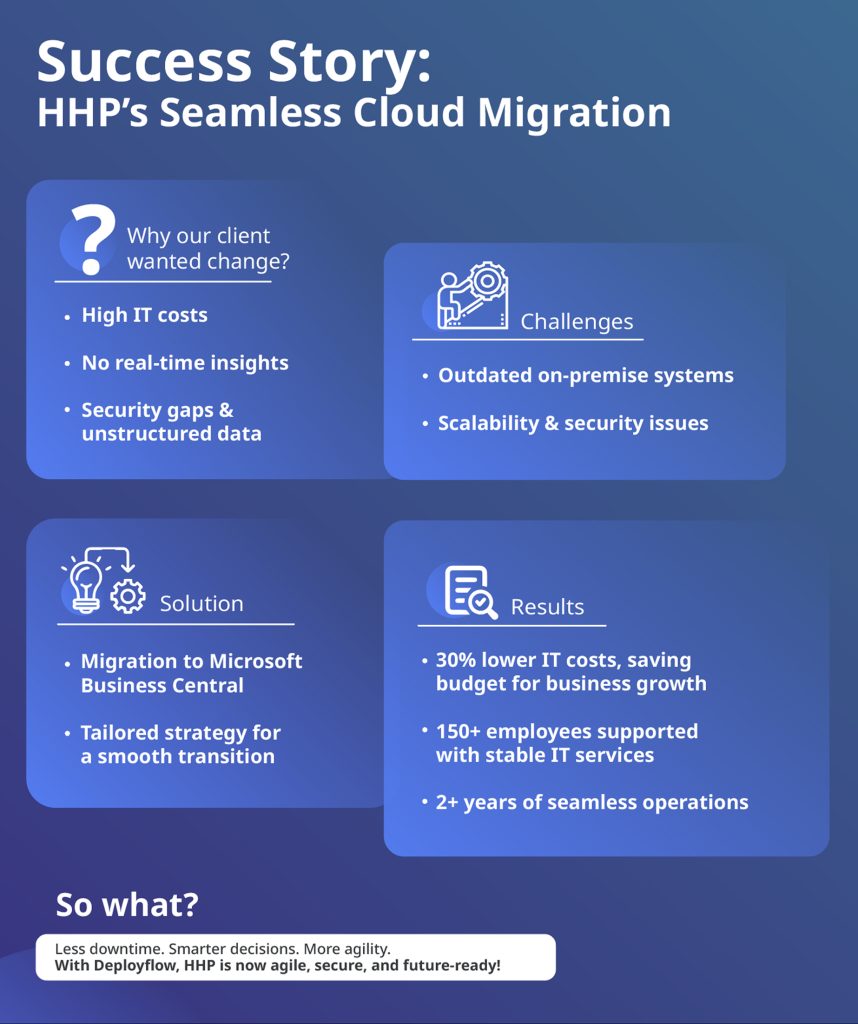
Thanks to Deployflow’s expertise, HHP now enjoys faster deployments, better scalability, and stronger security across its cloud environment.
The result? A more agile business that’s ready to tackle future challenges and drive innovation.
We’re proud to have played a part in their journey to the cloud and look forward to continuing our partnership.
Read the full success story here.
Make Your Cloud Migration a Success with Deployflow
Cloud migration isn’t just about moving infrastructure—it’s about unlocking new opportunities for innovation, agility, and growth.
With the right plan, tools, and team of Cloud experts, you can seamlessly transition to the cloud and future-proof your business.
Ready to take the leap? Explore Deployflow cloud migration services to learn how we can make your migration seamless, secure, and cost-effective.
FAQs
What are the benefits of cloud migration?
Cloud migration enhances scalability, strengthens security, reduces operational costs with pay-as-you-go pricing, and improves disaster recovery by ensuring data redundancy and business continuity.
How do I choose the best cloud provider for my business?
Choosing a cloud provider depends on factors like pricing, performance, security, and specific business needs—AWS offers vast services and global reach, Azure integrates well with Microsoft tools, Google Cloud excels in AI and analytics, while private clouds provide greater control and customisation.
How much does cloud migration cost?
Cloud migration costs vary based on infrastructure complexity, data volume, licensing, and service models, with potential hidden fees for data transfer, storage, and support—cost-saving strategies include rightsizing resources and leveraging reserved instances.
What tools can help streamline cloud migration?
AWS Migration Hub, Azure Migrate, CloudEndure, and Google Migrate for Compute Engine are key tools that assist with planning, automation, and execution of seamless cloud migrations.
Explore our BLOG
Recent articles

Is Claude Down? Anthropic Outage: Protect Your Cloud Infrastructure
Claude.ai has spent 2026 fighting its own success. Twenty-one incidents landed between 12 August and...
read full article

AI Experimentation vs AI Engineering: The Difference That Decides Whether Your AI Budget Survives
Experimentation buys you knowledge. Engineering buys you a system that still works next quarter, when...
read full article

Why Most Agentic AI Projects Fail Before They Scale
Has your agent been three months from production for nine months? Agentic projects break at...
read full article