



You can replace an outdated public sector system without taking it offline for a single minute. The service keeps running while the old one is retired beneath it.
Downtime fear keeps most modernisation on hold, but delay is not free. Every month an ageing system stays put, it costs more to run and makes the eventual switch riskier.
Read on for the method that retires a legacy system with zero downtime: how to replace it one piece at a time, move the data without losing a record, and keep frontline services untouched throughout.
Executive summary:
- Modernise with zero downtime. Citizen services stay live from the first sprint to switch off.
- Retire legacy one function at a time, with instant rollback at every step.
- Migrate decades of data with nothing lost and no service taken offline.
- Sequence the rollout so any failure lands on internal systems, never the public.
- Stay audit-ready throughout, with ISO 27001 and Cyber Essentials controls live.
- Fund it in stages, committing to each phase only once the last one proves out.
Why Most Legacy Modernisation Projects Cause Outages (and Yours Won’t)
Modernisation fails because of three avoidable mistakes, and you can design each one out from the start.
The scale of the problem is well documented, and it is getting worse. The government’s State of Digital Government Review found that 28% of central government systems were legacy in 2024, up from 26% the year before, with 22% of those rated red for both high likelihood and high impact of failure.
In May 2026, Re:State’s 2026 report warned that the situation had become a ticking time bomb, with the gap between public and private sector technology widening every year.
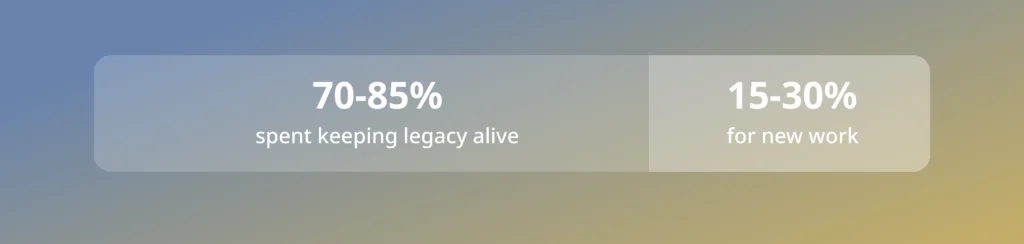
Reliability is the visible cost. A quarter of organisations surveyed reported a critical outage, with 123 hitting NHS England alone. The money is trapped, too. Most of the budget goes on upkeep, and 28% of the highest-risk systems have no funding set aside to fix them.
Where does the public sector technology budget go?
Three patterns cause most of the damage, and all three are optional.
- A big-bang cutover switches everything at once and leaves no way back when something fails.
- A live data migration changes the underlying records while the service still depends on them.
- And undocumented dependencies surface at the worst moment, because nobody mapped them.
Remove those three, and the outage risk falls away. The rest of this guide shows how.
The Strangler Fig Pattern: Replace Legacy Systems Piece by Piece
You replace a legacy system piece by piece, while it keeps running, until nothing is left to switch off.
Start by routing all traffic through a gateway that sits in front of the old system. Users hit the gateway, the gateway calls the legacy system, and nothing changes for anyone yet. With that in place, you rebuild one function at a time. Take a single feature, build it new, then tell the gateway to send that one request type to the new version. Everything else still goes to the legacy system.
You test each new function against real traffic before moving on. If it works, you keep it and start the next one. If it does not, you point the gateway back to the old version in seconds. The two systems run side by side at all times, so the service never goes down.
Repeat until every function has moved. At that point, the legacy system handles nothing, and you switch it off. No cutover, no big-bang weekend, no outage. This approach has a name, the strangler fig pattern, because the new system grows around the old one until it can stand on its own.
The Real Cost of Zero Downtime (And Why It’s Worth It)
Zero downtime is not free. You pay for it in a different currency than the risk.
Infrastructure, licensing, and support double up for every function, still mid-migration. On a large estate, that overlap can last months. Delivery also slows down in the short term. Teams spend real capacity on the gateway, the flag logic, and the rollback tooling, work that produces no visible feature for users.
And the approach demands discipline that a big-bang cutover does not. Every team touching the legacy system needs to know which functions have moved, or someone builds against the wrong version.
None of this outweighs the cost of an outage in a citizen-facing system. But it is worth budgeting for and staffing for.
How to Migrate Legacy Data Without Losing a Single Record
You copy data to the new system in the background, leave the original running, and switch over only after you have proven the two match.
The move runs in three stages.
- First, build the new database alongside the old one and change nothing that already works.
- Second, copy the records across while the service keeps reading from the original, so users notice nothing. Keep the two in step by writing every new change to both at once, so the copy never falls behind.
- Third, point the service at the new database, and retire the old one only once nothing else depends on it.
Verification is the step teams skip and later regret. Before any traffic relies on the new database, you check the records against the original and confirm they match, row for row. The original stays untouched until the very end, so at any point you can stop, fix, or roll back, with no downtime and no data lost.
Catch a Bad Release Before It Reaches the Public
Release new code to a handful of users first, watch it, and you can pull it back in seconds if it misbehaves.
Three controls make that possible.
- Ship the code switched off, then turn it on for a small group with a feature flag, so a problem means flipping one switch instead of redeploying.
- Send a fraction of live traffic to the new version first, a canary release, so you see how it behaves for real before widening it.
- Wire the pipeline to run its own health checks, so a failing signal rolls back the change automatically before anyone has to notice and react.
Each release becomes a small test instead of a leap. You expose the change to a few people, measure it, then widen it or pull it. A mistake reaches almost no one, so the public never feels it.
All three controls run on a delivery pipeline, and you can add continuous integration to a legacy codebase without waiting for the rewrite.
Migrate Low-Risk Systems First, Citizen Services Last
Migrate the systems nobody sees first, and save the frontline services for last, once the approach is proven.
Order is your strongest safeguard. Start with low-risk internal systems, a reporting tool or a back-office workflow, where a stumble stays invisible to the public and your team can prove the tooling for real. Each success earns the right to move up.
Citizen-facing services go last, after the method has worked repeatedly on systems that matter less.
This order also clears your assessments as you go. Map each stage to the government Service Standard and the Technology Code of Practice, and modernise in stages rather than piling up a compliance scramble at the end.
The National Cyber Security Centre adds the same point from the security side: carrying a clear plan for legacy technology is itself part of managing the risk. Sequence the work this way, and the one cutover that could hurt happens only when failure has become very unlikely.
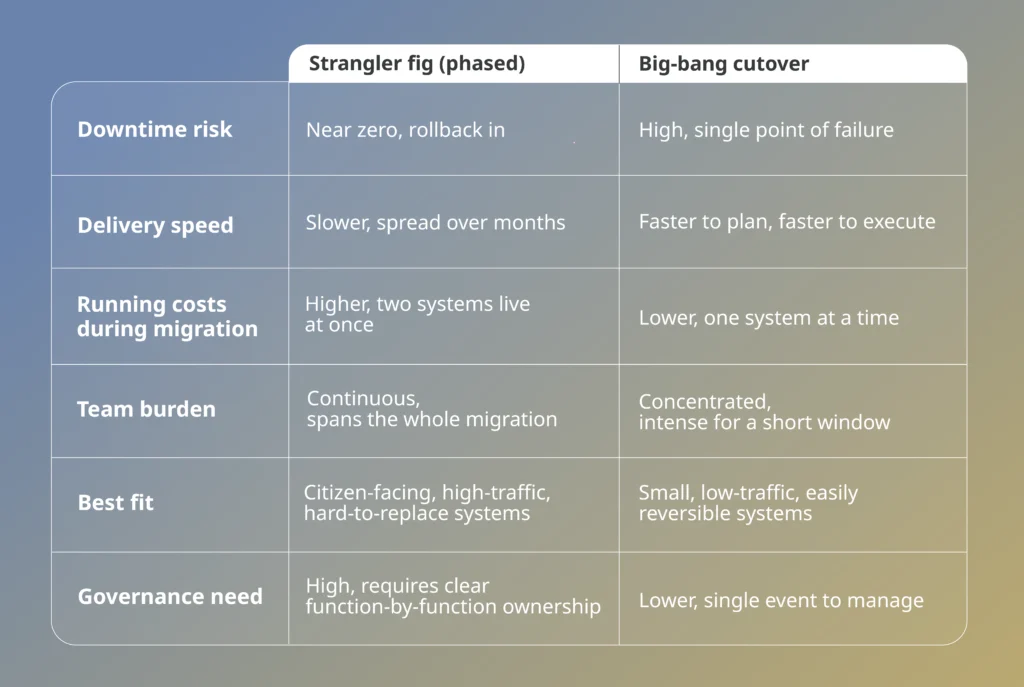
Strangler Fig vs Big-Bang: Which Fits Your System
How to Modernise Without Breaching ISO 27001 or Cyber Essentials
You can keep ISO 27001 and Cyber Essentials intact through every step of the move. Uptime means little if you trade it for a compliance breach, so the controls travel with the work.
You build them into the delivery pipeline itself. The checks run with the code rather than sitting to one side, and audit evidence becomes a by-product of delivery. Every release leaves its own trail, so the proof an assessor wants is generated as you go.
That pipeline-first discipline is the foundation of Deployflow’s public sector DevOps services, built to keep compliance and delivery moving in step rather than in sequence.
Deployflow delivers this work under ISO 27001 certification and Cyber Essentials accreditation, so those controls are the baseline from day one.
Data residency holds throughout as well. Classification drives the architecture from the first sprint, so sensitive records live where policy requires from the start, under the same NCSC cloud security principles that govern the finished system.
Modernisation done this way strengthens your security posture rather than suspending it. You finish more compliant than you started, with the documentation to prove it.
Fund Modernisation in Stages, Not One Risky Bet
Release budget one phase at a time, so you only pay for the next step once the last one has proven itself.
Policy now backs that approach. The government’s Blueprint for Modern Digital Government calls for funding standing teams and delivering value early, rather than staking everything on one long programme. See the full case for application modernisation if you are building the business case internally.
A phased engagement fits it cleanly, and it runs as five distinct stages you fund in turn.
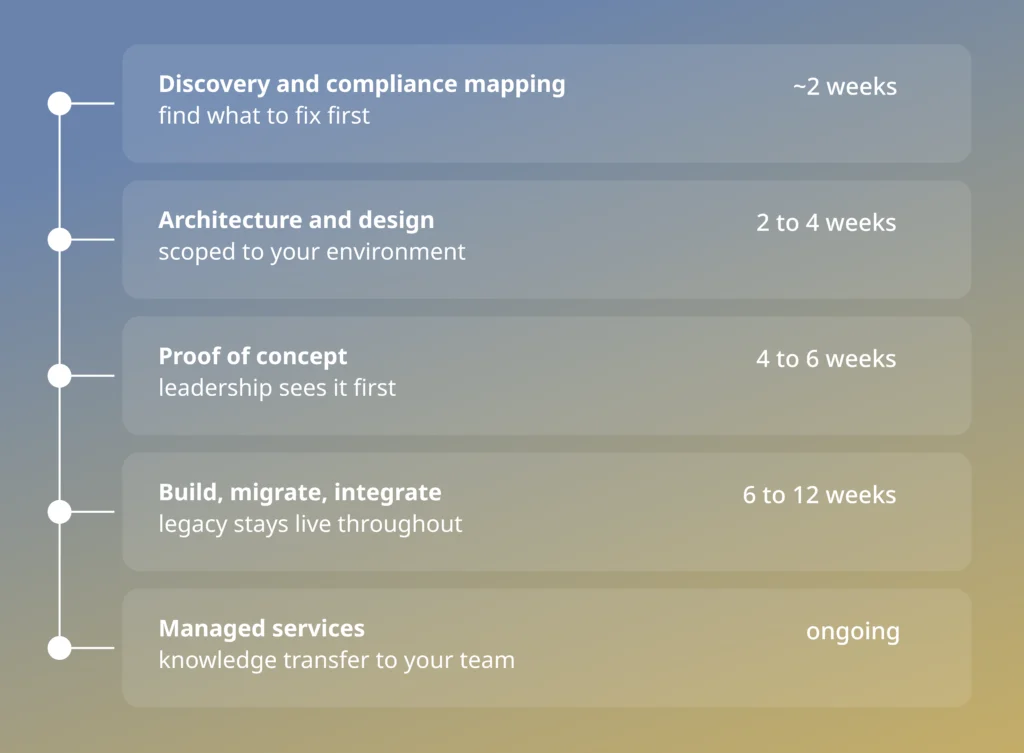
Each stage is a decision point. You can stop, adjust, or widen at any boundary, and every system, model, and document built is yours to keep, with no lock-in.
A multi-billion-dollar UAE public sector organisation did this with Deployflow. It approved a contained proof of concept first, then scoped the national rollout over six to twelve months. That first phase consolidated data scattered across surveys and spreadsheets into a single foundation and used AI pipelines to replace manual classification.
Start With a Readiness Assessment
In two to three weeks, you get a prioritised map of your legacy estate, your pipelines, and the compliance gaps to fix first, before any live service is touched. You finish with a sequenced plan and a proof of concept your leadership can approve.
Deployflow delivers public sector app modernisation under ISO 27001 certification and Cyber Essentials accreditation. Your team owns everything at the end. No lock-in, and no service taken offline along the way.
Is Your System a Candidate for This Approach? A Five-Point Check
Score one point for each that applies to your system.
- Citizens or frontline staff depend on it directly, not just an internal team.
- An outage would be visible externally, to the public, the press, or an oversight body.
- You cannot get a maintenance window long enough to migrate everything at once.
- The system has dependencies nobody has fully mapped, so a clean cutover carries unknown risk.
- You have, or can resource, a team that can own the migration for months, not weeks.
4 or 5: A phased approach is nearly mandatory for you. Start with the readiness assessment.
2 or 3: The phased approach will save you real risk, but weigh it against the cost of a longer timeline.
0 or 1: A faster, more contained cutover may be the better use of the budget. Talk it through before you commit to a longer programme.
Get a free consultation, and turn legacy risk into a plan you can fund and defend.
Frequently Asked Questions on Public Sector Legacy Modernisation
How much does legacy system modernisation cost?
There is no fixed price. Cost depends on the size of your estate, how many systems are involved, and how much data and integration each one carries.
A phased approach keeps it controllable, because you fund one stage at a time rather than committing to a single large figure upfront. The more useful comparison is the cost of doing nothing, since most of the public-sector technology budget already goes to upkeep rather than to new capabilities. Starting with a short readiness assessment gives you a costed, prioritised plan before you commit to the build, so spend maps to value at every step.
When should you modernise a legacy system?
Modernise when the system starts to limit you, when it is expensive to maintain, hard to secure, no longer supported by its vendor, or blocking services you need to deliver.
Waiting until it fails is the most expensive option. Common triggers include rising maintenance costs, difficulty finding people to support legacy technology, security patches that are no longer issued, and integrations that break whenever something changes. A system rated high risk for both likelihood and impact of failure is a clear signal to act, and the earlier you do, the more options you keep.
Should you modernise or replace a legacy system?
In most cases, modernise incrementally rather than replacing everything at once. A full rip-and-replace carries the highest risk and the longest wait before you see any value, while incremental modernisation keeps the service running and lets you prove each change as you go.
Replacement can be the right call when the underlying technology is genuinely beyond repair or no longer supported. Even then, you can stage the move so that the old and new systems run side by side, rather than switching over in a single event. The deciding questions are how much of the current system still delivers value, how exposed it is, and whether you can afford the downtime a full replacement risks.
What are the risks of not modernising legacy systems?
The main risks are security breaches, unplanned outages, rising costs, and an inability to deliver new services, all of which grow every year.
Unsupported software stops receiving security patches, which widens your exposure. Outages become more frequent and harder to recover from. The people who understand the old technology retire or move on, leaving you dependent on a shrinking pool of skills. Meanwhile, the budget tied up in upkeep is a budget you cannot spend on the services citizens actually need. Doing nothing is itself a decision, and usually the costliest one.
How to choose a public sector modernisation partner?
Look for a partner with public sector security credentials, a phased delivery model, and a track record of reaching production.
Check for certifications such as ISO 27001 and Cyber Essentials, and confirm they understand public sector procurement and data residency. Ask how they handle downtime, rollback, and compliance during the work. Favour a partner who proves the approach on a contained workload first, transfers knowledge to your team, and leaves you owning the result with no lock-in.
Explore our BLOG
Recent articles

Is Claude Down? Anthropic Outage: Protect Your Cloud Infrastructure
Claude went down across every surface on 29 September 2026. From 14:00 to 14:59 UTC,...
read full article
The SOC 2 Remediation Roadmap: From Compliance Dashboard to Passed Audit
This SOC 2 remediation roadmap takes you from a red compliance dashboard to a clean...
read full article
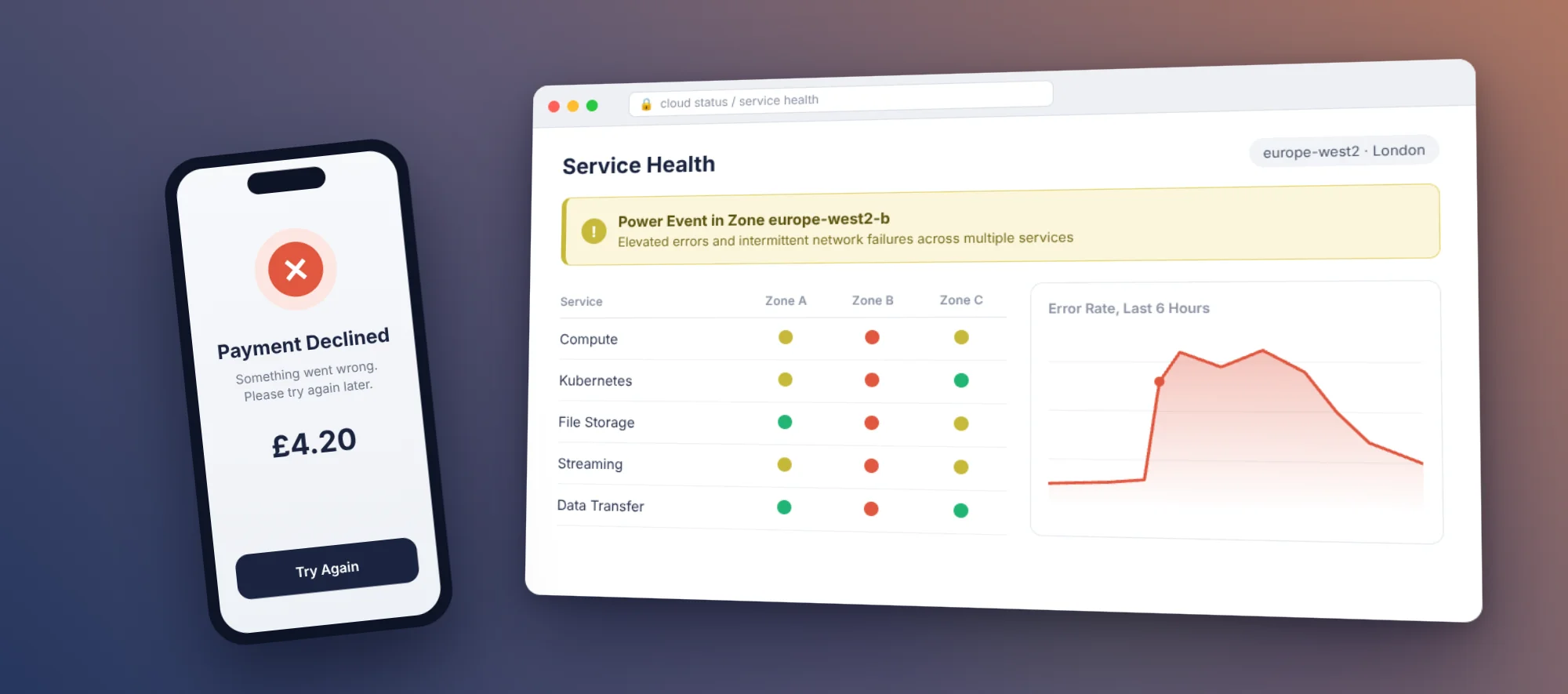
Is Google Cloud Down? The GCP Outage That Froze Revolut Cards and What CTOs Should Fix Now
Yes, Google Cloud went down in London. A major Google Cloud outage hit the europe-west2...
read full article