


You can cut deployment time by almost half without hiring more engineers by reducing CI/CD friction.
In the Jenkins vs GitLab CI debate, the real difference shows up in microservices environments where pipeline delays compound across dozens of services.
A Real-World Case: Faster Deployments After Consolidation
In one UK SaaS engagement, Deployflow migrated a fragmented Jenkins-based CI/CD environment supporting dozens of microservices into a unified GitLab CI architecture.
The original setup relied on distributed agents, multiple plugins, and separate integrations for container registry and security scanning. As the number of services grew, pipeline latency increased due to plugin compatibility checks, manual guardrails, and integration overhead.
After consolidating into GitLab CI (with native runners, integrated registry, and embedded security scanning), the average commit-to-deploy time decreased by 45%.
The application code did not change, but the pipeline architecture did.
TL;DR: Key Architectural Trade-Offs Between Jenkins and GitLab CI in 2026
- The Win: GitLab CI reduced deployment cycles by 45% through native Kubernetes integration and reduced plugin overhead.
- The Problem: Modern Jenkins reduces risk, but plugins still require careful version control, or compatibility issues can slow delivery at scale.
- The Solution: GitLab offers an all-in-one DevOps platform; Jenkins offers maximum customisation through an extensibility model.
- Best for Security: GitLab provides built-in SAST/DAST; Jenkins requires third-party integrations (e.g., SonarQube).
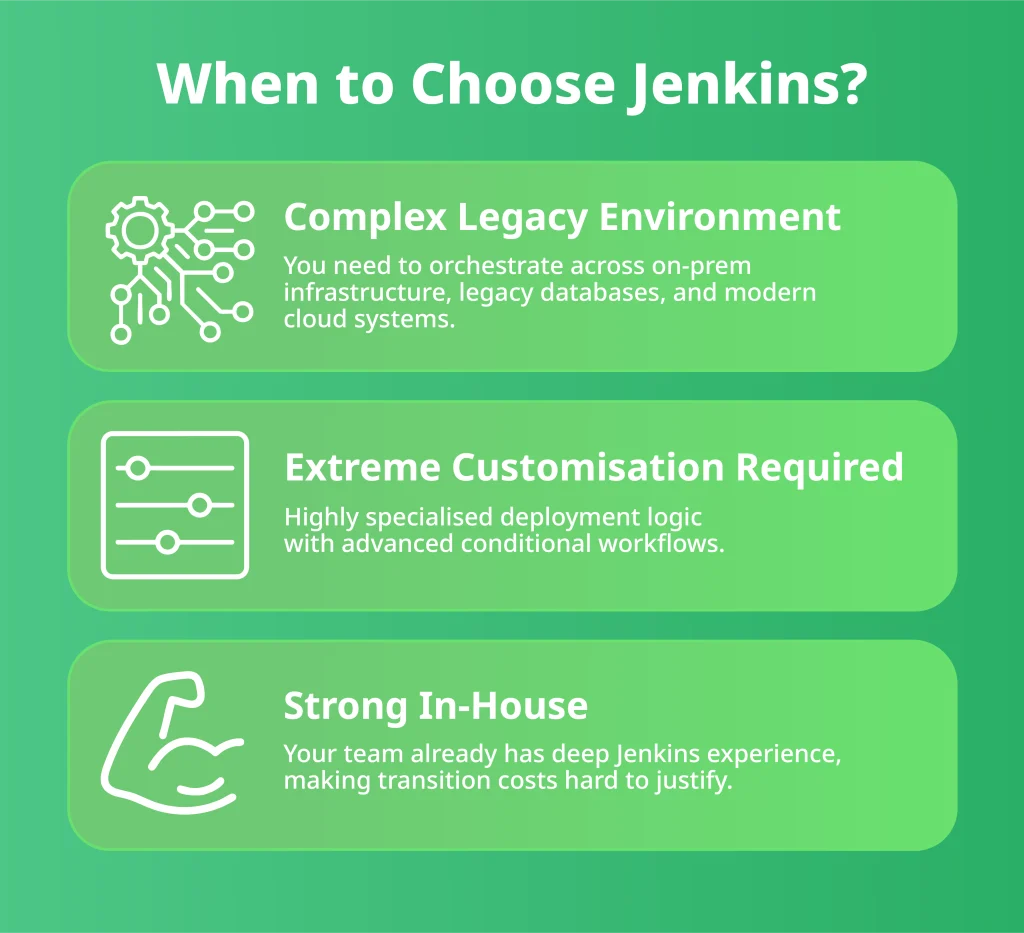
- Recommendation: Move to GitLab for speed and cloud-native simplicity; stay with Jenkins if you have complex, legacy on-premise requirements.
Jenkins remains exceptionally flexible. But in containerised, Kubernetes-driven environments, GitLab CI’s integrated model often reduces operational drag and shortens the path from commit to production.
This guide breaks down exactly why, and which model aligns with your growth strategy in 2026.
Jenkins for Microservices: Pros, Cons, and Scalability
Jenkins is a self-contained, open-source automation server designed to build, test, and deploy software throughout the entire release lifecycle.
In practical terms, it acts as the orchestrator of your delivery pipeline, triggering builds when code changes, running automated tests, packaging artefacts, and pushing releases into staging or production environments.
Built in Java, Jenkins runs on any system with a Java Runtime Environment (JRE). That portability has been one of its biggest advantages for over a decade. Whether deployed on Windows, macOS, Linux, or containerised environments, Jenkins integrates smoothly into diverse infrastructure landscapes.
Why Jenkins Became a CI/CD Standard
Jenkins rose to dominance because it offered something powerful yet simple: control.
It is:
- Easy to install: A standalone package with minimal prerequisites beyond JRE.
- Web-configurable: Its browser-based interface enables fast setup and pipeline management.
- Open source: No licensing costs, making it attractive for startups and enterprises alike.
- Distributed by design: Jobs can run across multiple nodes and machines, reducing bottlenecks and speeding up pipelines.
- Extensible through plugins: With over 1,700 plugins, Jenkins integrates with almost every major CI/CD, cloud, testing, and DevOps tool.
This plugin ecosystem is both its strength and its complexity. You can extend Jenkins to support Docker builds, Kubernetes deployments, security scanning, test automation frameworks, cloud providers, and version control systems.
That flexibility comes at a cost: maintaining plugin compatibility and version alignment can become operational overhead.
Example: Jenkins Declarative Pipeline (Groovy)
pipeline {
agent any
stages {
stage(‘Build’) {
steps {
sh ‘make build’
}
}
stage(‘Test’) {
steps {
sh ‘make test’
}
}
stage(‘Deploy’) {
steps {
sh ‘./deploy.sh’
}
}
}
}
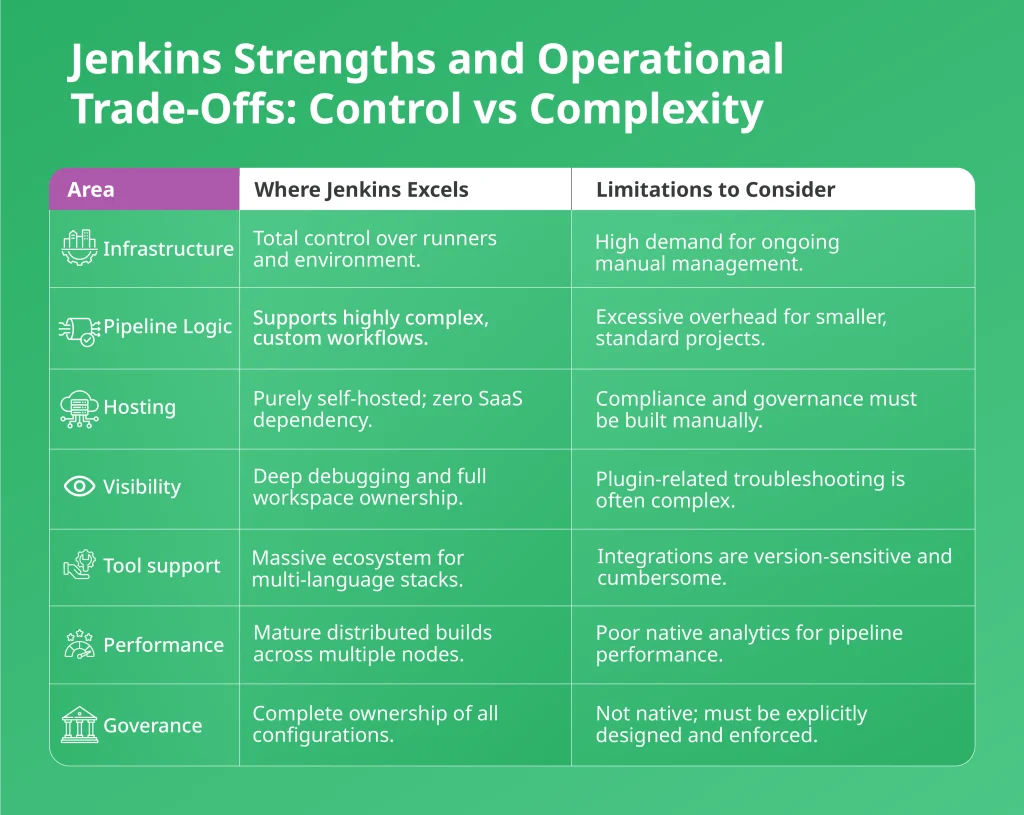
Jenkins provides flexibility and control, but governance and structure must be designed and maintained by your team. For mature DevOps teams, that flexibility enables precision control. For lean teams without platform engineering capacity, it can introduce operational overhead.
GitLab CI/CD: The Benefits of a Unified DevOps Platform
While Jenkins focuses primarily on automation pipelines, GitLab takes a broader approach. GitLab is a web-based DevOps platform that manages the entire software development lifecycle, from planning and version control to CI/CD, security scanning, and monitoring.
At its core, GitLab combines source code management with integrated CI/CD pipelines. It operates on a freemium model, offering both community and enterprise tiers. The platform supports automation across planning, building, testing, deploying, and monitoring in a unified interface.
Written primarily in Ruby (with Go and Vue.js components), GitLab integrates development, security, and operations into what it calls “Concurrent DevOps.” The philosophy is to remove silos, reduce handoffs, and accelerate secure delivery.
What Makes GitLab Different
Unlike Jenkins, GitLab does not rely heavily on external plugins to assemble a delivery workflow. Instead, it provides native features such as:
- Integrated CI/CD pipelines
- Issue tracking and task boards
- Merge request management
- Security scanning and compliance tooling
- Wiki documentation
- Role-based access control
- Analytics and business insights (in paid tiers)
This all-in-one architecture reduces tool sprawl. Teams can manage code, discussions, documentation, CI/CD, and reporting within the same ecosystem.
Below is a basic .gitlab-ci.yml structure illustrating a three-stage pipeline for a microservice:
stages:
– build
– test
– deploy
build_job:
stage: build
script:
– echo “Compiling microservice…”
– make build
test_job:
stage: test
script:
– make test
deploy_job:
stage: deploy
script:
– ./deploy_to_k8s.sh
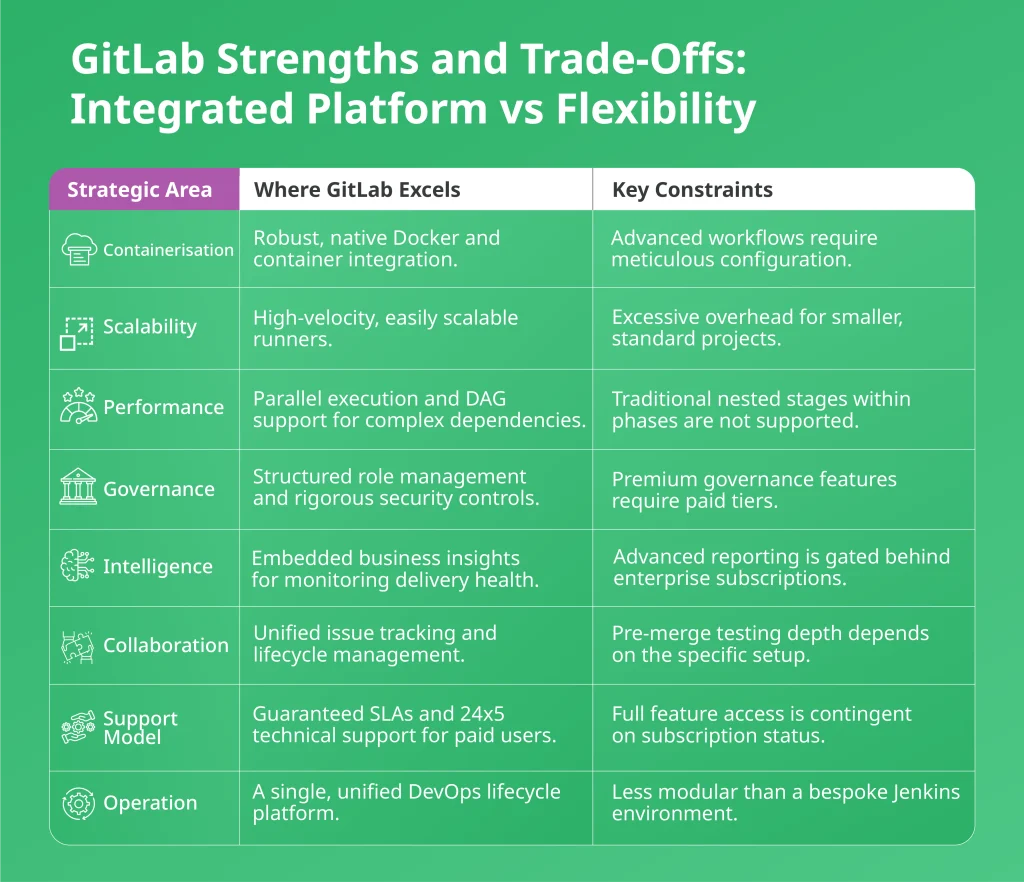
GitLab reduces tool sprawl by offering an integrated DevOps platform. That simplicity improves governance and visibility, but it can limit the depth of customisation compared to fully self-managed CI/CD architectures.
Choosing a CI/CD Pipeline for Microservices Architecture
Microservices multiply pipelines.
A monolith requires one delivery flow. A microservices estate may require 50, 200, or 500 independent pipelines, each building containers, running security scans, provisioning infrastructure, and deploying to Kubernetes.
Complexity scales horizontally, and CI/CD becomes a platform problem.
With Jenkins, this often means managing a growing ecosystem of plugins, shared libraries, runners, and integrations across services. Flexibility remains high, but enforcing consistency across hundreds of pipelines requires strong internal discipline and platform engineering effort.
GitLab CI approaches this differently. Repository management, container registry, CI configuration, security scanning, and Kubernetes integration are all within a single platform boundary. Pipelines are defined as code, and job dependencies can be structured using DAG logic to optimise execution. Standardisation is easier because integration is native.
In a microservices environment, the real trade-off is this:
Jenkins offers maximum composability, but governance and consistency must be engineered.
GitLab offers lifecycle cohesion, but with more structured constraints.
At scale, the choice directly affects deployment velocity, operational overhead, and risk exposure.
Practical Advice for UK SMBs
For most small and medium-sized businesses in the UK, microservices increase complexity faster than team capacity grows.
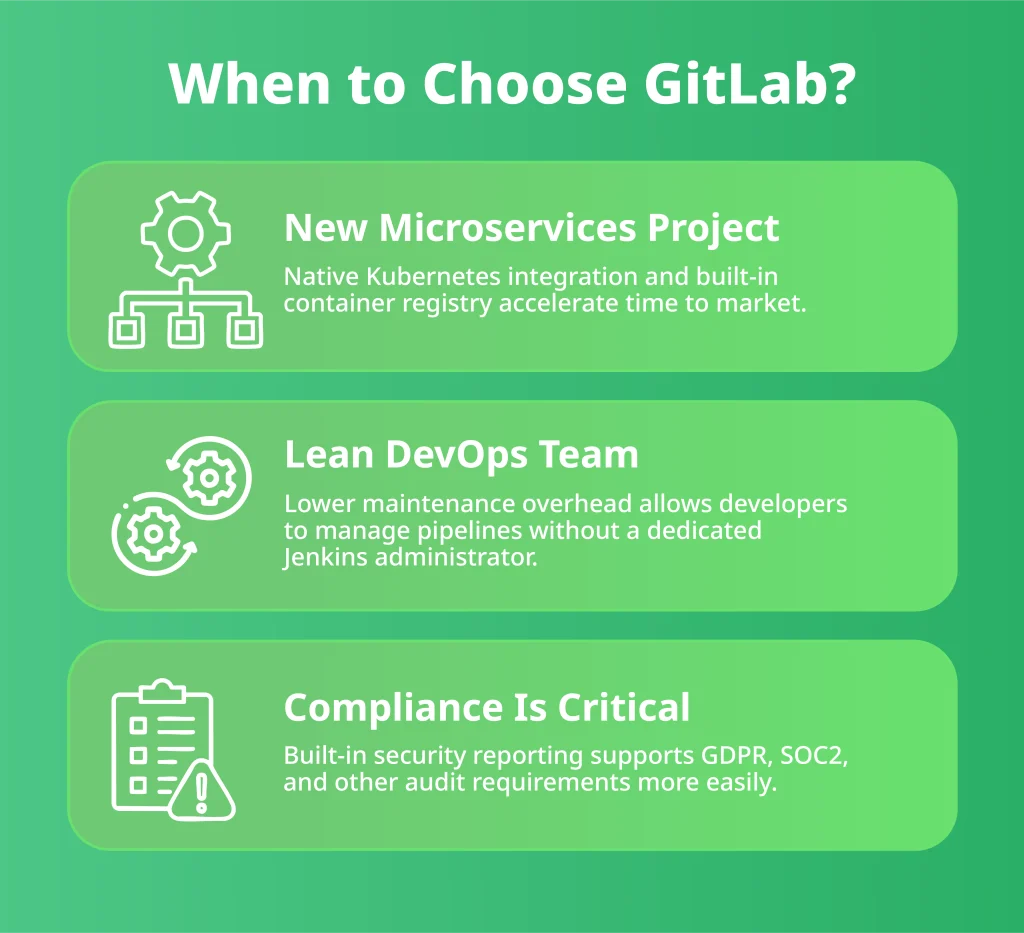
If you lack a dedicated platform engineering function, an integrated platform like GitLab often reduces overhead and simplifies governance, which matters for FCA reviews, ISO preparation, or client security checks.
If you already have strong DevOps maturity and internal standards, Jenkins can offer greater flexibility and control.
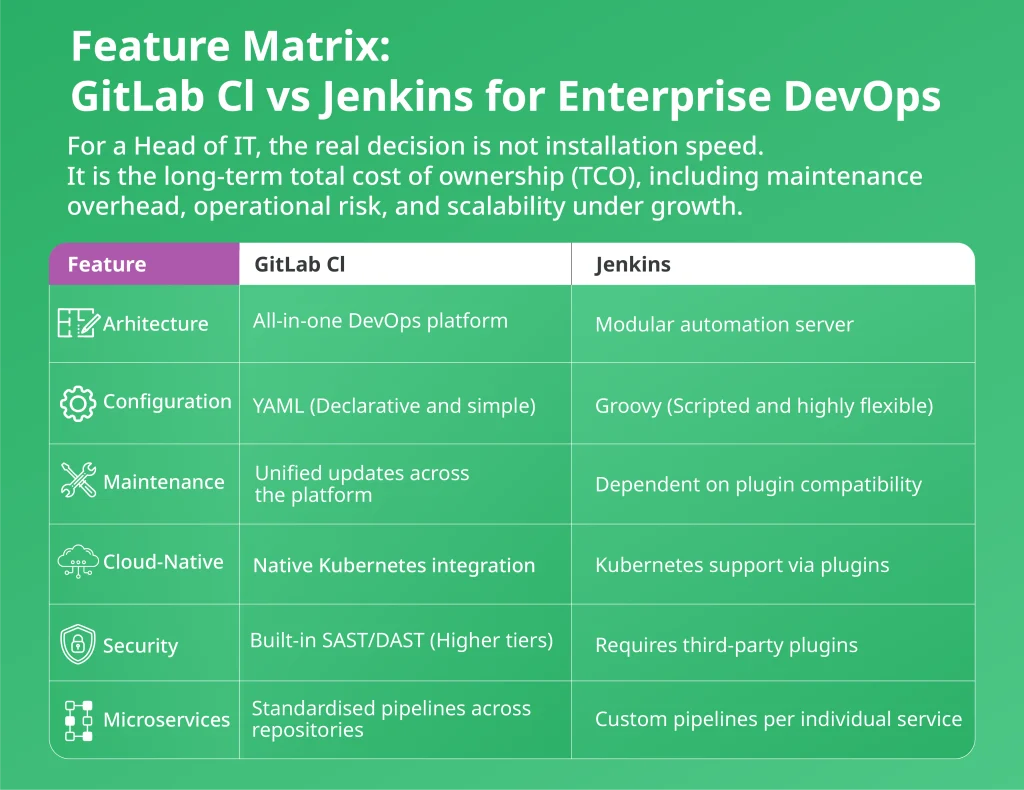
Jenkins vs GitLab: Total Cost of Ownership (TCO) and Maintenance
Jenkins’ flexibility comes from its vast plugin ecosystem. Unfortunately, that ecosystem introduces a structural dependency risk.
When updating the Jenkins core, there is a chance that one or more critical plugins may break. In large microservices environments, this can halt pipeline execution across multiple services simultaneously. Troubleshooting compatibility issues becomes part of ongoing platform maintenance.
It is called a plugin tax because you do not pay in cash but in maintenance effort. In the UK market, where senior DevOps talent is in high demand, this tax represents a high hidden cost. For an IT Head, every hour spent troubleshooting Groovy scripts or plugin version conflicts is an hour not spent on product innovation.
By contrast, GitLab’s integrated model reduces this fragmentation. Updates apply to the platform as a whole, and core CI/CD, security, and repository management components evolve together. That cohesion reduces maintenance variability and improves deployment predictability at scale.
In smaller environments, plugin management may feel manageable. But in microservices architectures with dozens or hundreds of pipelines, every compatibility issue slows delivery and absorbs senior engineering time.
The real comparison is maintenance overhead versus operational predictability.
However, GitLab Ultimate licensing costs must be weighed against the internal engineering cost of maintaining a Jenkins ecosystem.
For IT leaders responsible for uptime, compliance, and velocity, that trade-off directly impacts long-term cost, resilience, and growth capacity.
Compliance for UK FinTech: GitLab vs Jenkins for Audit Readiness
In 2026, API security, auditability, and data integrity are board-level concerns. For CTOs, the question is not whether security is built in but how consistently it is enforced.
GitLab’s advantage lies in cohesion. Code review approvals, CI execution logs, security scan results, and deployment history reside within one platform boundary, simplifying audit traceability.
Jenkins can achieve an equivalent security posture, but usually through a composed toolchain. This may include Vault for secrets, SonarQube for code quality, container scanners for image validation, and external compliance dashboards.
This composability increases flexibility but expands configuration surface area, which must be governed rigorously.
The difference is operational discipline.
Note on API Security: Regardless of CI/CD choice, microservices are only as secure as their exposed endpoints. Pipeline security is one layer; runtime visibility is another.
Integrating agentless API discovery and monitoring solutions is essential to map your API ecosystem and detect shadow or undocumented endpoints. CI/CD tooling strengthens delivery security, but API governance must extend beyond the pipeline.
GitLab CI vs Jenkins: When to Choose Which?
The Architectural Mechanics Behind the Improvement
The performance improvement came from removing structural friction.
In fragmented Jenkins environments, teams often manage:
- Plugin compatibility alignment
- Separate container registries
- External security scanners
- Disconnected secrets management
Each integration introduces small delays between stages. In a microservices architecture, those delays compound across services.
By consolidating CI, registry, security, and Kubernetes integration within one platform boundary, commit-to-deploy latency shrinks. Even marginal time savings per pipeline accumulate into significant throughput gains at scale.
Recent DORA findings show that teams using consolidated toolsets are five times more likely to achieve elite deployment speeds (under one hour) than those managing fragmented toolchains. Reducing integration overhead moves your organisation closer to elite performance.
How Deployflow Accelerates This Transition
Deployflow’s DevOps Managed Services and full-stack delivery squads help UK SMBs eliminate CI/CD bottlenecks without expanding headcount.
Instead of simply migrating tools, Deployflow audits pipeline architecture, reduces plugin dependency risk, embeds security scanning directly into CI, and standardises microservice templates for predictable releases.
For organisations balancing growth with compliance, Deployflow ensures that velocity improvements do not compromise governance.
Case Studies
At scale, the difference between fragmented tooling and cohesive delivery is not theoretical — it shows up in measurable results.
At Little Journey, Deployflow reduced deployment time by 80%, increased infrastructure scalability by 50%, and achieved 100% data segregation and compliance alignment. That transformation enabled the creation of a secure environment in just two hours instead of several days.
With Hall Hunter, migrating legacy infrastructure to a secure cloud environment led to a 30% reduction in IT costs and improved operational resilience. Standardised cloud architecture removed instability and reduced support burden across 150+ staff.
At Strike, Deployflow improved release reliability by 55%, reduced downtime by 60%, and increased cloud environment stability by 70%, demonstrating what structured CI/CD and DevOps governance can deliver in high-growth environments.
If your delivery model feels fragile or operational overhead is quietly expanding, it may be time to reassess the architecture behind your pipelines.
As Dan Rafferty, CTO at Strike, explains, Deployflow’s impact went beyond technical fixes. It was about tailoring the solution to the business:
“One of the most impressive aspects of Deployflow is their commitment to delivering customised solutions. They took the time to understand our specific requirements and crafted a strategy that perfectly aligned with our goals. Their help and advice in improving our continuous integration and continuous deployment (CI/CD) pipelines has drastically increased the reliability of our releases and the platforms.”
Dan Rafferty
CTO at Strike
Stop managing infrastructure and start accelerating delivery. Book a 15-minute technical audit with Deployflow and get a clear roadmap forward.
Frequently Asked Questions: Jenkins vs GitLab CI in Microservices Environments
Is GitLab CI better than Jenkins for Kubernetes?
GitLab CI is generally superior for Kubernetes because it provides native integration and a built-in container registry.
While Jenkins requires multiple external plugins to talk to clusters, GitLab uses a dedicated agent for seamless, “out-of-the-box” GitOps workflows. This integrated approach reduces the risk of configuration drift and simplifies deployment to containerised environments. It allows teams to manage infrastructure and application code within a single, cohesive YAML-based interface.
When to choose Jenkins for legacy infrastructure?
Choose Jenkins if your environment depends on complex on-premise systems or specialised hardware that modern SaaS tools don’t support. Its massive plugin ecosystem allows it to orchestrate builds for older version control systems and proprietary databases.
If your workflow requires deep, imperative scripting through Groovy to handle non-standard dependencies, Jenkins offers unmatched flexibility. It remains the best fit for organisations with a dedicated platform team that needs total control over a highly customised build server.
How to reduce CI/CD maintenance overhead in 2026?
The most effective way to reduce overhead is by consolidating fragmented tools into a single platform to eliminate plugin hell. Adopting standardised, reusable pipeline templates ensures consistency across services and reduces the time spent on manual configuration.
Moving to auto-scaling, ephemeral runners on Kubernetes also removes the burden of patching and maintaining permanent build servers. Finally, integrating automated security and dependency updates ensures your pipelines stay healthy with minimal human intervention.
Does GitLab CI completely replace Jenkins in enterprise environments?
Not always. GitLab CI can replace Jenkins in many modern, cloud-native environments, especially where Kubernetes and container workflows are standardised. However, enterprises running complex hybrid estates or heavily customised legacy integrations may still benefit from Jenkins’ flexibility.
The decision depends less on brand preference and more on architectural complexity, compliance demands, and internal DevOps maturity. In some cases, organisations even run both during transition phases.
Is Jenkins slower than GitLab CI by design?
No, Jenkins is not inherently slower.
Performance differences usually stem from architectural setup, plugin sprawl, and integration overhead rather than the core engine itself. Poorly maintained plugins, inconsistent runners, and fragmented security tooling often introduce delays. When optimised correctly, Jenkins can perform extremely well. The challenge is maintaining that optimisation as microservices scale.
How does CI/CD choice affect DORA metrics?
CI/CD architecture directly influences lead time for change, deployment frequency, change failure rate, and mean time to recovery.
Integrated platforms often improve consistency and reduce manual handoffs, which can lower failure rates and recovery time. Modular systems can achieve similar outcomes, but they require stronger governance discipline. The more friction between stages, the more DORA performance tends to degrade. Architecture impacts delivery predictability more than most teams realise.
Which platform is better for regulated UK industries like FinTech or HealthTech?
GitLab is typically easier to manage for regulated UK environments.
In sectors where FCA scrutiny, GDPR controls, and audit readiness are ongoing realities, consolidated visibility matters. GitLab’s unified audit trail keeps code reviews, security scans, and deployments within one system boundary, which simplifies reporting and traceability.
Jenkins can achieve the same compliance outcomes, but usually through multiple integrated tools that must be configured, monitored, and maintained correctly. The issue is rarely capability; it is configuration complexity. In regulated environments, reducing moving parts often reduces compliance risk.
Explore our BLOG
Recent articles

Is Claude Down? Anthropic Outage: Protect Your Cloud Infrastructure
Claude.ai has spent 2026 fighting its own success. Twenty-one incidents landed between 12 August and...
read full article

AI Experimentation vs AI Engineering: The Difference That Decides Whether Your AI Budget Survives
Experimentation buys you knowledge. Engineering buys you a system that still works next quarter, when...
read full article

Why Most Agentic AI Projects Fail Before They Scale
Has your agent been three months from production for nine months? Agentic projects break at...
read full article