


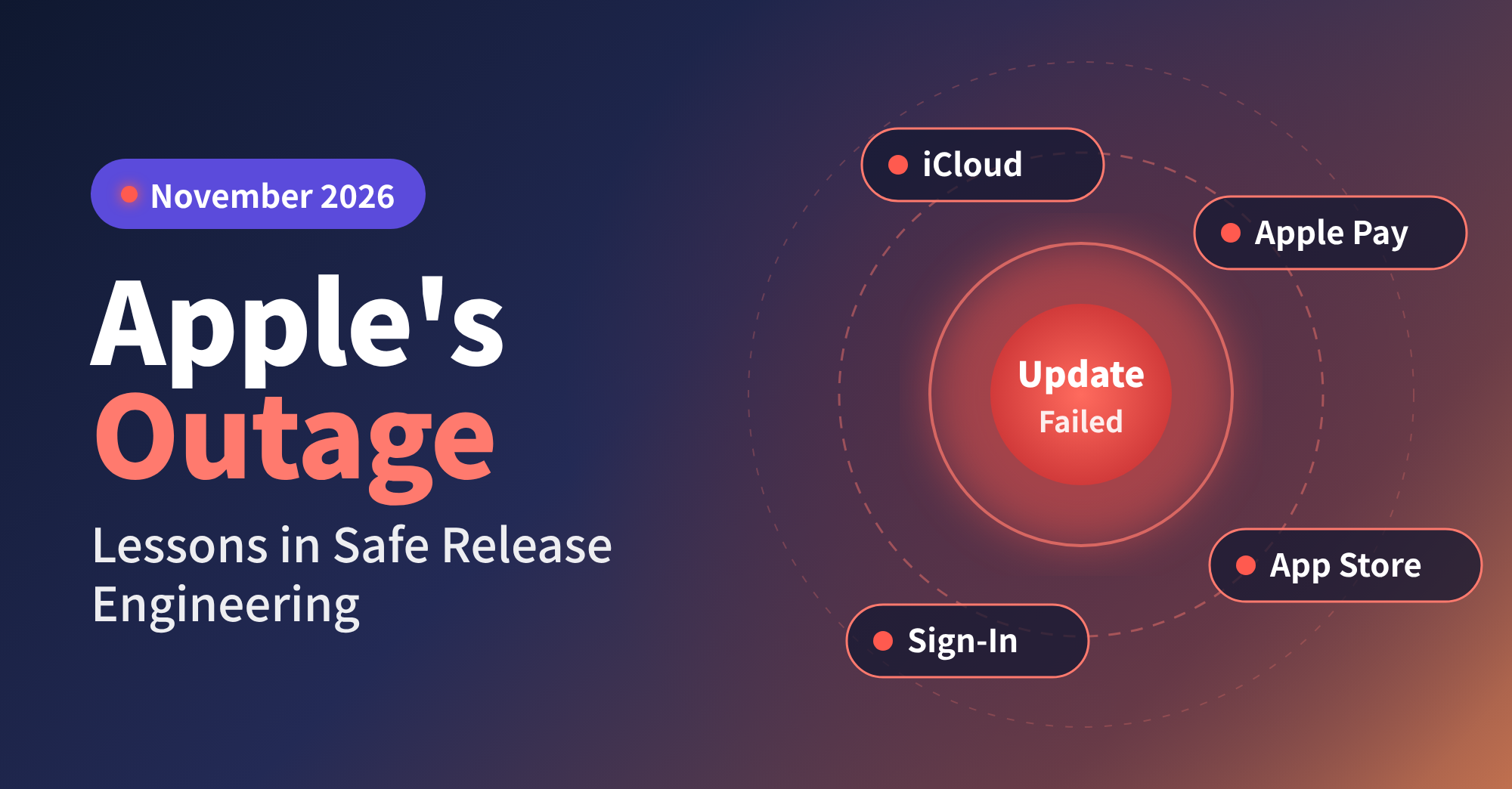
The Apple outage of 17 November 2026 was caused by an internal software update that disrupted Apple Account sign-in, iCloud, Apple Pay and the App Store for several hours.
Apple ruled out a cyberattack. A routine release to a shared service did the damage, and most organisations ship changes like it every week. Five release engineering controls keep that damage small, and none of them requires Apple’s scale.
November 2026 Apple Outage at a Glance
- Who felt it: consumers, developers using App Store Connect and, reportedly, Apple’s own retail stores.
- Why it spread: sign-in failures took down every service that depends on Apple Account, from payments to app downloads.
- Your exposure: a shared identity, DNS or payment component inside your own organisation carries the same risk.
- The fix: staged rollouts, feature flags, automated rollback, stricter gates for shared services and regular failure drills.
- Your next step: the audit table below shows where your release process would break first.
What Went Wrong at Apple on 17 November
Many users were unexpectedly signed out of their Apple Accounts, and verification failed when they tried to sign back in. App downloads stalled, some Apple Pay transactions failed and some new devices would not activate.
| Time (US, As Reported) | What Happened |
| 11:15 a.m. | Apple’s System Status page flags an AppleCare outage |
| Just before 1 p.m. | Around 2,000 users report problems with Apple Support, Apple Pay and iCloud |
| 3:30 p.m. | Apple marks the issue as affecting “all users” |
| Later that day | Services restored; Apple names an internal update as the cause |
Reports also spiked for Apple Music, Apple Card, Apple Business Manager and Sign in with Apple. Apple’s retail stores and corporate offices were reportedly affected as well. At the time of writing, Apple had not published a postmortem.
It also landed days after the Microsoft 365 outage, a nationwide FAA ground stop and disruption at several major US banks. No link between the incidents has been found.
Why One Update Took Down So Many Apple Services
Most of the affected services depend on Apple Account sign-in. Apple has not said which system the update changed, but the symptoms point to the account layer. When sign-in fails, Apple Pay, the App Store and Sign in with Apple fail with it.
Engineers call this the blast radius of a change: every user and system that a single fault can reach. A bug in a settings page reaches a handful of users. A bug in authentication reaches nearly everyone.
The pattern goes well beyond Apple. In the October 2025 AWS outage, a DNS fault in one region disrupted services at companies worldwide. Inside most organisations, one identity provider or API gateway supports dozens of applications. Changes to these components usually go through the same pipeline as changes to low-risk services. That is convenient, and it also gives one faulty change a route to everything.
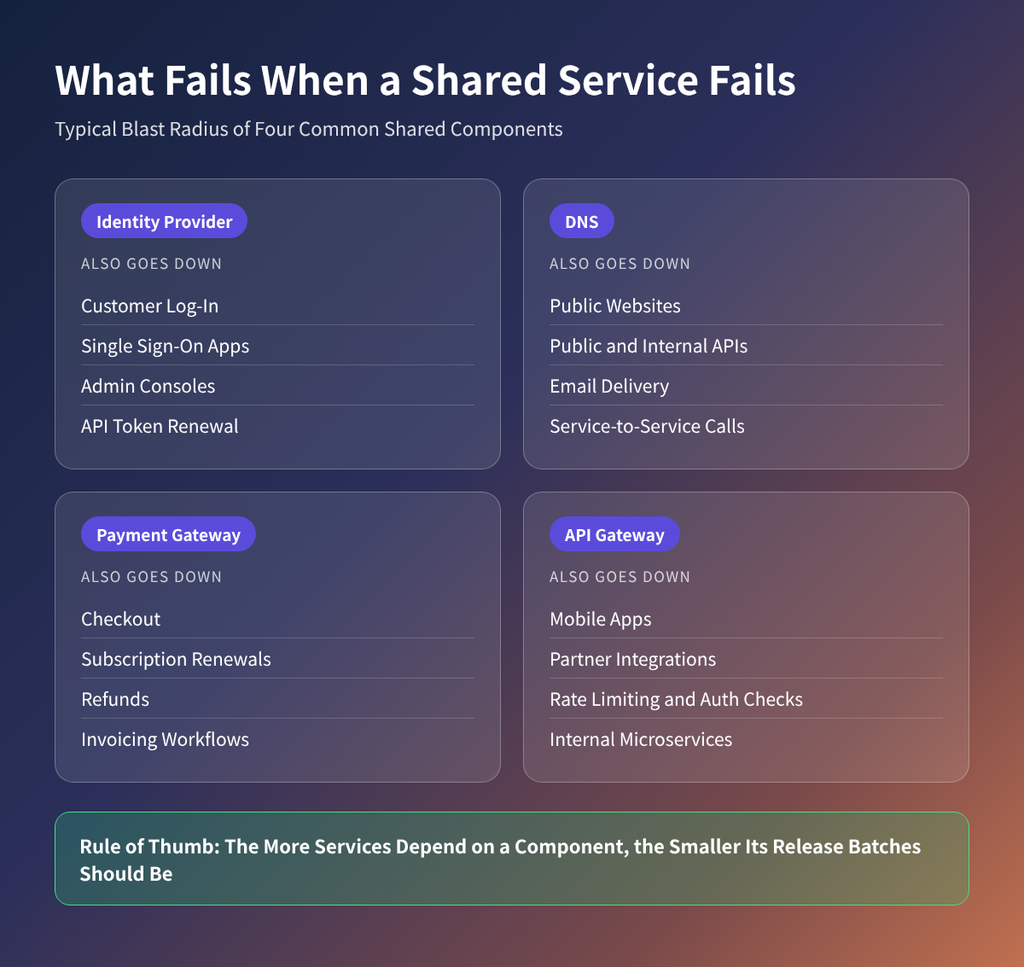
When a shared component fails, every service that depends on it fails too. That is why the Apple outage spread so far beyond iCloud.
Five Release Controls That Stop a Bad Update Spreading
Each control below either limits how many users a faulty change reaches or shortens the time it stays live.
1. Release to a Small Audience First
A canary deployment sends a new version to a small share of traffic first, such as one region or a few per cent of users. The pipeline then compares the canary with the current version. It checks error rates and latency, plus business signals such as successful sign-ins and payments. If the canary performs worse, the rollout stops before most users see the fault.
Start here: split the next release of one high-traffic service into two stages. Hold the first stage through at least one daily traffic peak.
2. Ship Code Switched Off With Feature Flags
Feature flags turn deploying code and releasing it into two separate steps. New code reaches production switched off, then opens up gradually to staff, a small customer group and finally everyone. Switching it off takes seconds and needs no redeployment.
Flags also need maintenance. Once a feature is stable, remove its flag, or old flags pile up into code paths nobody tests.
Start here: give every new flag a named owner and an expiry date.
3. Let Health Signals Trigger the Rollback
Manual rollback depends on someone noticing the fault, finding the cause and deciding to act. Apple’s status page did not show the issue as affecting all users until mid-afternoon. Automated rollback removes that delay. The pipeline watches health signals and reverts the change on its own when one crosses a set threshold.
Signals worth watching:
- Error rates and latency compared with the previous version
- Success rates for critical journeys such as sign-in and checkout
- Sudden spikes in support contacts
Set thresholds against the previous version’s baseline. A fixed number can trigger false rollbacks during normal peaks.
Start here: pick the two signals that would have caught your last incident. Connect them to automatic rollback on your most critical service.
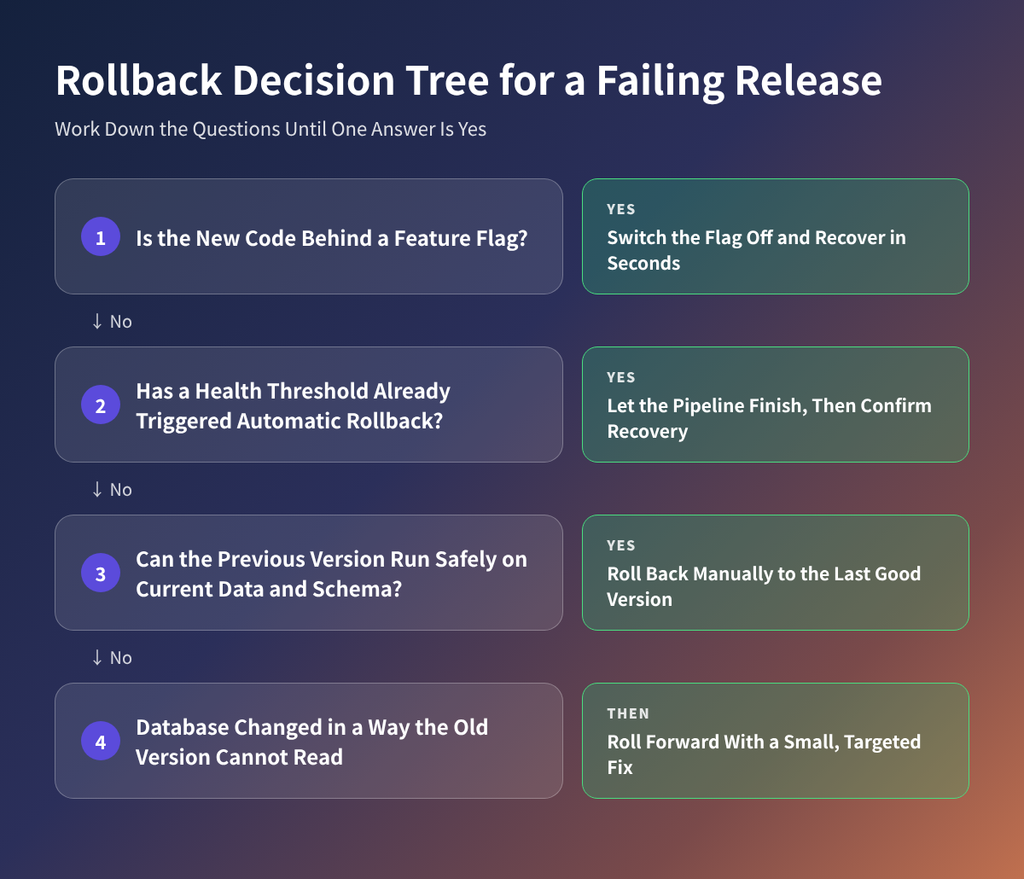
Use the fastest safe recovery route for a failing release. If the database has changed, roll forward with a fix.
4. Put Shared Services Behind Stricter Gates
Identity, payments and DNS need a tighter change process than a marketing site, because a fault in any of them spreads to everything that depends on it. In practice, that means:
- Smaller batches
- A second reviewer from the team that owns the service
- Longer canary stages
- No releases during peak trading hours
Deployflow’s CI/CD services help teams separate critical components from routine ones inside the pipeline.
Start here: tag shared services as critical in the pipeline and attach stricter release rules to that tag.
5. Rehearse the Failure Before It Happens
Staging environments rarely reproduce the dependencies that fail in production, so some weaknesses only appear during a real incident. Game days, which are planned failure drills, expose them on your own schedule.
A useful first drill is to disable your identity provider in a test environment. Then record which services fail, how long monitoring takes to notice and whether alerts reach the right person.
Start here: book one game day this quarter for your most widely shared service. Use time to detection as the main measure of success.
Is Your Release Process Exposed? Take the 10-Minute Audit
Answer each question for your most critical service. Every warning sign points to the control in the previous section that fixes it.
| Question | Healthy Answer | Warning Sign | Fix |
| What share of users sees a new release first? | A small share, widened in stages | Everyone at the same time | Control 1 |
| Can you disable a new feature without deploying? | Yes, by switching a flag off | No, only by redeploying | Control 2 |
| How long does a rollback take? | Minutes, triggered by health signals | Hours, with a manual rebuild | Control 3 |
| Who can halt a rollout? | Any on-call engineer, without approval | Only a senior manager | Control 3 |
| Do shared services follow stricter release rules? | Yes, with extra review and longer canaries | Same process as everything else | Control 4 |
| Which services fail if identity goes down? | Mapped and tested in a drill | Nobody knows for sure | Control 5 |
| When did you last rehearse a major failure? | Within the last quarter | Never, or only during real incidents | Control 5 |
Three or more warning signs mean a faulty change could reach most of your users before anyone acts.
Two Metrics That Show Whether Your Releases Are Safe
The audit tells you whether your controls exist. Two metrics from the DORA research programme tell you whether they work.
Change failure rate is the share of deployments that cause a failure in production. Canaries and stricter gates bring it down by catching faults before they spread. A rising rate is an early sign that your releases are getting riskier.
Failed deployment recovery time is how long it takes to restore service after a bad release. Feature flags and automated rollback shorten it. Customers feel this number directly, so it belongs in board reporting.
Four rules make both numbers trustworthy:
- Define a failure once. Count every rollback, hotfix or incident caused by a release, and use the same definition across every team.
- Measure per service. A healthy company-wide average can hide one critical system that fails far more often than the rest.
- Read them alongside deployment frequency. A team can cut its failure rate by releasing less often, but then each release gets larger and riskier.
- Report the trend over a quarter. A single bad week tells you less than the direction of travel.
How to Keep Customers Informed When a Release Fails
Your status page should confirm a problem before your customers announce it on social media. During Apple’s outage, Downdetector reports climbed while Apple’s page still showed services as available.
- Host the status page separately from your product, so it stays up when the product goes down.
- Link it to monitoring, so a confirmed alert posts a holding notice automatically.
Keep a short holding notice ready to adapt, for example:
“Some customers cannot sign in to the mobile app. Payments and web sign-in are working normally. Next update by 14:30 GMT.”
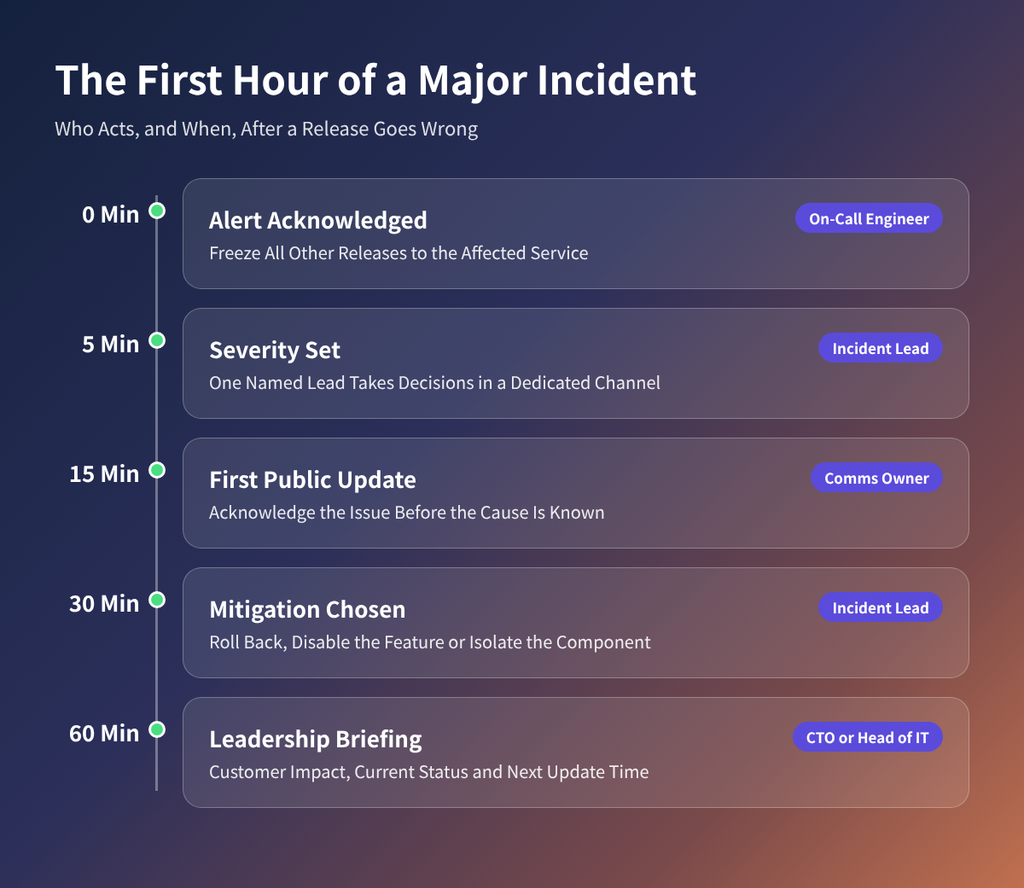
Agree roles before an incident starts, so the first hour is spent fixing the problem and keeping customers informed.
Close every incident with a postmortem that explains the cause and the changes made in response. UK banks, insurers and payment firms must also be able to stay within impact tolerances under FCA and PRA operational resilience rules. The UK National Cyber Security Centre’s incident management guidance covers the wider process.
Make Your Next Release a Non-Event
Apple can absorb a bad Tuesday. Most organisations have less margin, because a failed release to payments or identity hits revenue the same day.
If the audit showed warning signs, most can be fixed without a large transformation programme. Deployflow’s DevOps managed services team adds staged rollouts and automated rollback to existing pipelines. It starts with the services your business can least afford to lose.
Book a release process review to see which gaps in the audit apply to your most critical services.
Apple Outage: Frequently Asked Questions
How can I check if Apple services are down?
Check Apple’s System Status page at apple.com/support/systemstatus. It lists Apple’s consumer services, from iCloud Mail to Apple Pay, with a coloured indicator for each one and details of any active incidents. Developers should also check Apple’s separate Developer System Status page, which covers App Store Connect, TestFlight and other developer tools. Independent trackers such as Downdetector often show problems first, so check both before deciding the fault is on your side. If only one of your devices is affected, the fault is more likely local, so restart it before anything else.
Why was I signed out of my Apple Account?
You were most likely signed out because of the outage itself. Apple ruled out a cyberattack, so there is no sign that accounts were compromised. Now that services are restored, signing back in through Settings on iPhone or System Settings on Mac should work normally.
If it still fails, restart the device and try again. If your password is rejected repeatedly, reset it at iforgot.apple.com. As a precaution, review the devices listed under your Apple Account and remove any you do not recognise. Two-factor authentication remains the strongest protection for any Apple Account.
What is a blue-green deployment?
A blue-green deployment uses two identical production environments. One, called blue, serves live traffic. The other, called green, receives the new release and is tested there.
When the team is confident, all traffic switches from blue to green in one step. If problems appear, traffic switches back just as quickly. The main advantage is near-instant rollback without rebuilding anything. The main drawback is cost, because you often run double the infrastructure during each release. Database changes also need care, since both environments usually share the same data. Many teams combine blue-green with canary releases for critical services, managed through their CI/CD pipeline.
What is an error budget?
An error budget is the amount of unreliability a service is allowed before releases slow down.
It comes from a service level objective (SLO). If your SLO promises 99.9% availability over 30 days, the error budget is the remaining 0.1%, which is roughly 43 minutes of downtime. While budget remains, teams release freely. Once it is spent, the focus moves from new features to reliability work until the budget recovers. Error budgets give engineering and product leaders a shared number for deciding when speed gives way to stability, which settles most post-incident arguments before they start.
Do change advisory boards prevent outages?
Not reliably. DORA’s research on change approval found that heavyweight approval was linked to slower delivery, with no improvement in stability. Heavyweight approval means sign-off from a change advisory board (CAB) outside the team delivering the change. Long approval queues push teams to bundle changes together, and larger batches are harder to test and roll back. A CAB still has a role for genuinely high-risk changes, such as those to identity or payment systems. For routine releases, peer review, automated testing and staged rollouts give stronger protection at lower cost. Scrutiny should match the risk of each change.
Explore our BLOG
Recent articles
Apple’s Outage: Lessons in Safe Release Engineering
The Apple outage of 17 November 2026 was caused by an internal software update that...
read full article

Databricks Production Readiness Checklist: 7 Tests Before Go-Live
A Databricks production readiness checklist tests whether a data platform can run business-critical workloads unattended,...
read full article
Microsoft 365 Outage November 2026: What Failed and How to Keep Your Business Running
Microsoft 365 went down on 12 November 2026 and stayed down for almost 24 hours....
read full article