


Microsoft 365 went down on 12 November 2026 and stayed down for almost 24 hours. Company data stayed intact throughout, but most users lost access to their mailboxes for a full working day. The firms that kept trading had prepared for exactly that, and their playbook is below.
Microsoft 365 Outage: Key Facts for CTOs
- Status: Resolved. Impact ran from 16:20 UTC on 12 November to 16:10 UTC on 13 November. Microsoft published a preliminary post-incident report on 15 November.
- Cause: A latent Windows defect on Microsoft’s networking gateway servers, triggered by a traffic shift and reduced capacity. No attacker was involved.
- Scale: Exchange Online took the heaviest hit. Features in Teams, Copilot, Defender XDR, Purview and Intune that depend on it failed alongside it.
- Money: SLA credits must be claimed by 31 December 2026. They are never paid automatically.
- Action: Test how long your business can run without Microsoft 365, and put a number of hours on it.
What Happened on 12 November? The Outage Timeline
| Time (UTC) | Event |
| 12 Nov, early hours | Teams traffic moves onto the gateway shared with Exchange Online |
| 12 Nov, 16:20 | Exchange Online impact begins |
| 12 Nov, 18:25 | Downdetector peaks at 19,650 reports a minute across five Microsoft services |
| 13 Nov, before 01:50 | Microsoft starts reverting a recent network configuration change |
| 13 Nov, 16:10 | Impact ends |
| 15 Nov | Preliminary post-incident report published |
| 20 Nov | Repair details due from Microsoft |
Microsoft tracked the incident as MO1550821 and EX1550543. At the worst point, more than 80% of the affected gateway servers had stopped responding.
Is Microsoft 365 Down Right Now? Four Places to Check
| Where to Look | What It Tells You | Sign-In Needed |
| Service Health in the admin centre | Incidents affecting your own tenant | Yes |
| status.cloud.microsoft | Platform-wide incidents | No |
| Microsoft 365 Status on X | The latest engineering updates | No |
| Downdetector | Whether other organisations are affected | No |
Keep the three public sources in your runbook. The admin centre is no help if sign-in is part of the problem.
What Caused the Microsoft 365 Outage? A Latent Windows Defect
Microsoft’s preliminary post-incident report traces the failure to a fix deployed to its networking gateway servers from July. The fix ran for over three months without visible problems, until four conditions lined up:
- A Windows process on the gateways hit lock contention under certain traffic patterns and exhausted CPU and memory. Microsoft’s tests ran on older machines and missed it. Newer hardware with more cores suffered most.
- About 15 hours before the outage, Teams traffic moved onto the primary gateway shared with Exchange Online.
- Nearly 14% of gateway capacity was already offline for an unrelated reason.
- Automatic failover pushed connections onto healthy servers and spread the fault across regions in under two hours. Restarted servers failed again as soon as queued traffic returned.
Teams, SharePoint and OneDrive could route traffic elsewhere. Exchange Online could not at its scale, so email took the hardest hit. Microsoft says no tenant or device changes are needed, and has committed to publishing repair details by 20 November.
Was the Microsoft Outage a Cyberattack? Microsoft Says No
On 13 November, Microsoft ruled out both cyber activity and AI agents as causes.
The timing fuelled suspicion. Patch Tuesday, two days earlier, had fixed an Outlook spoofing flaw (CVE-2026-124194) that attackers were already using. Microsoft’s advisories draw no link between the two. Apply the patch regardless: the flaw leaks NTLMv2 hashes when a user opens a crafted message file, and CISA has added it to its Known Exploited Vulnerabilities catalogue.
Why Did Outlook Take Teams, Copilot and Defender Down With It?
Exchange Online holds the mail, calendars and contacts that other Microsoft 365 services read. When it stopped answering, they stalled as well.
What your business lost, by function:
- Communication: Outlook, Exchange Online and Teams. Email, calendars, meetings and chat were disrupted.
- Documents: SharePoint Online. Shared files and intranets became unreachable.
- AI assistance: Microsoft 365 Copilot.
- Integrations: the Graph API. Custom apps and automations that call it were exposed to failures.
- Security: Defender XDR. Security teams could not connect to their detection console.
Raise that last one with your board. A firm that runs email and threat detection on a single platform loses both in the same hour.
How Often Does Microsoft 365 Go Down? Three Major Outages in 2026
- January 2026: Elevated load during maintenance took Microsoft 365 down for more than nine hours.
- August 2026: A faulty core authentication configuration disrupted Exchange Online, Teams, SharePoint and Defender XDR for around three days.
- November 2026: This incident.
All three trace back to maintenance or changes Microsoft made to its own platform, and customers cannot review or delay any of them. Smaller Exchange Online incidents also hit in March, April, May and June.
Other providers have the same weakness. On 20 October 2026, a power event in Google Cloud’s London region (europe-west2) froze card payments and ATM withdrawals for Revolut customers.
Plan for provider failure as a recurring event.
Microsoft 365 SLA Credits: How to Claim Compensation for the Outage
Compensation comes as a credit against future fees. Microsoft commits to 99.9% monthly uptime for Exchange Online, Teams and SharePoint, and the credit grows as uptime falls:
- Below 99.9% uptime: 25% credit
- Below 99% uptime: 50% credit
- Below 95% uptime: 100% credit
A tenant offline for the full 24 hours would record about 96.7% uptime for November. That earns a 50% credit. Your real figure depends on how Microsoft measures downtime for your users.
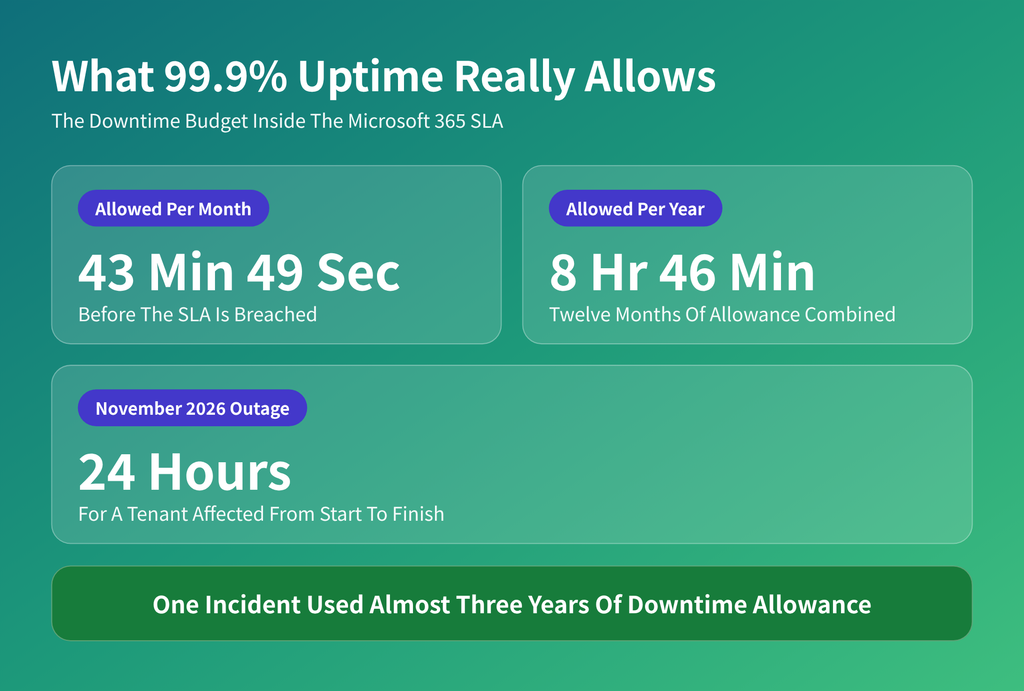
A 99.9% SLA allows under nine hours of downtime a year. November’s outage used almost three years of that allowance in one incident.
Four rules apply to every claim:
- An admin must submit the claim with incident details.
- Claims close at the end of the calendar month after the incident. For this outage, that is 31 December 2026.
- Credits cover fees for the affected service only.
- Lost revenue and idle staff time are excluded.
Microsoft 365 Outages and UK Regulation: FCA and DORA Duties
Firms in scope of the FCA’s operational resilience rules cannot pass the blame upstream. Those rules require impact tolerances for every important business service. Responsibility for staying within tolerance stays with the firm, even when a third-party provider causes the breach.
EU financial entities carry similar ICT third-party duties under DORA. In both regimes, a 24-hour email outage needs a documented, tested workaround.
How to Keep Working When Microsoft 365 Is Down
Before the outage
- Agree on a fallback messaging tool outside Microsoft 365. Keep staff and client contact lists somewhere that survives an outage.
- Save runbooks offline. Procedures stored only in SharePoint disappear with it.
- Map which business services depend on Exchange, Teams or the Graph API. Include in-house apps. An audit from a managed IT support team produces that map if nobody in-house has the time.
- Forward security logs to a platform beyond Defender. Independent DevSecOps monitoring keeps detection running when Microsoft’s console is unreachable.
During the outage
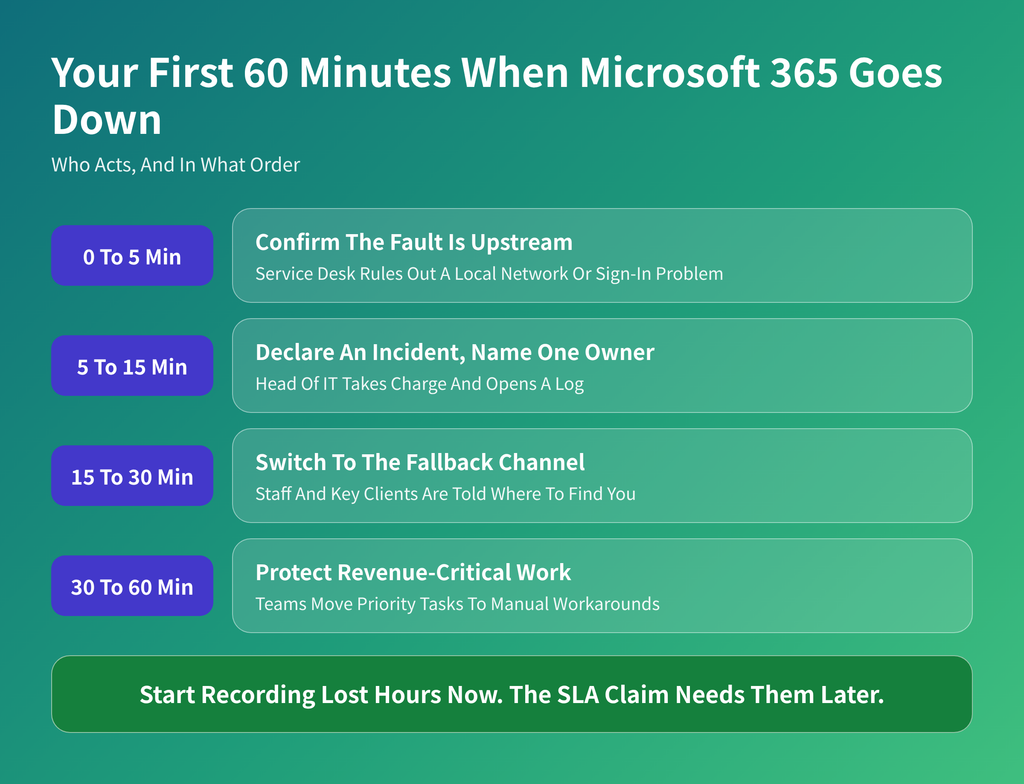
In the first hour: confirm the fault is Microsoft’s, name one incident owner, move to the fallback channel, then protect revenue-critical work. Log lost hours from the start for the SLA claim.
After the outage
- File the SLA claim before the deadline.
- Review your own change control. Microsoft’s defect ran for three months before it broke anything, so ship small, reversible changes and keep watching them long after rollout.
- Run a tabletop exercise on “Microsoft 365 unavailable for 24 hours”. Time every workaround.
Want to know which workaround breaks first? Deployflow engineers can run a 24-hour Microsoft 365 outage exercise with your team. Book a session.
Will a Microsoft 365 Backup Help During an Outage?
Yes, if the backup is held outside Microsoft’s infrastructure.
Under the shared responsibility model, Microsoft runs the platform, and you remain responsible for your data. Microsoft’s own Services Agreement recommends that customers back up their content regularly.
Retention policies do not solve this. They live inside the same tenant that went offline. An independent Microsoft 365 backup lets staff open a contract or a client mailbox while the tenant is unreachable.
Is Your Business Ready for the Next Microsoft 365 Outage?
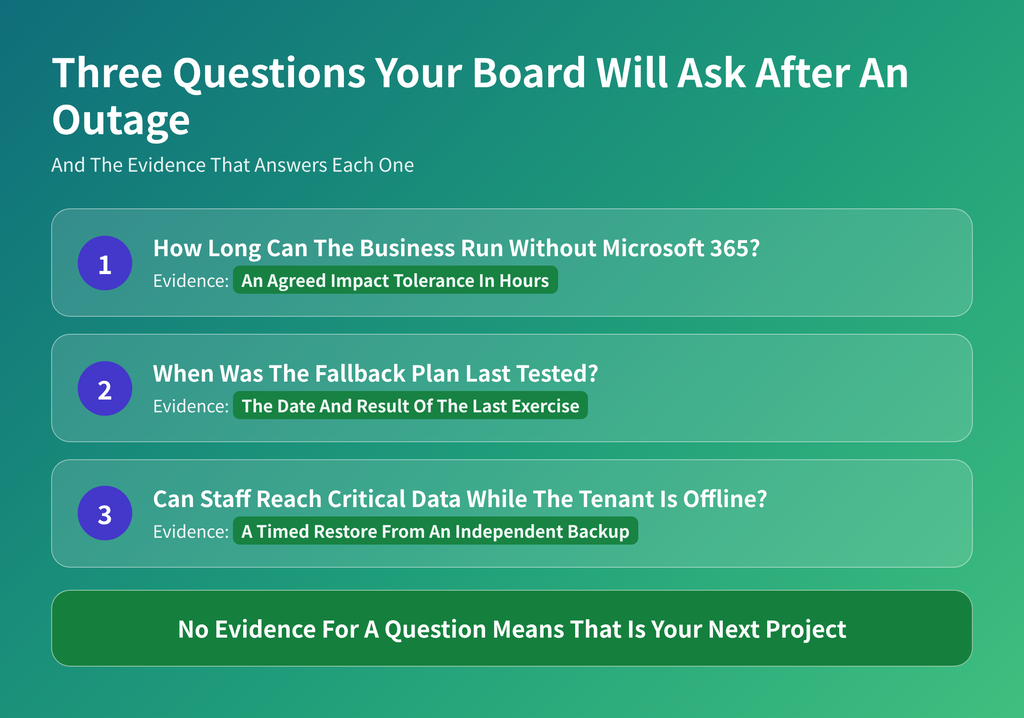
Boards ask how long the business can run without Microsoft 365, when the fallback was last tested, and whether data is reachable offline. Each answer needs evidence.
If one of those answers is missing, start there. A single tabletop exercise shows which workaround fails first.
Deployflow’s DevOps managed services include 24/7 monitoring, disaster recovery and business continuity support.
Book a free consultation to find out how long your business would last without Microsoft 365.
Is Microsoft 365 Down? Frequently Asked Questions
Can I still use Outlook when Microsoft 365 is down?
Yes, partly. Outlook for desktop in Cached Exchange Mode keeps a local copy of your mailbox, so you can read existing mail, search it and draft replies.
New messages wait in the Outbox and send once the connection returns. Outlook on the web has no such fallback. Offline support in the new Outlook for Windows is also more limited than in classic Outlook, so check which client your staff run. Check that Cached Mode is switched on across company laptops, and set the sync window to cover at least twelve months. Shared mailboxes and calendars may show older data until service resumes.
Does a Microsoft 365 outage affect on-premises Exchange servers?
No. On-premises Exchange Server runs on your own hardware and does not depend on Microsoft’s cloud mailbox servers.
Hybrid setups are the exception. If inbound mail routes through Exchange Online Protection, or some mailboxes live in the cloud, those parts can slow down or fail. Review your mail flow and confirm which path each domain uses. Moving back to on-premises servers purely for resilience rarely pays, because you take on the patching, hardware and security work that Microsoft handles today.
What is the difference between a Microsoft 365 outage and an Azure outage?
They are separate services with separate status pages, and one can fail while the other runs normally.
Microsoft 365 covers the productivity apps such as Outlook, Teams and SharePoint. Azure is the cloud platform that hosts your own applications, databases and virtual machines. The November 2026 incident was logged against Microsoft 365 only. Azure reports still spiked on Downdetector while Azure’s status page showed no issues, so crowd-sourced data alone can point you at the wrong provider.
Shared components, including identity and networking, can affect both at once. Your dependency map should cover both. If your own workloads run on Azure, 24/7 cloud management means someone is watching when a fault hits.
Does cyber insurance cover losses from a Microsoft 365 outage?
Sometimes, and rarely in full. Cover depends on whether your policy includes dependent business interruption for cloud providers, and whether it pays for system failures with no attacker involved.
Many policies respond only to cyberattacks. Most also apply a waiting period of several hours before losses start to count. Ask your broker whether Microsoft is a covered provider, whether accidental outages are included, and what proof of loss is required. Keep incident logs and revenue records from the outage either way.
How do I calculate the cost of Microsoft 365 downtime?
Multiply the number of affected staff by their average hourly cost and the hours lost. Then add revenue that could not be earned and any contractual penalties. Use your own payroll and sales figures, because published averages vary widely by sector. Count the recovery work too, such as clearing backlogs and paying overtime. The total sets a ceiling for resilience spending. If one day offline costs more than a year of fallback tooling, the investment is easy to defend at board level.
Explore our BLOG
Recent articles
Microsoft 365 Outage November 2026: What Failed and How to Keep Your Business Running
Microsoft 365 went down on 12 November 2026 and stayed down for almost 24 hours....
read full article

Is Claude Down? Anthropic Outage: Protect Your Cloud Infrastructure
Claude logged four incidents in 36 hours between 12 and 14 November 2026, including a...
read full article

PHP2Shell Explained: Why Patched Apps Were Still Exposed and What to Fix First
PHP2Shell is two critical flaws in the PHP runtime that let attackers take over unpatched...
read full article