


IT infrastructure continues to evolve, with security as one of the main priorities. As more organisations look to store information in a more secure and dynamic environment, AWS cloud migration services are increasingly in-demand to fulfill that requirement.
Migrating your on-premise data into a proven, secure platform like AWS can provide more peace of mind and encourage growth opportunities.
But why should you move to AWS, and how can it benefit your business? In this blog, we’ll explore those and even address the key challenges and advantages of migrating to AWS while explaining why AWS is the ideal solution for your needs.
Why AWS over Other Cloud Solutions?

Amazon Web Services (AWS) stands out for several key reasons. Here are the top five:
- Unmatched global reach: AWS has an extensive global infrastructure, operating 84 Availability Zones within 26 regions worldwide. This means your applications can be deployed closer to your users, reducing latency and enhancing performance. Whether your audience is in North America, Europe, or Asia, AWS has you covered.
- A service for everything: With over 200 fully-featured services, AWS offers solutions for computing, storage, databases, machine learning, and more. These capabilities allow businesses to find tailored solutions for their specific needs, facilitating innovation and scalability.
- Robust security measures: Security is a top priority for AWS. They provide features like Identity and Access Management (IAM), network isolation through Virtual Private Clouds (VPCs), and data encryption to protect your data. Regular compliance certifications further ensure a secure environment.
- Flexible pricing that makes sense: AWS operates on a pay-as-you-go model, meaning you only pay for the resources you use. For businesses with predictable workloads, Reserved Instances offer significant cost savings. This flexibility allows you to find a pricing model that fits your budget.
- Constant innovation: AWS is always rolling out new features and services, keeping you ahead of the curve. AWS is a solid bet if you want access to the latest and greatest in cloud tech.
5 Key Challenges during AWS Migration

Moving to the cloud is smart, but it’s not without its hurdles. Whether you’re going all-in or keeping some systems on-prem, here are common challenges and solutions to help ensure a smooth transition:
Challenge #1: Lack of a Clear Strategy
Jumping into cloud migration without a solid plan can lead to downtime and inefficiencies.
Solution: Create a detailed roadmap outlining what to migrate, why, and who’s responsible. Consider dependencies, security, and automation to streamline the process.
Challenge #2: Unexpected Costs
Many businesses underestimate migration expenses, from bandwidth needs to post-migration costs.
Solution: Use cloud cost estimation tools, set a realistic budget, and factor in both migration and ongoing cloud costs.
Challenge #3 Complex IT Architecture
Integrating the cloud with existing systems can be tricky, especially with legacy infrastructure.
Solution: Design a cloud transformation strategy that aligns with your IT setup to avoid unnecessary complexity and compatibility issues.
Challenge #4: Security & Compliance Risks
Transferring data introduces security risks, and cloud-hosted apps must meet compliance standards.
Solution: Choose a cloud provider with strong security protocols, ensure private connections for sensitive data, and verify compliance measures.
AWS-certified experts play a vital role in driving innovation and solving complex challenges, especially in industries with strict regulations. With proven skills and hands-on experience, these professionals help organisations build secure, scalable, and efficient cloud solutions, making them invaluable in today’s digital landscape.
5 Steps to AWS Migration Process
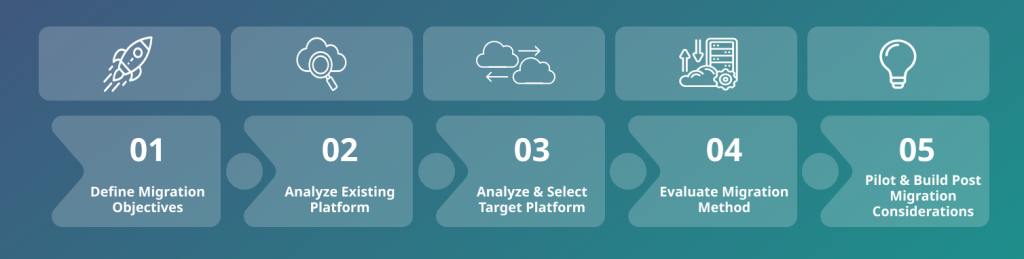
Migrating to AWS can unlock scalability, cost savings, and enhanced security for your organization. But to make the transition smooth, you need a well-structured plan. Here’s a five-step guide to help you migrate with confidence.
1. Discover Your IT Landscape
Start by taking stock of your current applications, data, and infrastructure. Identify dependencies, analyse performance, and assess security requirements. Understanding what you’re working with will help you build a solid migration strategy.
2. Assess and Plan
Decide on the best migration approach for each workload—whether it’s rehosting (lift and shift), replatforming, or refactoring. Identify any skill gaps in your team and consider AWS training or external expertise to fill them.
3. Test with a Proof of Concept (POC)
Before migrating everything, run a test migration on a low-risk workload. Define success metrics like performance improvements or cost savings. Use AWS tools to estimate costs, test security measures, and ensure your network can handle the shift.
4. Execute the Migration
Build a detailed migration blueprint, outlining the AWS services you’ll use (like EC2, S3, or RDS). Minimise downtime with automation tools like AWS Migration Hub. Keep a rollback plan ready in case of issues, and test thoroughly after migration.
5. Optimise and Manage in the Cloud
Once migrated, focus on optimising performance and security. Use AWS-native tools like CloudWatch for monitoring and CloudTrail for tracking changes. Automate maintenance tasks with AWS Systems Manager and continuously refine your cloud environment for efficiency.
How to Future-Proof AWS Cloud Investments
To future-proof your AWS cloud investments, it’s smart to tap into trends like serverless computing, AI/ML, and edge computing. Serverless options like AWS Lambda let you skip the hassle of managing servers, while AI/ML tools like SageMaker help you make data-driven decisions faster.
If you’re working with real-time apps, AWS edge computing (like Wavelength) brings performance with low latency right where you need it. To stay flexible as your business grows, make sure your cloud setup is scalable, think auto-scaling, multi-region setups, and using infrastructure as code. Keeping an eye on AWS updates and optimising resources will help keep you ahead of the curve!
How can Deployflow Help you Unlock the Full Value of the Cloud with AWS?
If you’re ready to move to the cloud, AWS cloud migration services can help you meet both current and future business needs. Migrating from on-premise to the cloud can be complex, which is why having the right partner is key.
Deployflow’s tool-based framework and cloud consulting services streamline the process, reducing time to market and driving business transformation. Our experienced cloud DevOps engineers use industry best practices to craft a tailored strategy for your business. Contact us to learn how we can unlock the full potential of the cloud for you.
FAQs
Benefits of migrating to AWS
AWS offers scalability, cost efficiency, security, and access to a broad range of innovative services, enabling businesses to accelerate growth and improve agility.
How long does an AWS migration take?
The duration of an AWS migration depends on the complexity of your infrastructure and the size of the data, typically ranging from a few weeks to several months.
What tools are available for AWS migration?
AWS provides several tools for migration, including AWS Migration Hub, AWS Server Migration Service, AWS Database Migration Service, and AWS Application Discovery Service.
What are the steps to migrate to AWS?
The main steps include discovery, assessment, proof of concept, migration, and post-migration optimisation.
How much does AWS cloud migration cost?
The cost of AWS migration varies based on factors like the size of your workloads, chosen services, and duration of the migration, but AWS offers cost estimation tools to help plan expenses.
Explore our BLOG
Recent articles

Is Claude Down? Anthropic Outage: Protect Your Cloud Infrastructure
Claude.ai has spent 2026 fighting its own success. Twenty-one incidents landed between 12 August and...
read full article

AI Experimentation vs AI Engineering: The Difference That Decides Whether Your AI Budget Survives
Experimentation buys you knowledge. Engineering buys you a system that still works next quarter, when...
read full article

Why Most Agentic AI Projects Fail Before They Scale
Has your agent been three months from production for nine months? Agentic projects break at...
read full article