


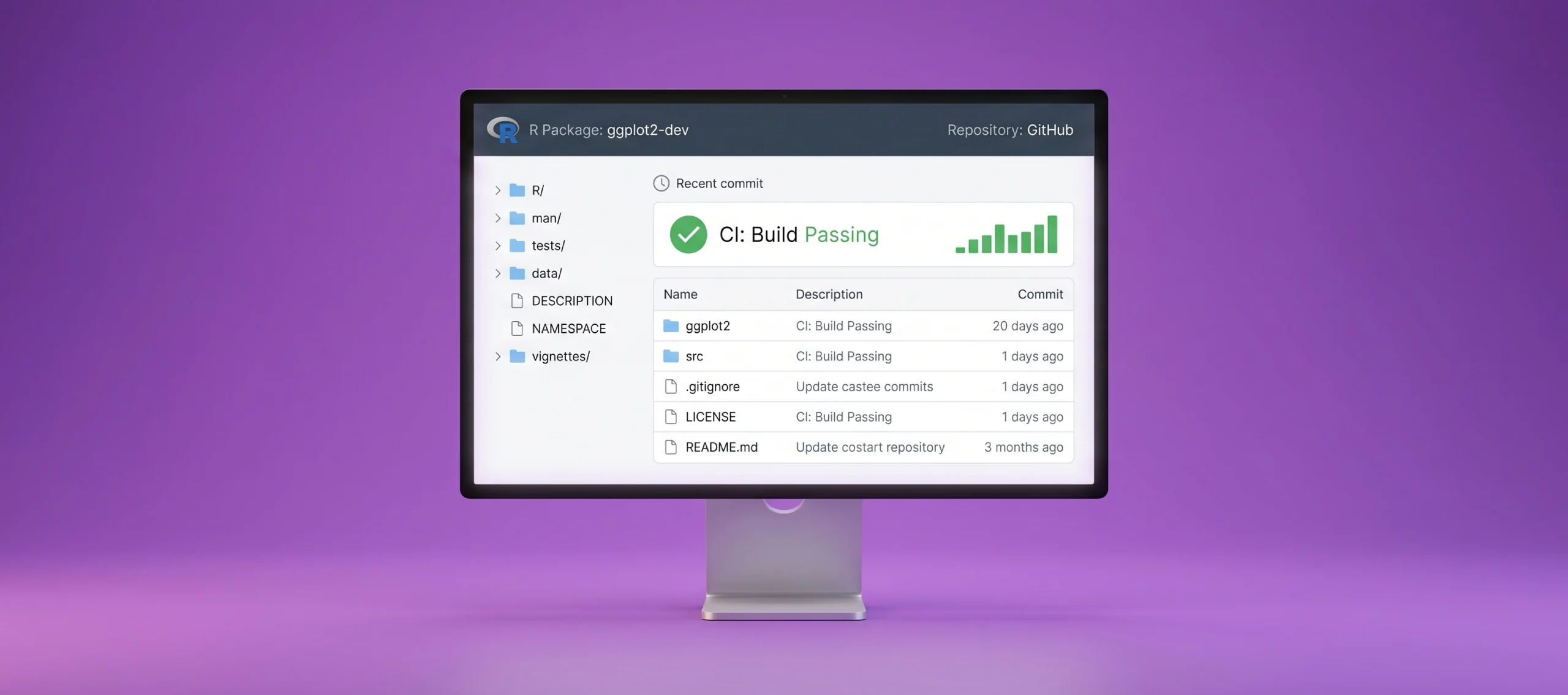
Your R scripts work perfectly on your machine and fail the moment anyone else runs them. This guide shows you why that happens and how to fix it with a CI pipeline you can have running by the end of today.
Executive Summary
- What R continuous integration does, and why R needs a different setup to a typical Python or JavaScript pipeline.
- The exact tools to use: GitHub Actions, usethis, renv, and testthat, and what each one is responsible for.
- A five-step setup you can follow today, with a working pipeline running inside a day.
- Which CI tool to skip. Travis CI and AppVeyor are no longer properly supported for R, even though older guides still recommend them.
- How this fits into a wider CI strategy if your team runs R alongside other languages, with the four questions that decide your next move.
R Continuous Integration: What It Does
R continuous integration sets up an automated pipeline that builds your R project, installs its dependencies, and runs your tests or checks every time you commit code. When something fails, the pipeline tells you immediately, before the broken version reaches anyone else.
The mechanism mirrors CI for any language: commit, build, test, report. What changes for R is the detail inside that loop. R projects often depend on a long chain of package versions, and a script that runs cleanly today can fail in six months when one of those packages updates underneath it. CI catches that gap before a colleague, a client, or a production report does.
Why Your R Projects Need Continuous Integration
R occupies an unusual position. Most of its use is for data analysis and statistical modelling rather than conventional software, which shifts where the risk lies.
Package and version drift. R relies on CRAN and, increasingly, Bioconductor for its package ecosystem. A script written for one set of package versions can behave differently or fail outright with another. Without something to track and reproduce those exact versions, you are trusting that nothing has shifted beneath you.
When researchers re-ran more than 9,000 published R files in a clean environment, 74% failed to complete without error, and 56% still failed after automated code fixes were applied.
Reproducibility of your analysis. A report that runs correctly only on the analyst’s laptop is not a reliable asset. The problem holds even when the code is shared. When a journal required authors to provide the data and code behind their results, the shared materials let researchers reproduce only about a quarter of the published findings. When a colleague cannot reproduce the same environment and obtain the same output, the analysis cannot be verified, and any decision built on it carries a hidden risk.
Early warning on long-running pipelines. Data science and machine learning workflows get extended, refactored, and rerun against new data for months or years. CI flags the moment a change breaks something downstream, rather than letting it surface in a stakeholder’s dashboard.
The principle is not unique to R. The tooling built to solve it has matured considerably.
How Does R Continuous Integration Work?
The loop is simple. You push a commit. A CI service spins up a clean environment, installs R and the packages your project needs, and runs your checks. A pass gives you a green signal. A failure gives you a clear report of what broke, before it reaches production.
Here is what that looks like as an actual workflow file. This is the minimum configuration needed to run checks on every push to GitHub:
# .github/workflows/R-CI.yaml

on:

  push:

    branches: [main]

  pull_request:

    branches: [main]

name: R-CMD-check

jobs:

  check:

    runs-on: ubuntu-latest

    steps:

      - uses: actions/checkout@v4

      - uses: r-lib/actions/setup-r@v2

      - uses: r-lib/actions/setup-r-dependencies@v2

        with:

          extra-packages: any::rcmdcheck

      - uses: r-lib/actions/check-r-package@v2
Save that file, push it to your repository, and GitHub runs it automatically on the next commit. No further setup required.
For R specifically, the centrepiece is often R CMD check, the same validation CRAN runs against every package submitted to it. Running it automatically on every commit catches issues that would otherwise only surface at submission time, or after a colleague has already built on top of broken code.
Two further pieces do the practical work underneath that check:
Dependency management. The renv package records the exact versions of every package your project depends on in a lockfile, and restores that exact set on any machine that runs it. You start it like this:
# Initialise renv in your project

renv::init()

# After installing or updating packages, record the current state

renv::snapshot()

# On a different machine, or in CI, restore that exact environment

renv::restore()

The lockfile this creates (renv.lock) looks something like this:
{
"R": {
"Version": "4.4.1"
},
"Packages": {
"dplyr": {
"Package": "dplyr",
"Version": "1.1.4",
"Source": "Repository",
"Repository": "CRAN"
}
}
}Commit that file alongside your code. Anyone who clones the repository or any CI runner that checks it out can now reproduce your exact environment with a single command. This turns “works on my machine” into “works on every machine.”
Test coverage. The testthat package runs your unit tests, and covr reports how much of your code those tests actually exercise. A basic test looks like this:
# tests/testthat/test-clean_data.R

test_that("clean_data removes rows with missing values", {

  raw <- data.frame(x = c(1, NA, 3), y = c("a", "b", NA))

  result <- clean_data(raw)

  expect_equal(nrow(result), 1)

})
Every time CI runs, it runs every test file in tests/testthat/. If clean_data changes in a way that breaks this behaviour, the pipeline fails immediately rather than someone noticing an incorrect row count three reports later.
Together, you get a pipeline that installs a known environment, runs known checks, and immediately tells you if either breaks.
The Three Layers of Reproducible R Project
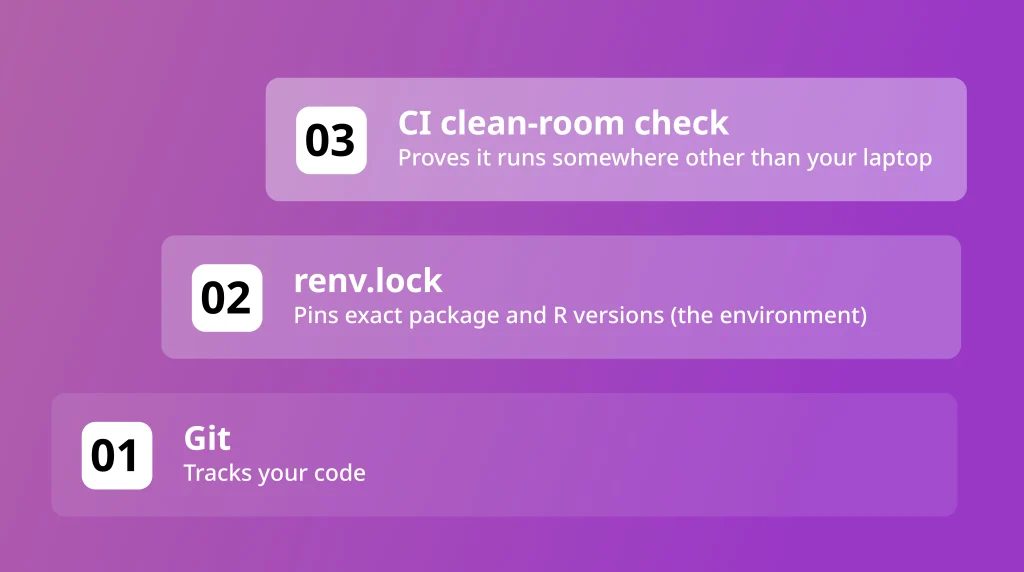
Most teams stop at layer 1 and skip the rest.
Best Tools for R Continuous Integration
GitHub Actions is the standard choice for most R projects today. The tidyverse team itself has moved to GitHub Actions for its own continuous integration, and the tooling around it is actively maintained. If your code already lives on GitHub, this is the path of least friction, with strong community support built specifically for R.
GitLab CI works well if your team has already standardised on GitLab for version control. The setup principles stay identical; only the configuration syntax differs. A comparable check in GitLab looks like this:
# .gitlab-ci.yml

image: rocker/r-ver:4.4.1

stages:

  - test

r_cmd_check:

  stage: test

  script:

    - Rscript -e 'install.packages("rcmdcheck")'

    - Rscript -e 'rcmdcheck::rcmdcheck(args = "--no-manual", error_on = "warning")'
Choosing between runners for the rest of your stack is a separate question, and how Jenkins and GitLab CI compare lays out the trade-offs in deployment speed and integration overhead.
Travis CI and AppVeyor were once the default for R projects. That has changed. Functionality for both is now soft-deprecated within the R tooling ecosystem, while GitHub Actions support continues to be actively maintained and exercised. If you inherit a project still configured against either, migrating to GitHub Actions pays off.
Specialist R workflows suit niche needs. The tic package offers CI-agnostic workflow templates that work across providers, and rworkflows extends this further with containerised deployment for projects that need a Docker image alongside their checks.
The tool matters less than what runs inside it. A reproducible, version-controlled environment passes cleanly on any of these services. An environment that has drifted fails on all of them, which is exactly the point.
How to Set Up CI for an R Package: Step by Step
Step 1: Generate the workflow file. Run this once, from inside your R project:
usethis::use_github_action("check-standard")This single function call writes the complete .github/workflows/R-CMD-check.yaml file into your repository, configured to test your package across Linux, Mac, and Windows.
Step 2: Choose your core workflows. Start with check-standard, which runs R CMD check across operating systems on the latest R release, and test-coverage, which reports how much of your code your tests exercise:
usethis::use_github_action("test-coverage")Add pkgdown, which builds a documentation site, once the basics run cleanly:
usethis::use_pkgdown_github_pages()Step 3: Lock your dependencies. From your project root:
renv::init()

renv::snapshot()
Commit the resulting renv.lock file. This is what makes Step 1 meaningful. A pipeline checking against an undefined set of package versions checks against a moving target.
Step 4: Write your tests. If your package has none yet, set up the testing structure with:
usethis::use_testthat()

usethis::use_test("clean_data")
This creates a test file ready to fill in, following the format shown earlier. If you are retrofitting tests onto existing code, start with the functions that change most often, not the ones that simply look easiest to test.
Step 5: Commit and push.
git add .github renv.lock tests

git commit -m "Add CI pipeline with renv and testthat"

git push
Open your repository on GitHub and check the Actions tab. You should see the pipeline running within a minute or two of the push.
A working pipeline can run within a day for most packages. The part that takes longer, and the part teams consistently underestimate, is reaching the point where the environment is reproducible enough for the checks to mean anything. Getting there reliably, on pipelines that have to stay trustworthy over years, is the core of what Deployflow’s DevOps CI/CD services deliver.
R Continuous Integration vs General Software CI: What Changes
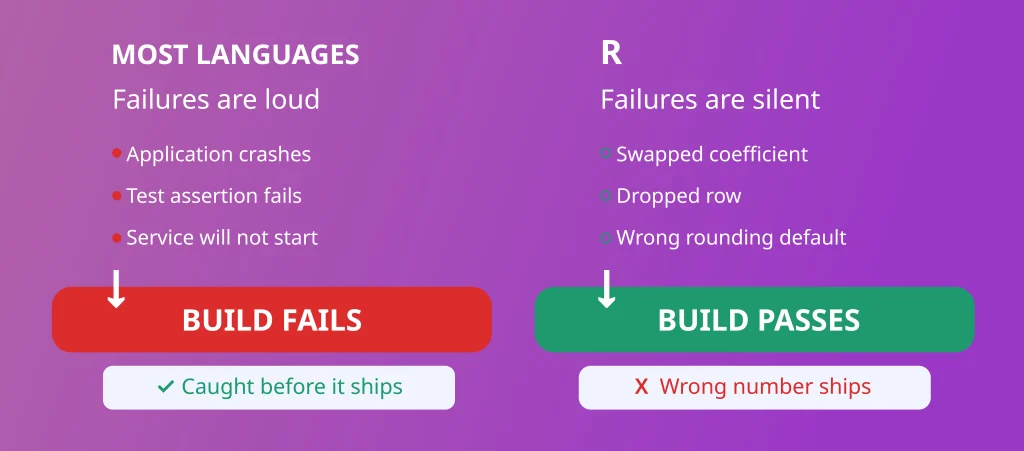
R failures hide better than most. A pipeline can run green for months while producing the wrong number, because a passing build only confirms the code ran, not that the answer is correct.
That is the real difference. Other languages mostly break loudly: a crash, a failed test, a service that won’t start. R can fail without a clear signal: a swapped coefficient, a dropped row, a wrong rounding default, none of which trip a standard check.
Two consequences follow. First, R CI needs output verification, not just build verification. Characterisation tests, which lock in a function’s current output and flag any change to it, catch what a green build will not. Second, CRAN package versions can shift statistical behaviour without warning, which is why renv is closer to mandatory than optional for R, more than dependency locking is for most other stacks.
If you run R alongside other languages, that is the budget shift worth making: spend more of your CI effort on checking that R’s answers are still correct.
Beyond R: Building CI Discipline Across Your Entire Stack
The discipline behind R continuous integration, locking down your environment, automating your checks, and gating changes on a passing pipeline, holds regardless of language. It applies to any codebase carrying risk you cannot afford to ship blind.
Few engineering estates run on R alone. It usually sits alongside a handful of other languages, each with its own CI maturity, and the gap is rarely the tooling itself. It is finding the time to apply that discipline consistently while the team is still shipping.
When friction shows up as slow builds or flaky releases elsewhere in the stack, a guide to five practical fixes for a slow CI/CD pipeline covers the most common causes and how to address them.
Deployflow experts integrate inside engineering teams to bring CI/CD discipline to codebases of every kind, including the ones that have been left to drift the longest. Deployflow covers that work end to end, from pipeline design to the dependency governance R projects in particular tend to skip.
When Little Journey needed to give a fast-growing pediatric health platform secure, repeatable environments, Deployflow automated their infrastructure with Terraform. Deployment time for new environments dropped from several days to two hours, an 80% reduction, while manual labour fell by 70%.
Every day that gap stays open is another day your team ships on hope instead of evidence. If part of your stack is still running on tribal knowledge and manual steps, the cost is not visible until the day it fails publicly. Talk to Deployflow before that day arrives.
Frequently Asked Questions: R Continuous Integration Setup and Costs
How long does it take to set up CI for an R package?
A basic pipeline with R CMD check and test coverage takes under an hour to configure once usethis generates the workflow file, and the first run typically completes within a few minutes on GitHub Actions. The real time cost sits elsewhere. If your project has no test suite or lockfile yet, writing tests and locking dependencies properly usually takes a few days to a few weeks, depending on how large and how undocumented the codebase already is.
If that work would stall your already-stretched team, DevOps managed services provide an embedded delivery team to handle everything from test coverage to locked, reproducible environments.
Does R CI cost money to run?
GitHub Actions gives every public repository unlimited free minutes, and private repositories get a generous free monthly allowance before any charge applies. For most R packages and analysis projects, that allowance comfortably covers regular commits. Costs only become a factor on very large projects with long-running checks across many operating systems, or where you are running dozens of builds a day across a busy team.
Why does my R package pass CI on Linux but fail on Windows or Mac?
This usually points to a dependency that behaves differently across operating systems, often one with compiled C or C++ code, or a file path written in a Linux-only format. Running the check-standard workflow across all three platforms from the outset, rather than testing on a single operating system, is what surfaces this early rather than after a colleague tries to install your package somewhere you never tested.
What is the difference between testing for CRAN and testing for Bioconductor?
CRAN runs its own R CMD check against every submission and expects packages to pass with no errors or warnings. Bioconductor adds its own build and check system on top of that, with stricter expectations around versioning, documentation, and ongoing maintenance, since Bioconductor keeps source code under git and runs builds on a recurring schedule rather than only at submission time. If your package targets Bioconductor rather than CRAN, your CI pipeline needs to mirror Bioconductor’s specific build checks, not just the standard CRAN ones.
What should I do when CI fails on an old or development version of R?
Treat it as useful information rather than noise. CI pipelines for CRAN-bound packages typically test against the current release, the previous release, and the development version of R, precisely because behaviour can shift between them. A failure against the development version often gives you early warning of a change that will affect your users months before it reaches a stable release. Address those failures rather than excluding that R version from your checks, since removing the warning does not remove the underlying risk.
Explore our BLOG
Recent articles

Is Claude Down? Anthropic Outage: Protect Your Cloud Infrastructure
Claude.ai has spent 2026 fighting its own success. Twenty-one incidents landed between 12 August and...
read full article

AI Experimentation vs AI Engineering: The Difference That Decides Whether Your AI Budget Survives
Experimentation buys you knowledge. Engineering buys you a system that still works next quarter, when...
read full article

Why Most Agentic AI Projects Fail Before They Scale
Has your agent been three months from production for nine months? Agentic projects break at...
read full article