



Still relying on spreadsheets that crash minutes before deadlines? Struggling with manual processes, poor visibility, and outdated tools? These are signs it’s time to consider a Business Central migration.
From lost stock and shipment delays to employee frustration and compliance risks, outdated ERP systems drain productivity and profit. Instead of planning ahead, your teams scramble to fix yesterday’s issues.
Migrating to Microsoft Business Central puts an end to patchwork tools and guesswork reporting. It’s a strategic move toward automation, better visibility, and decisions that are timely, accurate, and confidently made.
Here’s what you’ll learn in this guide:
- What Business Central migration looks like in practice
- Key phases of a successful ERP project
- Tangible benefits for UK SMBs across teams
- Timeline, roles, and support structure
- How Deployflow solves common migration risks
- Real-world results from SMB case studies
- Expert tips to avoid disruption and delays
If your systems move slower than your decisions, it’s time for a reset. This guide shows you how.
What Is Microsoft Dynamics 365 Business Central Migration?
Business Central migration means moving from a legacy ERP system, like NAV or on-prem solutions, to Microsoft’s cloud-based platform, Dynamics 365 Business Central. It’s more than a software upgrade. It’s a shift in how your business handles finance, operations, inventory, and reporting.
The Benefits of Switching to Business Central for SMBs
For small and mid-sized businesses, the benefits show up in everyday work:
- Cloud-based access means teams aren’t stuck at their desks. Finance can close books from home, warehouse managers can update inventory on the floor, and everyone has the same real-time data, wherever they are.
- Better reporting and security mean no more version control issues or digging through outdated spreadsheets. You get live dashboards, audit trails, and role-based access, so the right people see the right data, and nothing slips through.
- Easy integration with Microsoft 365 and third-party tools lets you stop duplicating work. Quotes from Outlook sync into Business Central, Excel reports pull live data, and CRMs or payment platforms connect without workarounds.
In short, it’s about cutting out the friction, speeding up decision-making, and giving every team, from sales to finance, a system that works with them. This integrated data foundation also enables sales teams to leverage advanced approaches like signal-based selling to identify high-potential prospects and respond to buying signals more effectively.
Data point worth noting: According to a Forrester study, businesses that switched to Business Central saw a 265% return on investment over three years.
Determine if Business Central aligns with your industry’s needs by evaluating its features, integration capabilities, and industry-specific benefits.
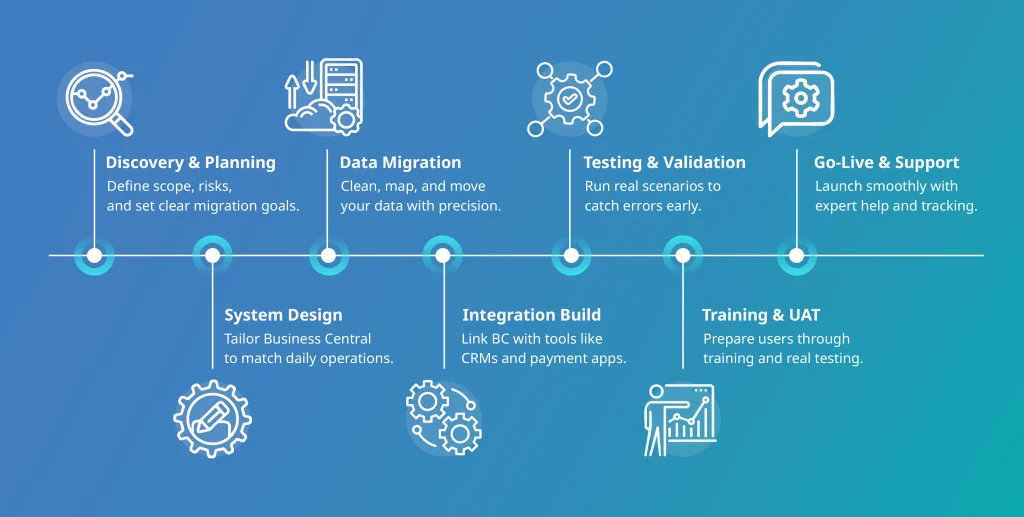
7 Phases of ERP to Business Central Migration
Why Business Central Beats Traditional ERP Systems
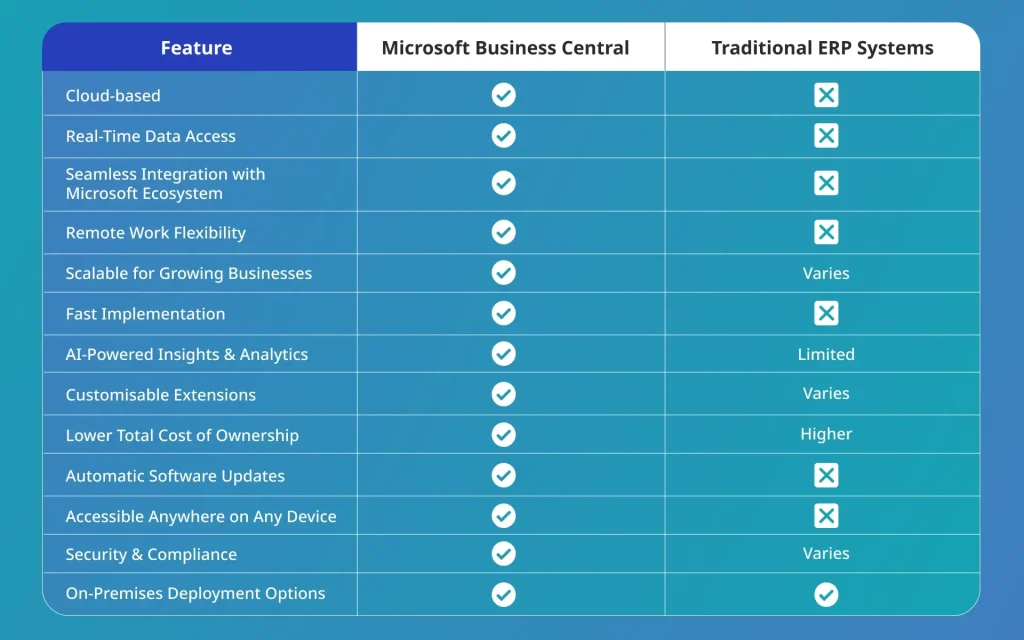
Compare Business Central with other ERP solutions like SAP to understand differences in cost, scalability, user experience, and suitability for growing mid-sized businesses.
Microsoft Business Central Migration Benefits for UK SMBs
Migrating to Business Central is about avoiding disruption, cutting hidden costs, and getting it right the first time. Deployflow helps you do exactly that, with a hands-on team and proven methodology built for UK SMBs.
Here’s how common migration pain points are solved:
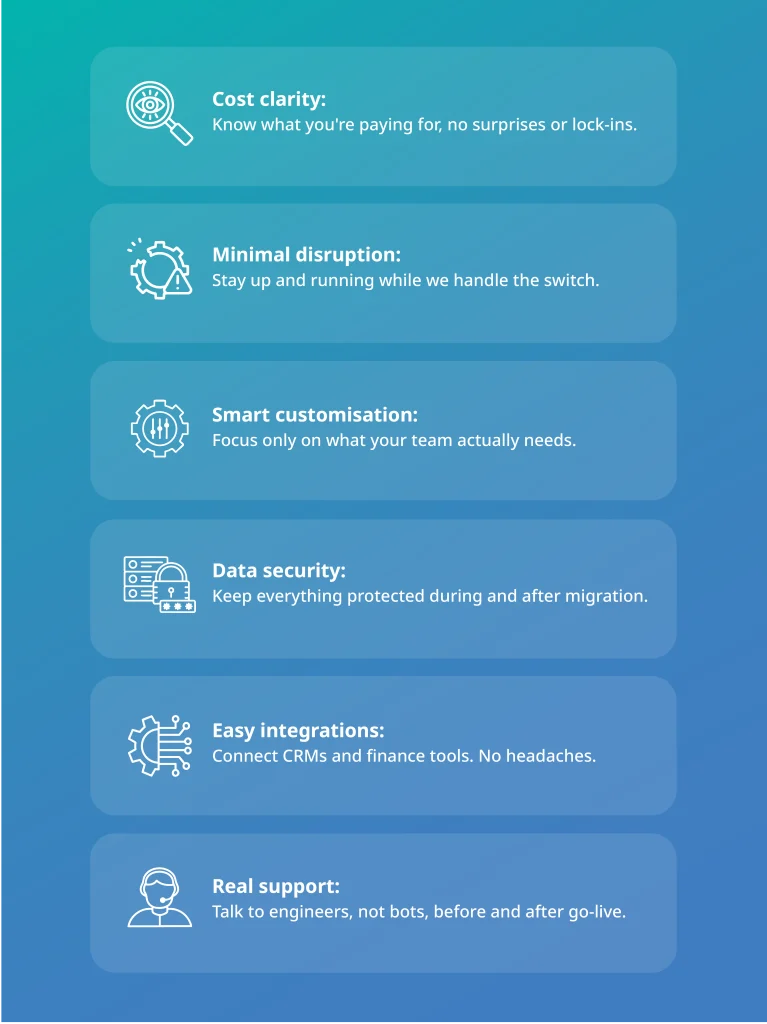
No more chasing spreadsheets, no unexpected downtime, and a team that can get back to working smarter, not fixing system issues.
Project Plan Overview: CRM & NAV to Business Central Online
Phase 1: CRM to NAV Integration
Goal: Send sales order details from CRM into NAV.
Duration: 5 days
Dependencies: CRM field list and coordination with CRM developers
Tasks:
- Build a web service in NAV to receive sales data from CRM
- Map required fields like name, email, course bookings, and more
- Sync contact and membership details
Phase 2: NAV to CRM Integration
Goal: Push key NAV updates back to CRM.
Duration: 3 days
Dependencies: CRM’s ability to receive and process NAV data
Tasks:
- Create a web service to send blocking info from NAV to CRM
- Send blocked dates and invoice numbers to CRM
- Sync invoice payments and set up key mapping for releases
Phase 3: Business Central Custom Development
Goal: Customise features in Business Central post-migration.
Timing: To be confirmed during the UAT (User Acceptance Testing) phase
Dependencies: Business Central environment setup and client validation of features
Tasks:
- Set up multi-email support
- Connect payment gateways (e.g., Worldpay Pay by Link)
- Automate invoice/remittance emails with templates
- Enable journal uploads and multiple account bank reconciliation
- Implement the CRM block feature and the GDPR assessment module
Phase 4: Migration to Business Central Online
Goal: Move from NAV to Business Central Online.
Duration: 17 weeks
Dependencies: NAV server access and a complete list of modules, customisations, and stored procedures
Tasks:
- Review the existing NAV setup and development environment
- Identify all custom features, add-ons, and reports
- Plan migration for everything needed
Proven Team, Clear Timeline, Minimal Disruption
This 4-month migration is driven by a Business Central expert and a project manager, supported by highly experienced senior engineers. Their track record means fewer delays, smarter decisions, and a setup that works across all teams from day one.
Ongoing support ensures you stay on track long after go-live.
Learn more about what’s included in the migration and how it can streamline operations across finance, sales, and beyond at Deployflow’s Microsoft Business Central page.
How Deployflow Overcomes Common Business Central Migration Challenges
Migrating to Microsoft Business Central can feel overwhelming, especially when the risks involve data loss, system downtime, or frustrated users. But with the right team guiding the process, it doesn’t have to be stressful.
At Deployflow, every migration is supported by certified engineers backed by the most senior technical experts in the company. With over 50 years of combined experience and hundreds of certifications, you’re partnering with some of the best minds in the industry.
Explore our comprehensive guide on transitioning from NAV to Business Central to streamline operations, reduce manual workloads, and unlock the full potential of cloud-based ERP.
Here’s how we solve the most common migration problems before they slow you down:
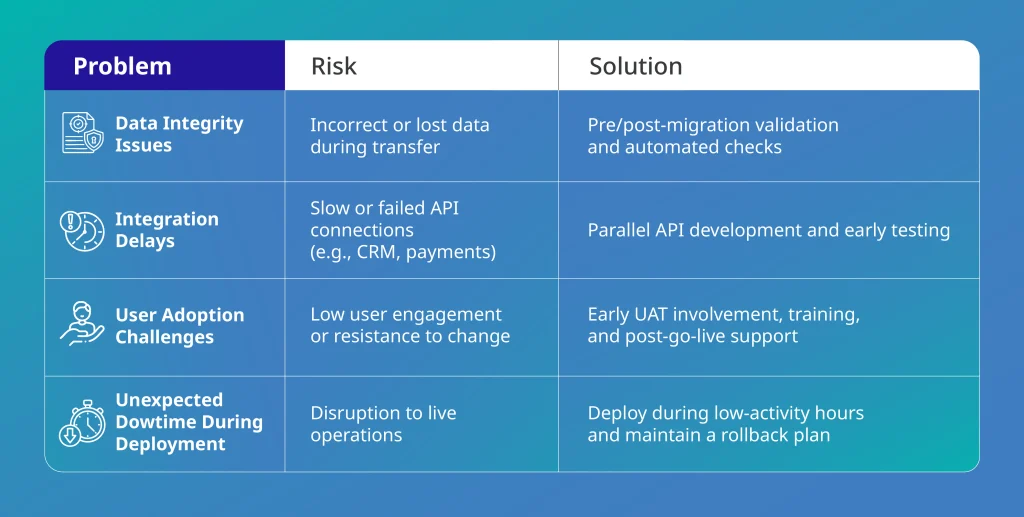
Real Feedback from Clients Who Migrated with Deployflow
The measure of success when it comes to complex ERP migrations lies in the client experience. Here’s what two leaders had to say about working with Deployflow’s expert team:
“… they’ve skilfully assembled a highly-committed team, facilitating the realisation of our technical vision. Their seamless synergy in team building and the depth of their knowledge transfer have played an indispensable role in breathing life into our intricate project.”
Toni Stoyanova, CFO
“.. they assembled a dedicated workforce, enabling us to transform our vision into reality. Their seamless team-building and thorough knowledge transfer have been instrumental in bringing our product to life..”
Sean Hederman, CIO
Case Study: Hall Hunter Transforms with Business Central
Hall Hunter, managing over 200 acres, struggled with manual processes, outdated infrastructure, and high IT costs from working with multiple vendors. With no internal IT team and poor system documentation, scaling operations was a challenge.
Deployflow migrated them to Microsoft Dynamics 365 Business Central, introducing AI tools for yield prediction, automated temperature and soil monitoring, and eliminating manual data entry. The result was a more agile, efficient, and sustainable system accessible from anywhere.
Impact:
- Migration completed on time and within budget
- Saved 30% on IT costs
- Reduced support tickets
- Delivered organised documentation
- Enhanced security
- Improved flexibility and mobility
Access our whitepapers for deeper insights into Business Central migrations and learn best practices, timelines, and real-world success stories that can guide your implementation.
Key Takeaways from a Successful ERP to Business Central Migration
- Microsoft Business Central migration is how you unlock faster decisions, leaner operations, and long-term growth.
- Manual systems cost more than they save. Business Central simplifies operations and improves forecasting.
- Common risks can be avoided. With the right plan and the right partner, disruption is preventable.
- Expertise matters. Deployflow combines certified execution with senior-level strategy to guide every step.
- The right time to migrate is before your system slows you down.
Why Now Is the Right Time to Migrate to Business Central
Forget about spreadsheets crashing five minutes before a board meeting, version control that feels more like version roulette, and systems so outdated they require ancient rituals just to reboot.
It’s time for change.
Migrating to Business Central is your chance to build a reliable, future-ready system. No more clunky workarounds, no more missed opportunities. Just smart tools, real-time visibility, and a setup that actually keeps up with your business.
With Deployflow’s certified engineers, seasoned experts, and a battle-tested roadmap, your migration is predictable, powerful, and genuinely worth the leap.
Unite your finance, sales, and ops teams on one powerful platform, built for real-time decisions and stress-free growth.
Take the first step toward smarter operations, real-time control, and stress-free board meetings.
Contact Deployflow today and let’s build a future-ready system that grows with you, seamlessly, securely, and confidently.
Frequently Asked Questions About Business Central Migration
What are the four types of data migration?
The four types of data migration are:
- Storage migration – Moving data from one storage system to another, such as upgrading from on-premises hardware to cloud storage.
- Database migration – Transferring data between database platforms or versions, often during upgrades or cloud migrations.
- Application migration – Moving data between applications or from a legacy system to a new software solution, such as migrating to Microsoft Dynamics 365 Business Central.
- Cloud migration – Shifting data, applications, and workloads from on-premises infrastructure to a cloud environment like Azure or AWS.
Each type plays a key role in digital transformation, ERP upgrades, and system modernisation.
What is the difference between data migration and data integration?
Data migration involves transferring data from one system, storage, or platform to another, often during ERP upgrades, cloud transitions, or software modernisation.
Data integration connects data from multiple sources, enabling real-time reporting, analytics, and business intelligence, without necessarily moving the data.
Key difference: Migration moves data, while integration connects data across systems.
How long does a typical data migration project take?
Small-scale data migrations (e.g., between cloud storage providers or CRM tools) can take a few weeks, while complex migrations, such as moving to Microsoft Dynamics 365 Business Central or transitioning from on-premise to cloud ERP, take several months.
Timeline factors:
- Volume of data
- Complexity of legacy systems
- Amount of data cleansing and testing
- Whether a phased migration or a big-bang approach is used
Proper planning and testing are key to a smooth enterprise data migration.
Deployflow delivers smooth, low-risk migrations with certified experts and a proven process. Contact Deployflow to get a tailored project timeline and expert guidance.
Explore our BLOG
Recent articles

Is Claude Down? Anthropic Outage: Protect Your Cloud Infrastructure
Claude.ai has spent 2026 fighting its own success. Twenty-one incidents landed between 12 August and...
read full article

AI Experimentation vs AI Engineering: The Difference That Decides Whether Your AI Budget Survives
Experimentation buys you knowledge. Engineering buys you a system that still works next quarter, when...
read full article

Why Most Agentic AI Projects Fail Before They Scale
Has your agent been three months from production for nine months? Agentic projects break at...
read full article